
People recording pronunciation samples
If you record lots of short words and sentences, it helps to keep the microphone in a fixed position and check the recording level beforehand. Audacity provides recording guidance for this.


If you mainly record at a computer, a wired headset with an adjustable microphone boom is a sensible starting point, provided the connection is compatible with your device. A wireless headset is worth considering if you want to move around while recording; charging and pairing will then become part of your routine. Make a test recording with any headset and listen back: a noise-cancellation claim alone doesn’t prove that short Dutch word samples will sound good.
If you record lots of short words and sentences, it helps to keep the microphone in a fixed position and check the recording level beforehand. Audacity provides recording guidance for this.
If you regularly stop, listen back and re-record a take, it’s important to have a straightforward workflow in your recording software. Audacity explains how to stop while recording and correct a mistake.
If there’s audible background noise, compare a test recording with one made somewhere quieter before relying on a headset claim. Trust and Jabra describe microphone noise cancellation for calls; that doesn’t tell you how Dutch pronunciation samples will sound.
Best for: recording at a computer when you make repeated short takes and don’t want to rely on a charge.
Bear in mind: the cable limits your movement; check that the USB connection is compatible with your device.
Best for: recording while moving around, if your device supports the headset in question.
Bear in mind: charging and pairing become part of your recording routine; a claim about call clarity doesn’t tell you how word recordings will sound.
Best for: exploring whether you can reduce background noise when your room isn’t quiet enough.
Bear in mind: make a test recording and listen for consonants and word endings; claims about calls aren’t an independent test of pronunciation recordings.
Start by choosing a connection and controls that suit your recording device and workflow. Then compare test recordings in the room where you’ll actually be recording.
| Factor to consider | What should you check? | Who is it important for? |
|---|---|---|
| Clarity between takes | Keep the microphone in the same position and check the recording level in your software. | If you want to record the same words repeatedly and compare them, focus on keeping the microphone in a fixed position and ensuring the level doesn’t clip. Around 26% of consumers say clear, consistent pronunciation is their main consideration. |
| Controls during short takes | Test the headset’s mute control and try pausing, stopping and listening back in your recording software. | If you record short sections and often re-record them, you’ll want to check your work and carry on quickly. Around 26% of consumers prioritise a smooth workflow for short takes. |
| Connection and microphone selection | Check the connection on the exact version you’re buying and select the headset as the input device. | If you want to avoid your computer using a different microphone, check both the port and the input settings in your software. Around 21% of consumers focus first on connection and compatibility. |
| Noise in the room | Make a test recording and, if possible, compare it with one made in a quieter room with less echo. | If you’re recording somewhere that background noise can’t always be avoided, listen to check that words and quiet word endings remain clear. Around 16% of consumers prioritise reducing background noise. |
| Comfort and freedom of movement | Consider the fit and whether you’d rather record with a cable or go wireless. | If you want to record for longer or move around while speaking, fit and freedom of movement matter; a wireless model also needs charging. Around 11% of consumers make comfort or freedom of movement their top priority. |
The mute control on your headset and the recording controls in your software do different things. A take may still be recording while your microphone is muted.
Before recording a series of words, test how mute, pause, stop and playback work with your headset and software.
Trust and Jabra describe features for calls, but that doesn’t establish how short Dutch sounds will come across in your recordings. Fans and echo can also be picked up.
Record words with quiet endings and plosive sounds in your own room, then listen back to the result.
HP describes different connection and wearing options within the Blackwire 3200 series. So check the exact version, not just the series name.
Compare the full model name and the connection offered with the ports on your device. An incompatible plug may mean you need an adapter or to exchange the product.
Logitech offers, among other options, a wired headset for recording at a computer and a separate range of wireless headsets.
The Ayda USB-ENC is a wired on-ear option with an adjustable microphone boom.
The Blackwire 3200 series includes business headsets in different wearing styles and connection options.
The PC 8 USB is a wired stereo headset for computer use, with controls on the cable.
The Evolve2 30 SE is a business headset range worth looking at if fit and calls in noisier surroundings are important to you.
This selection of Joybuy products includes wired headsets for short takes and a wireless option for anyone who wants to move around while recording.
 No image available
A wireless option to consider if you want to move around during short recordings; check beforehand that the connection is compatible with your recording device.
The product name lists USB-A and MS Teams. Wireless use requires charging.
 No image available
A wired option to consider if you record short takes at a computer and want to keep the microphone boom in a fixed position.
The product name lists USB. Check that the connection is compatible with your computer and test the mute control before you start.
 No image available
A wired headset to consider if you record at a computer and want to position an adjustable microphone for short takes.
The product name lists USB. Check the connection and select the headset as the input device in your recording software.
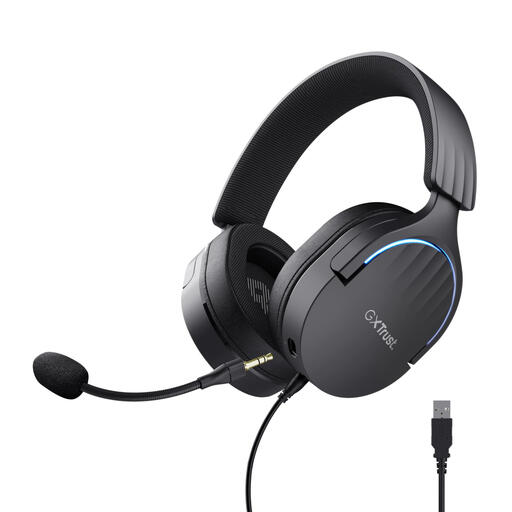 No image available
A wired option to consider if you want to mute between short takes and adjust the microphone position.
The product name lists Over-Ear, 7.1 and USB. Check that the USB connection is compatible with your recording device.
 No image available
A wired option to consider if you want to mute the microphone quickly between short takes by flipping it up.
The product name lists USB Type-A. Check the connection; the product description also mentions a USB-C adapter cable.
First, make a test recording at your normal speaking volume, check the level meter and listen back. Audacity recommends peaks between −18 dB and −6 dB for normal speech; re-record any take that clips.
No, you don’t. Audacity explains that you can pause during a recording and continue in the same clip; you can also stop and listen back to a take. Choose a workflow that makes it easy to find and correct your samples.
Connect the headset, select it as the input device in your recording software, then make a short test recording and check the level meter to confirm that the right microphone is recording.
When you buy online from a business, you generally have a 14-day cooling-off period. You’re also entitled to a product that works as it should; according to the Dutch government, statutory guarantee in the Netherlands has no fixed time limit. Check the terms that apply to your purchase.
That depends on whether the person can be identified and how you use the recording. The Dutch Data Protection Authority describes a limited exception for purely personal or household use; in most cases, you need consent to publish other people’s personal data.