Choose a headset with an adjustable boom microphone and a connection that works with your computer. Make a test recording of soft sounds and plosives. If you practise in a shared space, also consider the ear cushions and microphone position. Manufacturer specifications alone cannot prove how natural your recordings of individual words will sound.
Who is this for?
People recording pronunciation
You record examples of Dutch words and want to be able to assess consonants and softer parts of words when listening back. An adjustable boom microphone and a test recording give you more concrete ways to assess the sound than a general claim about call quality.
Evening practice in a shared space
You practise while other people are at home or there is background noise. Consider the microphone position and ear cushions; neither will automatically keep your recording or what you hear while listening back quiet.
Regular computer users
You practise frequently on a computer and want to be able to select the right microphone input. Compare the connection and controls on the exact version, and check the fit before starting longer sessions.
What should you look for?
For evening recordings, the main things to weigh up are clarity, background noise, connectivity and comfort.
| What to consider |
What to look for |
Who is this important for? |
| Clarity |
Check whether the boom microphone is adjustable. Test soft sounds and plosives with a recording. |
I want to be able to assess softer parts of words when listening back; around 33% of consumers give clarity in word recordings their top priority. |
| Background noise |
Listen back in the room where you practise, and assess the recording separately from the sound you hear yourself. |
If I practise in a shared or noisy space, I want to know how the microphone and ear cushions perform in my situation; around 27% of consumers prioritise a quiet evening. |
| Connection and input |
Compare the USB-A or USB-C connection with your computer port, then select the headset as the microphone input. |
I want to avoid my computer using a different microphone from the headset; around 20% of consumers give compatibility with the recording device their top priority. |
| Comfort and controls |
Compare the fit and check that the exact version has the controls you need. |
For several practice sessions, I want a comfortable headset that’s easy to use; around 20% of consumers prioritise comfort and controls. |
What to watch out for when buying
-
Assuming a noise-cancelling claim for calls proves recording quality
Manufacturer descriptions of call performance don’t tell you how natural recordings of individual Dutch words will sound.
Make a test recording in your own evening environment, paying particular attention to soft sounds and plosives.
-
Assuming versions with the same series name are interchangeable
Connections can vary within a series. For example, Audio-Technica distinguishes the USB-A version from the ATH-M50xSTS, which has an XLR microphone output and a 3.5 mm headphone connection.
Before buying, compare the full model number, plug and ports on your computer.
-
Assuming your recording app will automatically use the headset
Windows and macOS let you select a microphone input in the settings. If you don’t check, another available microphone may be active.
Select the headset as the input and listen to a short test recording before recording a whole series.
Brands to compare
Logitech
The H390 is a useful point of comparison if you’re looking for a wired computer headset with a boom microphone and in-line controls.
- Logitech describes the H390 version as having a positionable microphone and a USB-A connection.
- Check that you’re looking at the USB-A version. A claim about clear calls is not an independent assessment of pronunciation recordings.
Jabra
The Evolve2 30 series is worth comparing if you’re weighing up a wired work headset and comfort.
- Jabra describes the series as having two microphones and memory foam ear cushions.
- Check whether you’re looking at the SE, UC or Teams version, and what connection it has. A manufacturer’s claim about noise reduction during calls doesn’t prove how word recordings will sound.
HP Poly
The Blackwire 3220 is a useful point of comparison if you’re looking for a wired stereo headset with USB-C and a supplied USB-A adapter.
- For version 8X228AA, HP lists a USB-C cable with a USB-A adapter, in-line controls and a noise-cancelling microphone.
- Check the full model number; other Blackwire versions may have different connections. HP presents this headset for communication, not as an independently assessed tool for pronunciation recordings.
EPOS
The PC 8 USB is a wired stereo headset worth comparing for recording on a compatible PC or Mac.
- EPOS lists in-line controls and a noise-cancelling microphone.
- The manufacturer mainly describes it for calls; this doesn’t establish the recording quality of Dutch word examples.
Audio-Technica
The ATH-M50xSTS-USB is worth comparing if you record regularly and are looking for a headset with a flexible boom microphone.
- For the USB version, Audio-Technica specifies a cardioid condenser microphone and a USB-A connection.
- The analogue ATH-M50xSTS has different connections. Audio-Technica’s statements about studio quality are manufacturer claims, not an independent comparison with other headsets.
Headsets at Joybuy
These Joybuy picks are headsets with microphones for computer use. For each version, check the connection, fit and controls you need for your recordings.
 No image available
Jabra Evolve2 30 SE
Compare this version if comfort matters during longer practice sessions, and check that the connection works with your computer.
View at Joybuy
 No image available
Logitech PC 960 USB
A wired USB headset to compare for short computer recordings; check that this version has the boom microphone and controls you need between recordings.
View at Joybuy
 No image available
Logitech H340 USB, black
Compare this wired USB headset for computer recordings; check that the microphone position and connection suit the way you work and your computer.
View at Joybuy
 No image available
Trust Ayda wired headset, USB Type-A
An option to compare if you’re looking for a wired headset with USB Type-A; check that the connection works with your computer and whether you need an adapter for your port.
View at Joybuy
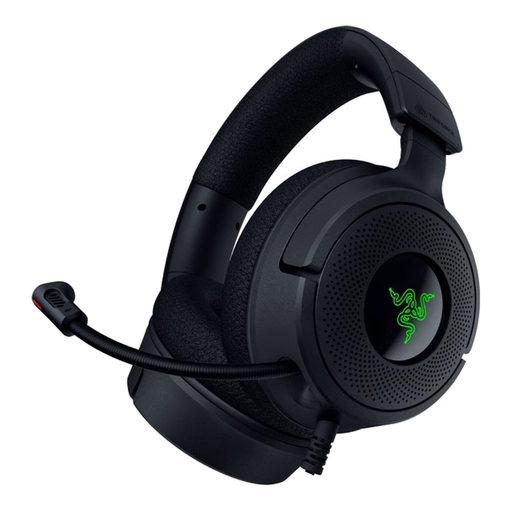 No image available
Razer Kraken V4 X
Compare this wired headset if you’re considering it for computer recordings; check that the connection and microphone controls work with your recording software and routine.
View at Joybuy
Frequently asked questions
How can you check that you’re recording with the headset microphone?
Select the headset as the input device and listen to a short test recording. Microsoft Support explains how to test a microphone in Windows’ input settings; Apple Support explains how to choose an input device on a Mac.
Where should you position the boom microphone for words with a p or b sound?
Position the microphone beside the corner of your mouth, rather than directly in front of it, and check the result with a test recording. In its SM35 guide, Shure recommends this position to reduce plosive sounds; test what works for your headset.
Does noise cancellation mean your word recordings will sound clear?
No. A manufacturer’s claim about noise cancellation during calls doesn’t prove how recordings of individual words will sound. Record in your own practice space and listen for both soft sounds and plosives.
How can you avoid choosing the wrong connection?
Compare the full model number and connection for the version you’re considering with the ports on your computer. Once connected, also check that the headset is selected as the microphone input.


