Choose a headset microphone whose boom you can position in the same place beside your mouth each time, then check the result with a test recording of your own voice. A wired USB headset is suitable for direct recording if its connection matches your equipment; a broadcast headset with separate connectors is best suited to setups that already have compatible equipment. None of these features alone proves how naturally Dutch sounds will be recorded.
Who is this relevant to?
Making repeatable word recordings
If you record lots of short examples from one spot, a headset lets the microphone move with your head and makes it easier to reset the distance. DPA Microphones describes this as a way to keep the distance between your mouth and the microphone more consistent.
Recording in a shared space
If there’s background noise, you’ll want to consider both the microphone position and the room, then check what you can hear in the recording. DPA Microphones and RØDE both highlight positioning as something to consider; a noise-cancelling feature doesn’t replace this check.
Recording with existing audio equipment
If you already use a computer, recorder or audio interface, check that it’s compatible with the chosen headset’s connection. Logitech describes USB models, while Audio-Technica lists separate microphone and headphone connections for the BPHS1.
What should you look for when choosing?
For repeatable word recordings, key considerations include a consistent microphone position, the effect of background noise and a compatible connection.
| Consideration |
What to look for when buying |
Who is this important to? |
| Consistent microphone position |
Check whether the boom is adjustable and can be put back in the same position each time you put the headset on. |
When I record the same short words again after a break, I want to be able to position the boom at the same distance without fiddling around. Around 36% of consumers prioritise a repeatable mouth-to-microphone distance. |
| Plosives and background noise |
Record p and f sounds in the room where you’ll be working; judge the recording itself rather than relying on a noise-cancelling claim. |
In a shared space, I want clear consonants without distracting plosives or background noise. Around 29% of consumers give controlling unwanted noise top priority. |
| Connection |
Check the exact model against the ports available; a headset may use USB-A, USB-C, 3.5 mm or separate connectors. |
When I record on my computer or audio interface, I want to know in advance whether the headset will fit the available ports. Around 21% of consumers prioritise compatibility with their existing equipment. |
| Comfort |
Check the fit and wearing style, and see whether the microphone boom stays where you want it after you take the headset off and put it back on. |
When I have several recording sessions, I want a comfortable headset that stays in place without the microphone boom constantly shifting. Around 14% of consumers prioritise lasting comfort and a stable fit. |
Common pitfalls
-
Assuming noise cancellation means a natural-sounding pronunciation recording
A feature designed for calls doesn’t prove how naturally Dutch words will sound. Microphone positioning, plosives and the recording environment still have an effect.
Record your own sample words and listen back for consonants and the silence between words. Test recordings take time, but having to re-record unclear examples takes even longer.
-
Choosing an XLR broadcast headset for a computer with USB only
According to the manufacturer, the Audio-Technica BPHS1 has a separate 3-pin XLR connection for the microphone and a 6.3 mm connection for the headphones. This is a different connection setup from USB.
Before buying, check the full model name and both connections. You may also need a compatible audio interface or other recording equipment.
-
Positioning the microphone directly in front of your mouth because closer is always better
Breath and plosive sounds can hit the microphone, and the best position also depends on your voice and the microphone model.
Try positioning it to one side of the direct airflow, then check with a short recording of words containing plosive sounds.
Brands to consider
Logitech
The H390 is a wired computer headset for direct recording via USB. The product page describes USB-A and USB-C versions, so check which one you’re looking at.
- For the H390, Logitech lists an adjustable microphone boom, in-line controls and a noise-cancelling microphone.
- These features aren’t an independent measure of how naturally Dutch pronunciation is recorded.
HP Poly
The Blackwire 3200 series includes wired office headsets with different wearing styles and connection options.
- HP Poly describes adjustable headbands and mono and stereo versions.
- Don’t assume every version has the same plugs or accessories; check the exact model.
Jabra
The Evolve2 30 SE is an office headset for anyone who wants to make recordings as well as take calls.
- Jabra describes a two-microphone system that analyses and reduces background noise, as well as soft ear cushions.
- These manufacturer claims don’t prove how faithfully individual word samples are recorded.
EPOS
The IMPACT 100 series includes wired mono and stereo headsets.
- The technical sheet lists a USB-C connection with a USB-A adapter, a flexible microphone boom that can be worn on either the left or right, and a directional microphone.
- The stated microphone frequency response of 100 Hz–8 kHz is a model specification, not a comparative test of pronunciation recordings.
Audio-Technica
The BPHS1 is a broadcast headset for a recording setup with compatible separate microphone and headphone connections.
- Audio-Technica lists a flexible boom, a cardioid dynamic microphone, and replaceable cable and ear cushions.
- The BPHS1 uses 3-pin XLR for the microphone and 6.3 mm for the headphones; don’t confuse it with the differently connected BPHS1-XF4.
Headsets at Joybuy
These Joybuy products are wired headsets with an adjustable microphone, suitable for short word recordings; the connection varies by model.
 No image available
Logitech PC 960 USB headset
The adjustable microphone boom lets you choose a consistent position for successive word recordings.
Wired USB connection; the description lists in-line volume and mute controls.
View at Joybuy
 No image available
Logitech H340 USB headset, black
The adjustable microphone boom can be positioned for short recordings from a fixed spot.
Wired USB connection; the product description lists a noise-cancelling microphone, adjustable fit and soft ear cushions.
View at Joybuy
 No image available
Logitech H150, white, 981-000350
The rotatable, adjustable microphone can be positioned consistently beside your mouth.
Wired 3.5 mm connection. If your device has separate microphone and headphone ports, you may need a splitter; the product description says one isn’t included.
View at Joybuy
 No image available
Edifier G2II wired USB gaming headset
The adjustable microphone lets you set a suitable position for word recordings.
Wired USB connection; the product description lists a noise-cancelling microphone. Check that the connections are compatible with your recording equipment.
View at Joybuy
 No image available
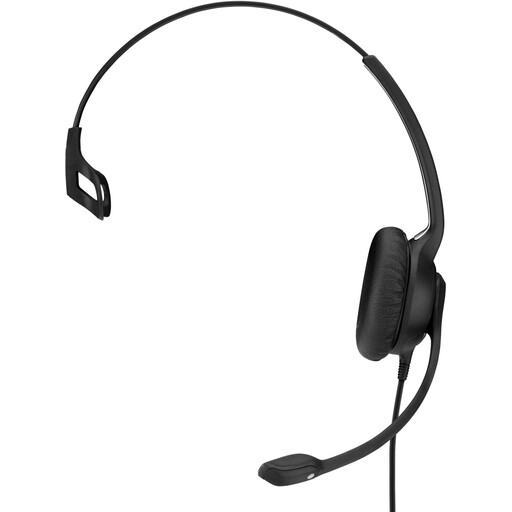
EPOS | SENNHEISER IMPACT SC 230 USB MS II
The adjustable microphone can be positioned for repeatable word recordings.
Wired USB headset; the product description lists a noise-cancelling microphone and adjustable headband.
View at Joybuy
Frequently asked questions
Where should you position the microphone boom for short word recordings?
Choose a position you can repeat each time, away from the direct airflow from your mouth or nose. Record words with plosive sounds and listen back; the right position also depends on your voice and the microphone.
How do you check the recording level before you start?
Select the microphone you intend to use as the input, then make a short test recording in your normal speaking voice. Check the waveform for clipping; Audacity’s tutorial suggests a peak of around −6 dB as a practical guide. With a USB microphone, you may need to adjust the input level in your system settings.
Do you always need a USB adapter for a broadcast headset?
No, it depends on the headset and your recorder or audio interface. According to the manufacturer, the Audio-Technica BPHS1 has separate 3-pin XLR for the microphone and 6.3 mm for the headphones; a USB port alone isn’t enough.


