Start with an adjustable microphone boom that you can position close to your mouth, then make a test recording with the room’s usual background noise. A wired USB headset is a good fit if you record on one computer; wireless is an option if you want to move around, but check the connection, adapter and battery. Assess noise cancellation by listening back to the saved file: just because you hear less through the earcups doesn’t mean the recording will contain less background noise.
Who is this choice relevant to?
People recording in a busy shared space
You want your voice to remain clear in the recording while other people are talking nearby. An adjustable microphone boom and a test recording with the usual background noise will help you assess what’s actually being picked up.
Creators of pronunciation examples
You listen back to short recordings to assess words and individual sounds. Pay attention to the microphone position, plosive sounds and how any noise processing comes across in the saved file.
People recording in different workspaces
You record using different computers or move around while speaking. The right USB version, any adapter or the wireless connection therefore needs to work with your recording device.
What should you look for when buying?
First choose a microphone setup that suits your recording space, then check the connection and fit. Before deciding, listen back to a test file recorded with the sort of background noise you’d normally expect.
| What to consider |
What to look for |
Who is this important for? |
| Voice and background noise |
Make a test recording using your recording app in the room under normal conditions; assess the voice and background speech separately. |
If people are talking nearby, I want to know how much of that ends up in my recording. Around 36% of consumers say reducing background noise is their top priority. |
| Clarity of sounds |
Record some representative words and listen back; adjust the microphone boom to find a position that works well by your mouth. |
For short word examples, I want to be able to hear individual sounds clearly and spot plosive noises. Around 29% of consumers prioritise speech clarity. |
| Connection and freedom of movement |
Check whether the exact headset version uses USB-A, USB-C, 3.5 mm or a compatible wireless connection. |
If I record on different devices or move around while speaking, the connection needs to work with my recording device. Around 21% of consumers say connection or freedom of movement is their top priority. |
| Fit |
Check that you can adjust the headband and microphone boom comfortably; choose mono or stereo depending on how you want to listen while recording. |
For regular recording, I want a headset I can adjust comfortably, and the option to choose how much of the room I can hear. Around 14% of consumers prioritise fit. |
Common pitfalls
-
Assuming ANC in the earcups means a clean microphone recording
Hearing less background noise yourself doesn’t automatically mean that noise is removed from the recorded microphone signal.
Make a test recording using your own recording app and the usual background noise. Listen back to the file and assess the microphone separately from the noise reduction for your ears.
-
Assuming every version has the same connection
USB-A, USB-C and 3.5 mm connections vary between products and sometimes between versions. The wrong connection may mean the headset won’t plug directly into your recording device.
Before buying, check the full model and version name and compare it with the port on your device.
-
Buying a standalone headworn microphone as a complete computer headset
A specialist microphone won’t necessarily connect directly to a computer, and it won’t automatically include headphones for listening back to your recording.
Check which connector and any extra equipment you need, and how you’ll listen back to the recorded words.
Brands to consider
Logitech
The H390 is a wired computer headset available with USB-A and USB-C connections; according to Logitech, the H151 has a 3.5 mm connection. Your device’s port can help you choose the right version.
- For the H390, Logitech specifies an adjustable microphone boom, in-line controls and a noise-cancelling microphone.
- These features alone don’t tell you how recordings of spoken Dutch examples will sound. Check which USB version you’re choosing, too.
Jabra
The wired Evolve 20 and wireless Evolve2 65 are different ranges; the Evolve2 65 is available in mono, stereo, UC and Teams versions, among others.
- Jabra lists three microphones and up to 37 hours of battery life for the Evolve2 65.
- Jabra’s sound comparison is based on its own laboratory test, not an independent assessment of word recordings. The Evolve2 65 Flex is a different model.
HP Poly
The wired Blackwire 3200 series includes mono and stereo versions. Choose the specific version to suit your preferred style and connection.
- HP lists an adjustable headband and a range of connection options across the series.
- According to the HP manual, a 3.5 mm connection is available only on the Blackwire 3215 and 3225; don’t assume it’s available across the whole series.
EPOS
The wired IMPACT 100 range includes mono and stereo versions with USB-C and a USB-A adapter.
- EPOS specifies in-line controls and a directional microphone with noise-cancelling algorithms.
- The term ‘professional sound quality’ is an EPOS claim, not an independent comparison of recordings of Dutch word examples.
Shure
The WH20 is a specialist dynamic headworn microphone for situations where a fixed microphone position is important. It isn’t, by itself, a complete USB computer headset.
- For the WH20, Shure specifies a cardioid pickup pattern and describes isolation from background noise.
- Check the connector and the recording equipment you’ll need. A standalone microphone doesn’t automatically include earcups for listening back to recordings.
Headsets at Joybuy
This selection includes wired USB headsets and wireless models with microphones. Compare the connection and how you can position the microphone, then listen back to a test recording to see how your words sound in a shared space.
 Image unavailable
Jabra Evolve2 75 USB-A MS Teams Black
A wireless option if you want to move around while recording; the description also mentions connecting to two devices at once.
The description lists Bluetooth, eight microphones and beamforming for calls. This isn’t an assessment of recorded word examples.
Allow for pairing and charging.
Joybuy
 Image unavailable
Logitech PC 960 USB headset
A wired USB option for computer recording, with an adjustable microphone boom.
The product description lists an adjustable microphone boom, a noise-cancelling microphone and in-line volume and mute controls.
The cable limits your freedom of movement compared with a wireless headset.
Joybuy
 Image unavailable
Logitech H650e Stereo wired headset
A wired stereo headset to consider if you want to record on a computer using USB.
The description lists USB plug-and-play, in-line volume controls, a microphone that isolates sound and echo cancellation for calls. These call-related features don’t tell you how it will perform for word recordings.
The cable limits your freedom of movement compared with a wireless headset.
Joybuy
 Image unavailable
Logitech H340 USB, black, wired
A wired USB headset for computer recording, with a microphone you can adjust according to the description.
The description lists stereo sound, a flexible headband and an adjustable microphone that reduces background noise. Listen back to see how it works in your recording.
The cable limits your freedom of movement compared with a wireless headset.
Joybuy
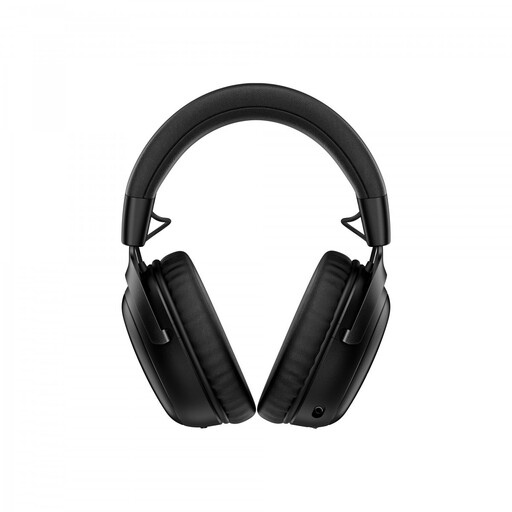 Image unavailable
HyperX Cloud III S wireless gaming headset
A wireless headset with a detachable microphone for anyone looking for freedom of movement while recording.
The description lists a 10 mm microphone boom, wireless connectivity via 2.4 GHz or Bluetooth, and PC compatibility. USB-A and USB-C connections are also mentioned; check which connection your recording device requires.
A microphone designed for voice chat hasn’t necessarily been tested for the clarity of recorded Dutch words.
Joybuy
Frequently asked questions
Is ANC for my ears the same as noise reduction in the recording?
No. Noise reduction for the wearer and processing of the microphone signal are two different things. So listen back to the saved file with the sort of background noise you’d normally hear in the room.
How should I position the microphone for short word examples?
Position the microphone boom by your mouth and listen for any plosive sounds caused by its position. Also check that your recording app is using the intended headset as its input device, then make a test recording.
Can I connect any Blackwire 3200 with a 3.5 mm plug?
No. According to the HP manual, only the Blackwire 3215 and 3225 have a 3.5 mm connection. Check the full model number before choosing a version.
Who should I contact if a headset breaks too soon during normal use?
Contact the seller. ACM ConsuWijzer explains that statutory guarantees depend on what you could reasonably expect from the product during normal use; this is separate from any manufacturer’s warranty.
Am I allowed to record and save other people’s voices in a shared space?
This depends on who can be identified in the recording, its purpose and the circumstances. According to the Dutch Data Protection Authority, an organisation processing personal data that can be traced back to an individual needs an applicable legal basis under the GDPR; consent is one possible basis. The Dutch Data Protection Authority also says employees must know when their conversations are being recorded. This is not blanket permission or a blanket ban for every shared recording space.


