For long sequences of Dutch word examples, an adjustable microphone boom that you can position in the same place each time is a practical starting point. First, make a test recording where you plan to record. For a simple computer setup, a wired USB headset is an obvious choice, while an analogue model may require additional equipment. Shure points out that a microphone won’t eliminate echo, so fit, connectivity and your recording environment all matter.
Who is this guide for?
Recording word examples
You record lots of Dutch words and short sentences one after another, and want to check the microphone position and clarity for each take. Shure explains why keeping the microphone in a consistent position matters, while Audacity recommends selecting the correct recording input.
Recording for long sessions
You wear your headset for extended periods, so you’ll want to consider its fit, ear cushions and how much room the cable gives you to move. Logitech and Jabra describe the fit of their models, but that won’t tell you how a headset feels on you.
Recording in a noisy environment
You can’t always record in a quiet room, so you’ll want to weigh background noise against how clearly pronunciation details come through. Jabra describes noise reduction for calls; Shure points out that a microphone won’t eliminate echo.
What should you look for?
Start by checking the microphone position and how it connects to your recording device. Then consider whether the headset will stay comfortable during a long session and how your own room sounds in the recording.
| What to consider |
What should you check? |
Who is this important for? |
| Clear pronunciation |
Check whether the microphone boom is adjustable, then make a test recording using both soft and hard Dutch sounds. Listen back and check the recording level to make sure it isn’t clipping. |
If I’m recording long sequences of words, I want the microphone to stay in roughly the same position by my mouth each time. Around 36% of consumers put consistent pronunciation first. |
| Comfort |
Check the adjustability, the type of ear cushions, and whether the headset is on-ear or over-ear. Try it during a session that’s similar in length to your usual recording sessions. |
When I’m recording for a long time, I want the headset to stay comfortable without distracting me. Around 29% of consumers prioritise comfort. |
| Background noise |
Test the headset where you normally record, with the usual background noise. A claim about noise cancellation during calls doesn’t prove how recordings of Dutch words will sound. |
If I can’t always record in a quiet room, I want to know how my voice will be captured alongside the usual background noise. Around 21% of consumers put background noise first. |
| Connectivity and workflow |
Check the exact USB type or the required microphone input, then select that input in your recording software. The RØDE HS2 requires a 3.5mm microphone input with plug-in power. |
If I want to start a long recording without connection problems, I want to know in advance which port and any additional equipment I’ll need. Around 14% of consumers prioritise a simple connection. |
Avoiding common buying mistakes
-
Confusing noise cancellation with recording quality
A specification for calls doesn’t show how pronunciation details will be recorded in your room. A microphone can’t fix poor room acoustics.
Test the exact headset in the place you plan to record, using representative Dutch words, then listen back to the unedited recording.
The analogue model may need a suitable audio interface or mixer.
-
Assuming a standalone microphone is a complete headset
The RØDE HS2 is a microphone worn on the head, not a pair of headphones. Its microphone input must also provide plug-in power.
Check that your recording device has the right input and decide how you’ll monitor the recording as you go.
You may also need a separate pair of headphones or a suitable microphone input.
Brands to consider
Logitech
The H390 is a wired USB computer headset for anyone looking for an adjustable headband and on-cable controls.
- Logitech lists a positionable microphone boom, with USB-A and USB-C versions available.
- Check the connection on the version you choose. The product information doesn’t prove how well it records Dutch word examples.
Jabra
The Evolve2 30 SE is a headset designed for calls, with a stereo version among the options.
- Jabra lists memory foam ear cushions and a two-microphone system.
- The description of noise reduction relates to calls. Make a pronunciation recording before drawing conclusions about recording quality.
Audio-Technica
The ATH-M50xSTS series combines headphones with a flexible microphone boom.
- Audio-Technica lists a USB-A connection for the ATH-M50xSTS-USB.
- The ATH-M50xSTS has an XLR microphone output and a separate headphone connection. The specifications aren’t an independent comparison of recording quality.
HP Poly
The Blackwire 3220 USB-A is a wired on-ear headset for a fixed computer setup.
- HP lists a noise-cancelling microphone and a weight of 87 g with cable for this version.
- These model specifications aren’t a wear test and don’t prove how every pronunciation sound will be recorded.
RØDE
The HS2 is a lightweight microphone worn on the head; you’ll need to provide your own headphones and a suitable recording input.
- RØDE lists an adjustable boom and a 3.5mm TRS output.
- The input must provide plug-in power, so check your entire recording setup before placing your order.
Headsets and microphones on Joybuy
These product picks are aimed at recording with a headset or microphone, particularly when using a computer. Check the connection and microphone setup for each model.
 Image unavailable
Logitech PC 960 USB headset
An option for long recording sessions at a computer if you’re looking for a wired USB headset with an adjustable microphone boom.
The description lists a lightweight design, adjustable headband and soft ear cushions. The microphone boom is adjustable, and the cable has volume and mute controls.
View on Joybuy
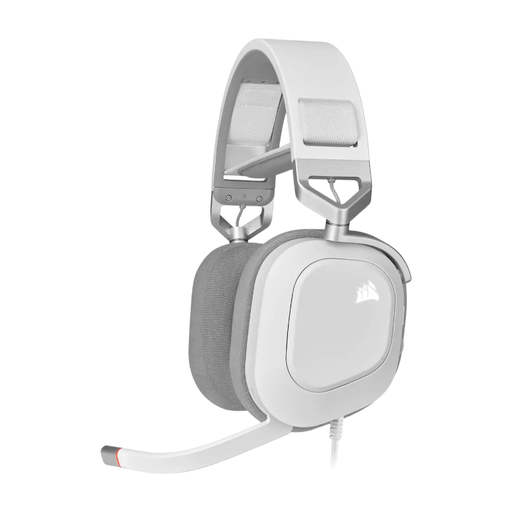 Image unavailable
CORSAIR HS80 RGB USB headset, white
A wired USB headset to consider if you want a flip-up microphone and plan to use the headset with a computer.
The description lists an omnidirectional microphone with a mute function, USB audio, an adjustable headband and fabric-covered memory foam ear cushions.
View on Joybuy
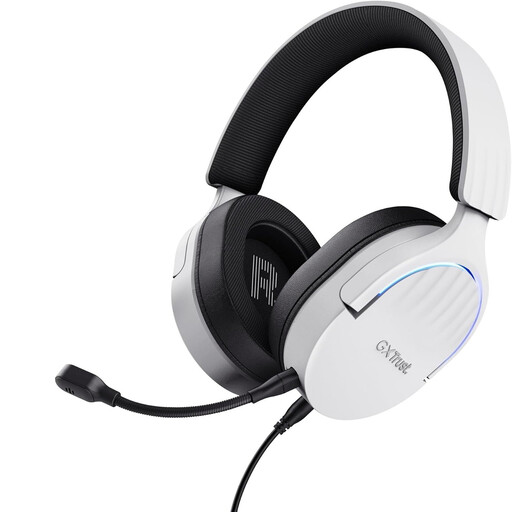 Image unavailable
Trust GXT 490 FAYZO USB Type-A headset, white
A wired option for a computer setup if you want to adjust the microphone position while recording words.
The description lists a flexible, detachable microphone, a USB connection and a 2 m cable. The ear cups are adjustable and swivel.
View on Joybuy
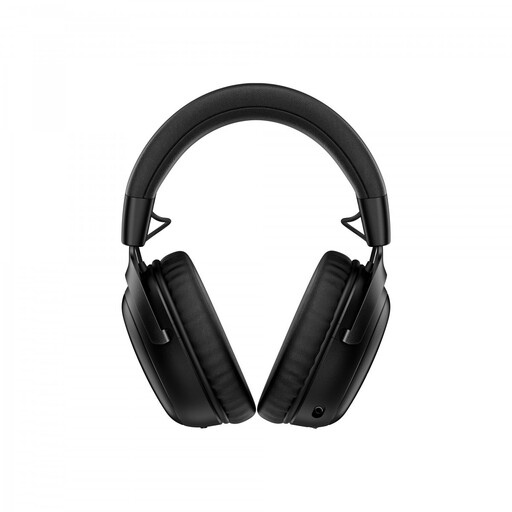 Image unavailable
HyperX Cloud III S wireless gaming headset
A wireless option if freedom of movement matters while recording. Before you buy, check the connection and monitoring during a full test session.
The product description lists 2.4GHz and Bluetooth connections, a detachable boom microphone and memory foam ear cushions. The headset is listed for PCs, mobile devices and other specified devices.
View on Joybuy
 Image unavailable
Jabra Evolve2 75 headset
A headset to consider if you want the option of switching between wireless use and a wired computer connection while recording.
The description lists Bluetooth and a USB-C cable for wired use. It also mentions an adjustable headband and soft ear cushions.
View on Joybuy
Frequently asked questions
How can I avoid clipping during a long word recording?
First, select the headset as your recording input. Record a short passage using your loudest pronunciation and check the recording meter. Audacity suggests aiming for a peak of around −6 dB in its recording workflow; listen back to the test as well before starting a long take.
Will a standalone headset microphone work with any 3.5mm connection?
No. RØDE says the HS2 needs a 3.5mm microphone input that provides plug-in power. Check your recorder or transmitter’s manual: a headphone output isn’t the same as a suitable microphone input.
What if an online headset doesn’t fit comfortably or is faulty?
The Dutch government says that when you buy at a distance, you generally have 14 days to change your mind; check whether the terms apply to your purchase. You also have statutory rights if a product is faulty. In the Netherlands, there is no fixed statutory guarantee period; the seller must offer an appropriate solution.
Can I publish recordings of other speakers or existing lesson recordings?
It depends on what you record and publish. The Dutch Data Protection Authority says that publishing other people’s personal data online requires an applicable legal basis under the GDPR and, in many cases, consent. For other people’s copyright-protected material, the Dutch government says you need the creator’s permission; this doesn’t mean that every recording of your own words requires permission from others.


