Choose a headset microphone that you can position close to your mouth and that connects to your recording device. Then make a test recording using both softly and clearly spoken words. A wired USB headset can be a practical choice for recording on a computer, while a directional microphone is worth considering if there’s background noise. Call-quality specifications don’t prove that recordings will preserve subtle details in softly spoken words.
Who is this guide for?
Creating examples of softly spoken words
You record short words or phrases in a quiet voice and want to check that they’re still clear when you play them back. Shure explains why microphone placement matters, while Audacity offers guidance on testing recording settings.
Recording in a shared space
You record examples when other voices or household sounds may be present. Microphone direction, placement and the level of background noise in the room are all worth considering, as Shure also notes in its recording advice.
Creating a longer series of lessons
You record lots of examples in one go and want to make sure the connection, controls and fit work with your computer and your way of working. Logitech, EPOS, Jabra and Poly product information describes a range of connection and control options.
Which features should you consider?
Start by checking the connection and microphone position. Then make a test recording to see if softly spoken words remain clear in your recording environment.
Simple wired USB headset
Best for: short recordings on a computer in a quiet room, if you’re looking for a plug-in headset with an adjustable microphone boom.
Keep in mind: Logitech and EPOS describe their microphones as being for calls. That information doesn’t tell you how subtle speech details will sound in your recordings.
Wired office headset
Best for: longer sessions where fit, controls and the exact connection type matter.
Keep in mind: Jabra describes its dual-microphone system in the context of calls. Check what’s included in each version and make a test recording.
Directional headset microphone
Best for: situations where you want to point the microphone directly at the speaker and take sound from other directions into account.
Keep in mind: Shure describes the WH30 as a directional microphone. Check in advance which connection or interface you’ll need to record on your computer.
| What to consider |
What to look for when buying |
Who is this important for? |
| Clarity of softly spoken words |
Check whether the microphone boom is adjustable, and record a few words at your usual quiet speaking volume. |
When I record softly spoken words, I want to be able to understand them clearly on playback. Around 40% of consumers prioritise the clarity of quiet speech. |
| Background noise and speech details |
Compare a short recording in a quiet environment with one made in your usual background noise. |
In a shared space, I want to check whether other voices make the words harder to understand. Around 30% of consumers prioritise reducing background noise. |
| Connection, controls and comfort |
Check whether it uses USB-A or USB-C, and test the microphone input, mute function and fit during a short recording session. |
For a longer series, I want to be able to connect the headset to my device and use the controls comfortably. Around 30% of consumers put connection and long-term use first. |
What to watch out for when buying
-
Relying solely on the ‘noise-cancelling microphone’ label
A specification for calls isn’t the same as listening to a test recording of softly spoken Dutch words.
Record the words you want to use yourself, then play them back and check their clarity and any background noise.
-
Checking the connection or version only after you’ve bought it
Headsets in the same product range can have different USB versions, and a different connection won’t necessarily fit your recording device.
Compare the full variant name with your computer’s ports before you order.
Depending on your device and the version, you may need a separate adapter.
-
Trying to compensate for a microphone that’s too far away by simply turning up the recording level
Shure explains that microphone placement affects the balance between direct voice and room sound. Turning up the level won’t fix poor positioning.
Start with a suitable microphone position in a quiet room. Then check the recording meter and play back the result.
Brands to compare
Logitech
The H390 is a wired computer headset with an adjustable microphone boom and in-line controls. Check whether you’re looking at the USB-A or USB-C version.
- Logitech lists a noise-cancelling microphone and describes the headset as being for use with a computer.
- The product information focuses on calls. Make a test recording yourself to judge how subtle speech details sound.
EPOS
The PC 8 USB is a stereo computer headset with a directional microphone and in-line controls, designed for PC and Mac.
- EPOS lists a USB connection, volume control and an in-line mute function.
- The manufacturer describes the microphone as being for calls. This doesn’t replace making a test recording with softly spoken words.
Jabra
The Evolve2 30 SE is an office headset available in various mono, stereo, USB and collaboration software versions. The exact variant determines the features.
- Jabra specifies two microphones and an on-ear fit for this product range.
- Jabra describes sound reduction in the context of calls, not as an independent measurement of softly spoken word recordings.
Poly
According to the product information, the Blackwire 3320 version with model number 8X220AA has a flexible microphone boom, USB-C and a USB-A adapter.
- HP lists a noise-cancelling microphone and a USB-A adapter included with this version.
- Don’t assume another version is identical. Check the model number and connection.
Shure
Shure describes the WH30 as a professional headset microphone for vocalists and other users.
- According to Shure’s manual, the WH30 has a cardioid, directional pickup pattern.
- The manual doesn’t confirm a direct USB connection for this purpose. Check which version and recording input you’ll need.
Headsets at Joybuy
This selection includes headsets for computer recording, with models featuring adjustable or directional microphones and USB connections.
 No image available
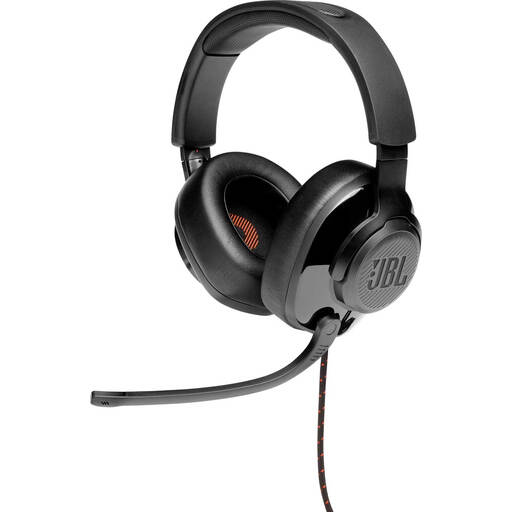
JBL Quantum 300 wired over-ear gaming headset with flip-up microphone, black
An option for computer recording if a directional microphone is important to you. The product description lists a directional microphone boom that flips up to mute, plus a USB audio adapter for use with a PC.
Joybuy
 No image available
Razer Kraken V3 X headset, black
Worth considering if you pay attention to microphone direction when recording on a computer. The product information lists a cardioid microphone, PC compatibility and a weight of 285 g.
Joybuy
 No image available
Logitech PC 960 USB headset
An option for computer recording if you want to position the microphone boom close to your mouth. The product description lists an adjustable boom, a USB connection and in-line volume and mute controls. It also mentions a lightweight design and soft ear cushions.
Joybuy
 No image available
Trust Ayda wired USB Type-A headset, black
An option for computer recording if your device has a USB Type-A port. The product description lists a flip-up microphone for muting, volume controls on the ear cup and an adjustable headband.
Joybuy
 No image available
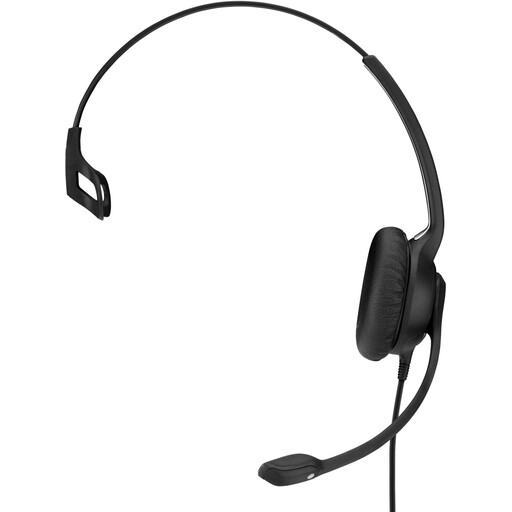
EPOS | Sennheiser IMPACT SC 230 USB MS II headset, black
A wired option for longer recording sessions if you’re looking for a flexible microphone boom and a USB connection. The product description lists a weight of 58 g, an adjustable headband and extra ear cushions.
Joybuy
Frequently asked questions
How do I set up a headset to record softly spoken words?
Select the connected headset as your recording source and record a test using your usual quiet speaking volume. Position the microphone close to your mouth and check the input level. Audacity recommends lowering the level if the meter enters the yellow or red area during a test.
Does ‘noise cancelling’ mean subtle speech details will be preserved?
No. The product specifications cited don’t establish that: manufacturers describe noise reduction for calls. Record your own words with and without your usual background noise to compare the results.
What should I check when buying, and what about the warranty?
Check the full version and connection, and review the terms that apply to your purchase. According to the Dutch government, when you buy online from a business, you generally have a 14-day cancellation period, although there are exceptions. EPOS lists a two-year international warranty for the PC 8 USB with article number 1000432.
Can I record someone else’s voice and publish the examples?
That depends on the recording, how it’s used and whether the speaker can be identified. The Dutch Data Protection Authority says that, in most cases, you need permission to publish personal data online, with exceptions including use solely for personal or household purposes. If you collect and use personal data, the regulator says you must have a lawful basis under the GDPR.


