What should you look for when choosing?
Start by checking your recording device’s connection and the microphone’s position. Then consider how the controls and a test recording fit the way you practise.
| What to consider |
What should you check? |
Who should consider this most? |
| Listening back to your pronunciation |
Position the microphone in the same place each time and compare a soft and a loud sentence. Listen for distortion in your recording. |
I want to listen back carefully for differences in my pronunciation. Around 33% of consumers prioritise being able to hear speech and voices clearly when listening back. |
| Switching quickly between takes |
Check whether the version you’re considering has mute or volume controls. Also factor in the controls in your recording software. |
I want to record short takes and listen back quickly without having to keep changing my setup. Around 27% of consumers prioritise recording a series of takes smoothly. |
| Connection |
Check whether your device supports USB-A, USB-C or a compatible 3.5 mm TRRS connection, and whether any adapter you need will fit. |
I want to make sure my device can use the headset as a microphone. Around 20% of consumers prioritise device compatibility. |
| Background noise |
Make a test recording where you practise and listen back to the quiet parts too. Treat noise-cancellation claims as applying to the use stated. |
I practise somewhere where background noise could make it harder to listen back. Around 20% of consumers prioritise reducing audible background noise. |
Joybuy product picks
This selection includes headsets and a pair of headphones whose product titles mention microphones or recording. For each version, check that the microphone and connection are suitable for your short reading takes.
 No image available
Sennheiser MOMENTUM 4 Wireless
If you’re considering wireless headphones, make a test recording to check whether the microphone sounds suitable for your reading takes.
The product title mentions over-ear headphones, noise cancellation, four microphones and 60 hours of battery life. These details alone don’t tell you how pronunciation details will sound in a recording.
View at Joybuy
 No image available
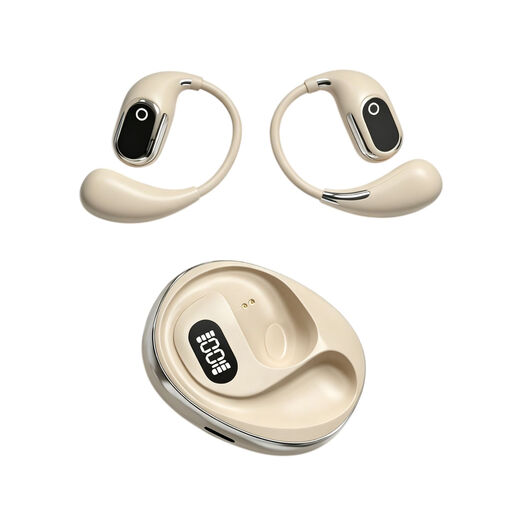
OWS on-ear headphones with built-in condenser microphone
If you’re considering headphones with a recording function, check that the described setup is suitable for recording and listening back to short reading takes.
The product title mentions a built-in condenser microphone, on-location recording, a binaural mode and a charging case with Type-C and a digital battery indicator.
View at Joybuy
 No image available
Razer Kraken V3 X
The product name identifies this as a headset. Check that the microphone and connection on the version you choose are compatible with your recording device, then listen back to a test sentence.
View at Joybuy
 No image available
Jabra Evolve2 75
If you’re considering this headset for short recordings, check that the microphone works as an input source and that your voice sounds clear and comfortable to listen back to.
The product title identifies it as a headset. Check the connection and features of the specific version before choosing.
View at Joybuy
 No image available
Jabra Evolve2 75 USB-A MS Teams
This version may be suitable if your recording device has a USB-A connection. Before buying, check that the headset appears as a microphone source and test a short recording.
The product title mentions USB-A and MS Teams. The Teams designation alone doesn’t indicate how well it performs for recordings of spoken Dutch.
View at Joybuy
Frequently asked questions
How do I check my first take?
Select the headset as the input source in your recording software, record a few seconds of speech and listen back. If you hear distortion or the peaks are clipped, lower the recording level and try again. For its test recording, Audacity suggests a peak of around −6 dB as a guide, not as a product specification.
Do I need stereo for spoken text?
For a single microphone, the Audacity manual describes using a mono track. Also check the settings in the app you’ll actually use to record.
What should I look for when it comes to cleaning and wearing a headset for longer periods?
Follow the cleaning instructions for the specific model and check that it remains comfortable to wear. RØDE describes the NTH-100M as having detachable ear pads and headband padding; don’t assume other headsets can be cleaned in the same way.
What can I do if the headset doesn’t work properly during normal use?
When you buy a product in the Netherlands, you’re entitled to a product that works as it should. According to the Dutch government, there is no fixed statutory warranty period; if a product is faulty, contact the seller. A manufacturer’s warranty is in addition to your statutory rights.
Can I record my own reading practice for private use?
According to the Dutch Data Protection Authority, the GDPR has an exception for use that is solely personal or domestic. This doesn’t automatically apply to recording other people or sharing recordings publicly or professionally; consider those situations separately.


