What should you look for?
Wired USB headset
Choose this option: if you practise on a computer with a compatible USB port and want to position the microphone at a fixed distance from your mouth.
Bear in mind: USB-A and USB-C are different types; also check that the recording app is using the headset as its microphone.
Wired headset with a 3,5mm connection
Choose this option: if you want to use devices with a compatible headset socket.
Bear in mind: not every model variant has a 3,5mm connection; check the socket and included cables for the exact version.
Wireless Bluetooth headset
Choose this option: if freedom of movement matters and the headset works well with your device and recording app.
Bear in mind: according to Microsoft, listening in stereo while using the microphone requires specific Bluetooth LE Audio support from Windows, your computer, its drivers and the headset.
| What to consider |
What should you check? |
Who should pay particular attention? |
| Recording speech you can review |
Adjustable microphone boom, selected microphone input and input level; listen back to a test recording. |
If I want to compare sounds and stress patterns, I want to hear what the recording app actually captures. Around 33% of consumers prioritise being able to review their speech recordings. |
| Comfortable listening back |
Mono or stereo style, fit and the option to listen at a comfortable, low volume. |
When practising in the evening, I want to listen without speakers and choose a style that feels comfortable to wear. Around 27% of consumers make listening back comfortably their top priority. |
| Connection and app |
The exact USB-A, USB-C or 3,5mm version, and the input source used by the recording app. |
If I switch between devices, I want to be sure the microphone works on each one and in the app I intend to use. Around 20% of consumers put compatibility first. |
| Fit for repeated practice |
Style, adjustability and whether the headset feels comfortable during a typical practice session. |
When speaking and listening back repeatedly, I want a headset that suits my wearing preferences. Around 20% of consumers give fit their highest priority. |
Noise cancellation mentioned for calls does not prove that subtle differences between Dutch sounds will be preserved in your recording. So compare a test recording made with the same app and speaking style you use for practice. If the input meter reaches its upper limit when you speak loudly, Audacity recommends lowering the recording level; distortion caused by clipping cannot be undone afterwards.
Keep the volume low when listening back repeatedly. The World Health Organization points out that both sound level and listening duration matter.
Headsets at Joybuy
These products include wired headsets with microphones for USB or 3,5mm use, as well as a wireless stereo headset. Check that each model's connection and microphone work with your device and recording app.
 No image available
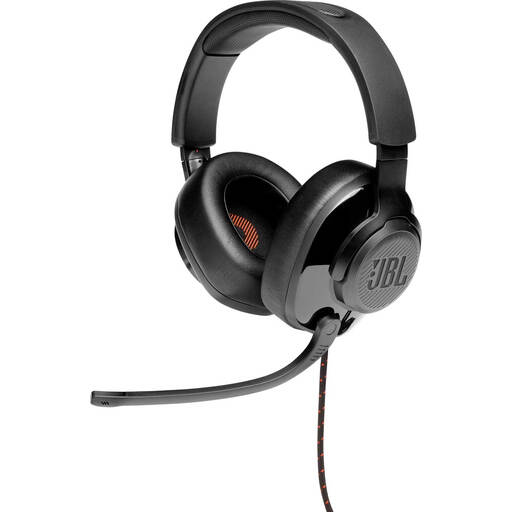
JBL Quantum 300, wired over-ear headset
A wired over-ear option for anyone who wants to use a headset with a microphone for pronunciation practice.
The product name specifies a flip-up microphone.
View at Joybuy
 No image available
Logitech PC 960 USB
A wired USB headset for anyone who wants to practise on a computer and set the microphone as the input source.
The product name specifies a USB connection.
View at Joybuy
 No image available
Logitech H340 USB
A wired USB headset for anyone who wants to use a microphone on a computer and listen back to the recording through the headset.
The product name specifies USB and a wired design.
View at Joybuy
 No image available
Jabra Evolve2 55, wireless stereo headset
A wireless stereo option for anyone who wants to listen without using computer speakers; test the microphone with your device and recording app.
The product name specifies a wireless stereo headset.
View at Joybuy
 No image available
Razer BlackShark V2 X 7.1, wired headset
A wired headset option for anyone who wants to use a microphone and check the connection works with their practice device beforehand.
The product name specifies a wired design.
View at Joybuy
Frequently asked questions
How can you check that the headset microphone is recording instead of the built-in microphone?
In Windows, select the headset under Input, speak normally, stop the test and play back the recording. Also check that the headset is selected as the microphone input in your recording app.
How can you prevent distortion when practising loud sounds?
Make a short test recording that includes the loudest sounds you practise. Audacity recommends lowering the recording level if the input meter reaches its upper limit; distortion caused by clipping cannot be undone afterwards.
Will a USB-C headset automatically work with a mobile pronunciation app?
No, not always. For the Evolve2 30 SE, Jabra warns that not all mobile USB-C devices or apps support USB audio. Check that the combination works and test the recording before relying on it.
What are your rights when you buy a headset online in the Netherlands?
According to ACM ConsuWijzer, when you buy a product online you generally have 14 days from delivery to change your mind, although exceptions may apply. The Netherlands Authority for Consumers and Markets also says that the seller is responsible for the statutory guarantee and must arrange a free repair or replacement if a product does not meet expectations. An additional paid warranty does not replace these rights.
How can you listen back safely during repeated evening practice?
Start at a low volume and take breaks. The World Health Organization recommends keeping your device volume at no more than 60% of the maximum and points out that listening duration matters too.


