
Practice sessions with recordings to compare
You record the same sounds or sentences several times and want to position the microphone in the same place each time and check your recording settings.


For short pronunciation exercises at a computer, a wired headset with a compatible connection and an adjustable microphone boom is a practical starting point. If you want to compare takes carefully, also consider your recording settings and the differences between USB and analogue versions. No product specification on its own proves that your pronunciation will be recorded accurately in your room. Make a short test recording, check that you have selected the right input, and listen for distortion or background noise.
You record the same sounds or sentences several times and want to position the microphone in the same place each time and check your recording settings.
You want to hear your voice over background noise. Noise reduction designed for calls does not prove that pronunciation details will be recorded accurately.
You practise for long stretches or use different devices. So check the fit and make sure the microphone connection works with each device.
Choose this if: you practise at a computer and want to connect the headset directly to a compatible USB port.
The trade-off: the cable limits your movement, and a USB connection does not prove that the recording is suitable for assessing pronunciation details.
Choose this if: you want to compare recordings carefully and are prepared to check the entire connection and recording setup.
The trade-off: according to Audio-Technica, the ATH-M50xSTS-USB has USB-A; the analogue ATH-M50xSTS has separate XLR and headphone connections.
Choose this if: you practise while other people can be heard and the manufacturer describes a microphone system for calls that reduces background noise.
The trade-off: Jabra's claim about call use does not prove that Dutch speech sounds will be reproduced faithfully in your recording.
Choose this if: you switch between devices that support the headset's connections for microphone recording.
The trade-off: having multiple connections says nothing by itself about recording quality; test the microphone input on each device.
| What to consider | What to check before buying | Who is this important to? |
|---|---|---|
| Consistent recordings | Check that the microphone boom can be positioned securely and select the right input in your recording app. Listen to a short test for distortion. | If I compare the same pronunciation across several takes, I don't want a different microphone position to be the cause of any differences. Around 33% of consumers say consistent recordings are their top priority. |
| Voice clarity with background noise | Record both quiet and emphatic sentences in the room where you practise, then listen to your voice and the background noise. | In a shared space, I want to hear my voice clearly without assuming that noise reduction designed for calls preserves pronunciation details. Around 27% of consumers say intelligibility with background noise is their top priority. |
| Wearing comfort | Check the adjustability and ear cushions, and if possible assess the fit during a session similar to the way you practise. | For long or frequent practice sessions, I want a fit that doesn't distract me. Around 20% of consumers put wearing comfort first. |
| Connection and playback | Compare the complete model version with the ports on your device, and check separately that both microphone input and playback work. | If I use different devices, I want to know in advance which connection supports microphone recording. Around 20% of consumers let device connectivity determine their first choice. |
Features described for calls don't show how your speech sounds will be recorded in your room.
Make a test recording using sentences and background noise that reflect your practice environment.
The ATH-M50xSTS-USB uses USB-A, while the analogue ATH-M50xSTS has separate XLR and headphone connections.
Before buying, check the full model name, the cable supplied and the inputs on your device.
If the wrong input is selected or the audio is clipping, comparing takes may be pointless.
Check the selected input and make a short test recording. If the audio clips, lower the recording level, as Audacity recommends.
The H390 is a straightforward wired computer headset for anyone who wants to connect the USB version to a compatible port.
The ATH-M50xSTS range is worth considering if recording and careful playback are priorities; choose between the USB and analogue versions carefully.
The Evolve2 30 SE is a call-focused option to consider if you practise in a shared space.
The NTH-100M combines an over-ear design with a detachable microphone.
The wired Cloud III is worth considering if you switch between devices with different supported connections.
These wired headsets with microphones are designed for recording and playing back your voice. Above all, check that the connection and microphone input are compatible with your device.
 Image unavailable
May suit repeated voice recordings if your device has a compatible 3.5 mm connection.
The product description lists a flexible 360° microphone and a 3.5 mm connection.
 Image unavailable
Suitable for practising at a computer with a USB port and an adjustable microphone boom.
The description lists a wired USB connection, an adjustable boom and volume and mute controls. Check that your computer recognises the headset as a microphone input.
 Image unavailable
May suit wired recording and playback if the connection works with your device and recording app.
The description lists a 3.5 mm connector and USB via the LINK controller. The cable is listed as 0.95 m long.
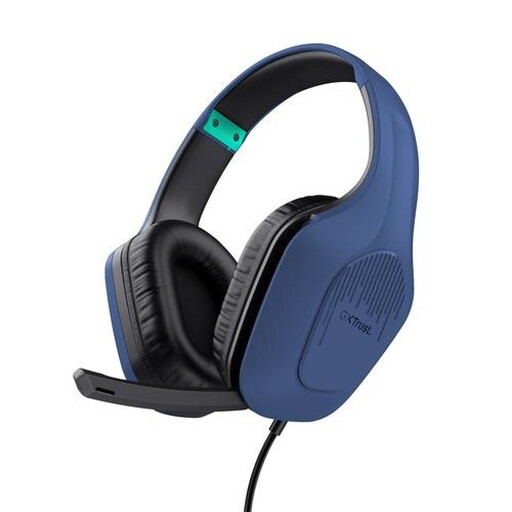 Image unavailable
May suit wired practice sessions if your device has a compatible 3.5 mm connection.
The description lists a foldable microphone, a 2 m cable, an adjustable headband and 50 mm drivers.
 Image unavailable
May suit computer recordings if your device supports the listed USB connection as a microphone input.
The description lists USB-A with a USB-C adapter cable and a microphone with flip-to-mute functionality. Check which connection your device uses.
Select the headset as the recording input in your system and recording app, then make a short test. Audacity recommends checking the waveform for clipping and lowering the recording level if it occurs.
Don't position a suitable adjustable microphone directly in front of your mouth. For the SM35, Shure recommends placing it beside the corner of your mouth to reduce plosive sounds; test the position for your headset with a short recording.
No. According to RØDE, the supplied TRRS cable is needed for the NTH-100M microphone to work correctly. Also check that your device has the right microphone input.
For online consumer purchases, you generally have a 14-day cooling-off period, according to the Dutch government. This is separate from your statutory rights if a product is faulty; the Netherlands does not have one fixed statutory guarantee period that applies to all products.