
Practice partners sitting together
You want to hear both voices in a practice conversation. First decide how you want to record both speakers; a personal headset is primarily designed to pick up the wearer’s voice.


If you want to record your own voice, a personal headset microphone that you can position near your mouth is your best option. A single headset is not a reliable way to capture someone sitting next to you as well. First decide how many voices you want to record, then check the connection and make sure your laptop is using the correct microphone as its input. A wired headset does not need charging, but it does restrict your movement; Bluetooth requires pairing and charging.
You want to hear both voices in a practice conversation. First decide how you want to record both speakers; a personal headset is primarily designed to pick up the wearer’s voice.
You mainly want to listen back to your own Dutch pronunciation while sitting close to your laptop. The microphone position, connection and a test recording will help you assess your setup.
You practise on your laptop and want to be able to move around. Check whether your laptop can use the Bluetooth microphone as an input, and bear in mind that you’ll need to pair and charge it.
First decide whether you want to record one voice or two in the same room. Then compare the connection options and how much freedom of movement you need.
| What to consider | What to look for when buying | Who is this important for? |
|---|---|---|
| Recording both voices | Decide how many speakers will be in the room and listen back to a test recording featuring both voices. | If you practise with someone sitting beside you, you’ll want to hear both voices, not just the headset wearer’s. Around 36% of consumers say recording both voices is their top priority when buying. |
| Listening back to your own pronunciation | Look for a microphone you can position near your mouth, and test the recording in the room where you practise. | If you mainly want to assess your own pronunciation, you’ll want to be able to hear your voice clearly when you listen back. Around 29% of consumers prioritise listening back to their own pronunciation. |
| Connection and input | Check your laptop’s ports and the exact product variant, then select the intended microphone as the input. | If you want to make sure your laptop doesn’t inadvertently use a different microphone, check the connection and recording input. Around 21% of consumers say laptop compatibility is their top priority when buying. |
| Freedom of movement | Check whether your laptop supports Bluetooth audio input, and bear in mind that you’ll need to pair and charge the headset. | If you want to move around while practising online, a cable may get in the way. With Bluetooth, you’ll need to test the connection with your recording app. Around 14% of consumers make freedom of movement their top priority. |
A personal headset microphone is designed to pick up the wearer’s voice. That doesn’t prove it will capture someone sitting next to you clearly.
First decide whether you want to record one person in the room or two. Then make a test recording featuring both speakers.
Recording two voices may require a different microphone setup, with extra connections and careful positioning.
Connections and included accessories can vary between versions. The product name alone won’t confirm which plug or adapter you’ll receive.
Compare the full product name, connection and package contents with your laptop’s ports.
If the plug doesn’t fit, you may need an adapter or a different version.
Your laptop may show several input devices, so it won’t necessarily use the headset microphone by default.
Select the intended microphone in your sound settings, then listen back to a short test recording before your practice session.
Logitech offers both wired personal USB headsets and a Bluetooth alternative for anyone who wants to move around while practising.
The Ayda USB-ENC, product number 25089, is a wired option to compare if your laptop has a compatible USB port.
The Blackwire 3220 is a wired headset range to consider if you’re looking for a specific USB version for a laptop.
The Evolve2 30 SE is a wired headset range to compare if fit and the right USB version are important to you.
These Joybuy products are wired headsets with microphones for practising on a laptop or computer. Check which connection is compatible with your device and whether you mainly want to record your own voice.
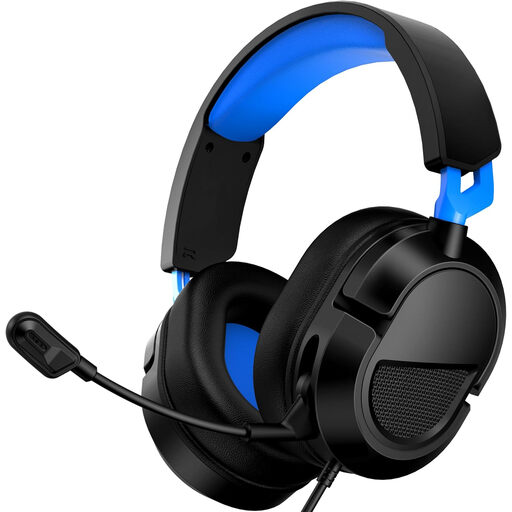 Image unavailable
The adjustable microphone can be useful if you want to change its position while practising.
The description lists a 3.5 mm connection and an adjustable, 360° rotatable microphone. Check that the connection is compatible with your laptop.
 Image unavailable
This wired headset is designed for use with a computer and has an adjustable microphone boom.
The description lists a USB connection and in-line volume and mute controls.
 Image unavailable
This wired headset may suit you if you use a computer connected via USB and want in-line controls.
The product description lists a microphone, USB connection and in-line volume control.
 Image unavailable
This wired headset is designed for use with a computer and has an adjustable microphone.
The product description lists a USB connection and plug-and-play use.
 Image unavailable
This wired headset may suit a device with a 3.5 mm combo port and has an adjustable microphone.
The description lists in-line volume and mute controls. If your device has separate audio and microphone ports, you may need a splitter; the description says one is not included.
Select the intended microphone as the input in your sound settings, then listen back to a short test recording. Microsoft Support describes this test for Windows 10 and 11; if you use another operating system, follow its equivalent settings.
Don’t assume so: a personal headset is designed for the wearer and doesn’t guarantee that someone sitting next to you will be recorded clearly. If both voices matter, test a setup that captures both speakers. If you’re using multiple microphones, pay attention to positioning and audio bleed.
For the exact wired version, check that the plug fits your laptop’s ports and that any adapter you need is included. With a Bluetooth headset, you’ll also need to allow for pairing and charging.
The Dutch Data Protection Authority states that processing data purely for personal or household use falls outside the GDPR; if the GDPR does apply, you need a lawful basis. This is not a blanket statement that every recording or publication is or isn’t allowed. Tell the other person what you want to record and agree separately on whether you can share the file.