For practising Dutch speaking in a shared space, a wired USB headset is a practical choice if you’re recording on a computer with the right port. Shure recommends positioning the microphone slightly to one side of your mouth; then make a test recording while the room is being used as usual. Noise reduction doesn’t guarantee that background conversations will disappear from your recording: Audacity warns that the feature isn’t suitable for all irregular noises.
Who is this buying guide for?
Practising in a noisy room
If other people are talking nearby, you’ll want to record your own voice clearly. Shure recommends positioning the microphone slightly to one side of your mouth; a test recording will show you how well that position works in your space.
Listening back to focus on pronunciation
If you’re listening back to Dutch sounds, stress and rhythm, you’ll want to check that these details remain clear. The Audacity manual notes that noise reduction isn’t suitable for all irregular background noises.
Practising with different devices
If you use different computers or recording setups, check the connection for each headset version and select the correct microphone input in both your operating system and recording app.
What should you look for?
| What to consider |
What should you check? |
Who is this important for? |
| Your voice and background conversations |
Shure recommends positioning the microphone close to your mouth and slightly to one side. Make a test recording while other people are talking. |
If other people are talking nearby, I want to be able to assess my own voice clearly; around 36% of consumers prioritise reducing background voices. |
| Listening back to your pronunciation |
Record the same sentence using the available settings, then listen back to check that sounds, stress and intonation remain clear. |
I want to be able to assess Dutch sounds, stress and rhythm when listening back; around 29% of consumers prioritise hearing pronunciation details. |
| Connection and recording input |
Check the USB connection and version. Once connected, select the headset microphone as the input source in your operating system and recording app. |
If I want to record on my own computer, I want the connection and input source to be right; around 21% of consumers prioritise easy connection. |
| Comfort during repeated practice |
Check the adjustability and fit, and see whether the headset remains comfortable during a session of your usual length. |
When practising regularly, I want a fit that stays comfortable; around 14% of consumers prioritise wearing comfort. |
Common buying mistakes
-
Confusing ANC with a microphone that removes background voices from recordings
Noise cancellation for what you hear through the ear cups and processing of the microphone signal are different features. A product listing that mentions noise cancelling doesn’t prove that conversations with housemates will disappear from a recording.
Make a test recording with normal background conversation and listen to it, rather than relying on the term noise cancelling alone.
-
Assuming every version of a headset has the same connection
A product range may include versions with different connections. A headset that doesn’t fit the port on your recording device won’t necessarily work with it straight away.
Before buying, compare the connector on the exact version with the port on your device.
If the connection isn’t compatible, you may need a suitable adapter or a different version.
-
Trying to filter out irregular background noise too aggressively afterwards
According to the Audacity manual, noise reduction isn’t suitable for irregular sounds such as traffic or a talking audience. Processing therefore can’t solve every situation in a shared space.
First, improve the microphone position and recording conditions. After any processing, listen again to check that the sounds you want to practise remain clear.
Brands to consider
Logitech
The H390 is a wired computer headset; check which connection the version you’re considering uses.
- Logitech lists a swivelling microphone boom, microphone noise reduction, in-line controls and an adjustable headband for the H390.
- These features aren’t an independent comparison of recorded voices in a shared space.
Jabra
The Evolve2 30 SE is designed for communication in shared workspaces and is available in different versions.
- Jabra describes the Evolve2 30 SE as having a two-microphone system that helps reduce background conversations during calls.
- This is the manufacturer’s claim about calls, not a guarantee for recordings of Dutch speaking practice.
HP Poly
The Blackwire 3220 USB-A is a wired stereo headset for computer communications; treat other connection options as separate versions.
- HP lists a noise-cancelling microphone, mute control and adjustable fit for the USB-A version.
- These specifications don’t provide comparative test results for background voices in saved recordings.
EPOS
The IMPACT 100 range comprises wired communication headsets; check the fit and connection for each version.
- EPOS lists a unidirectional microphone, noise-processing algorithms and USB-C with a USB-A adapter for the range.
- The manufacturer’s call-quality features alone don’t demonstrate an independent improvement for pronunciation analysis.
Joybuy product picks
These picks focus on wired headsets for practising on a computer or through a USB connection. Check that the connection is compatible, then select the correct microphone input once connected.
 No image available
Trust GXT 490 FAYZO Wired USB Type-A Headset, White
The wired version is designed for use with a computer that has a compatible USB-A port; once connected, check that the headset microphone is selected as the input source.
View at Joybuy
 No image available
Logitech PC 960 USB Wired Headset
The wired USB version is suitable for practising on a computer with a compatible connection; check which microphone input the recording app is using.
View at Joybuy
 No image available
Logitech H340 USB Headset, Black, Wired
This wired USB headset is an option for practising on a computer with a compatible port; select the headset microphone in your recording app.
View at Joybuy
 No image available
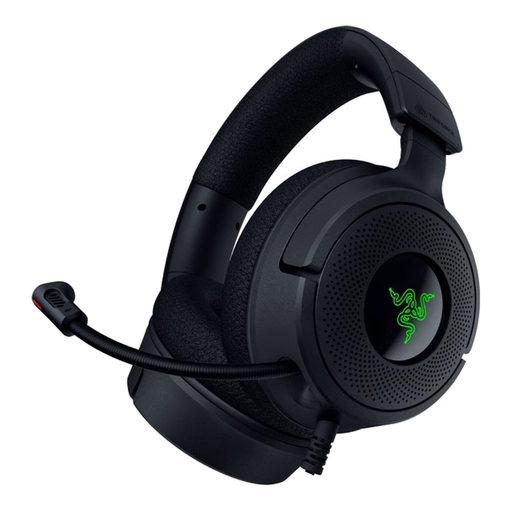
Razer Kraken V4 X Wired Gaming Headset
This wired gaming headset may suit practising on a compatible computer; check the connection on the version you choose and make sure the correct recording input is selected.
View at Joybuy
 No image available
Edifier G2II Gaming Headset, USB Wired
The product title specifies use with PC and Mac via USB; check the connection and select the headset microphone as the input source before making practice recordings.
View at Joybuy
Frequently asked questions
Will ANC in the ear cups keep voices out of my recording?
Not automatically: ANC mainly affects what you hear, while the microphone and recording chain determine what gets recorded. Test both features in your shared space by making a recording.
Where should I position the microphone when speaking?
Position the microphone slightly to one side of your mouth, rather than directly in front of the airflow from your mouth. Make a short test recording; with a directional microphone, the pickup side should face your voice.
Why is my computer still recording through its built-in microphone?
Select the headset as the input device in both your operating system and recording app, and check that the microphone isn’t muted. Logitech’s H390 setup guide also suggests trying a different USB port as a troubleshooting step.
Do I need extra warranty cover for a headset in the Netherlands?
You don’t need to pay extra to have your statutory rights. According to the Dutch government, there is no fixed statutory warranty period in the Netherlands; if a product is faulty, the seller must provide a solution. Check whether paid cover offers anything extra.
Can I record if other people can be heard in the same room?
Don’t automatically assume that every recording made in a shared space counts as personal or household use. Ideally, limit the recording to your own voice and let others know before recording or sharing speech that could identify them. The Dutch Data Protection Authority describes an exception for images used exclusively for personal or household purposes; different considerations may apply if you share them more widely or process them on behalf of an organisation.


