
Listening back to your pronunciation
You practise sitting down and mainly want to record your own voice clearly. Check the microphone position and connection, then make a short test recording first.


If you practise sitting at a computer and mainly want to listen back to your own voice, choose a wired headset with an adjustable microphone boom and a connection that suits your device. If you also want to record your conversation partner, first work out whether their voice will come through your computer or from the same room: a headset microphone won’t automatically record both voices. The choice between USB and an analogue connection depends on your recording device and the recording setup you want to use.
You practise sitting down and mainly want to record your own voice clearly. Check the microphone position and connection, then make a short test recording first.
You practise with someone remotely or beside you and want to hear both voices in the recording. First work out how the other speaker’s voice will be captured.
You practise for longer sessions or listen closely to details in speech. Compare the fit and the exact microphone and connection configuration; specifications can’t tell you how a headset will feel when you wear it.
Suitable if: you record your own pronunciation at a computer while seated and want a direct connection; check whether USB-A or USB-C is right for your device.
Bear in mind: the microphone won’t automatically record a conversation partner’s voice if you hear it through your computer.
Suitable if: you often practise for extended periods and want to take weight or the exact mono or stereo configuration into account.
Bear in mind: manufacturers describe noise reduction for calls, but that doesn’t prove that Dutch speech sounds will be recorded faithfully.
Suitable if: you want to listen back closely or already use recording equipment with a compatible 3.5mm input.
Bear in mind: check whether your device has a combined connection or separate microphone and headphone ports; an analogue headset isn’t automatically a USB headset.
The percentages show each consumer’s main concern when choosing a headset for practising Dutch conversation.
| Main concern | What to look for | Who considers this more important? |
|---|---|---|
| Recording your own voice clearly | Check that the microphone boom is adjustable, select the microphone in your recording software and make a test recording at a normal speaking volume. | If I want to assess my pronunciation afterwards, I need to be able to hear my own voice clearly. Around 36% of consumers say recording their own voice is their main concern. |
| Hearing both speakers in the recording | Work out where the second voice is coming from and make a short test recording to check that both voices are captured. | When I practise with someone, I want to hear not only my own voice but theirs too. Around 29% of consumers prioritise recording both voices. |
| Comfort during longer practice sessions | Compare mono or stereo, on-ear or over-ear, the headband, ear cushions and the weight of the exact model. | If I do several practice sessions in a row, I want a comfortable headset; try the fit yourself where possible. Around 21% of consumers name wearing comfort as their main concern. |
| Connection and recording settings | Check whether you need USB-A, USB-C or a compatible 3.5mm connection, and whether your microphone is recognised as an input. | When I set up my recording device, I want to be sure the headset connects and the microphone works with my recording software. Around 14% of consumers say connection and recording checks are their main concern. |
A conversation partner’s voice may come from a different audio source to the headset microphone. During an online conversation, your computer’s audio output follows a separate signal path.
Before you start, work out how both voices will reach the recording and check this with a short test in which both speakers talk.
Features described by manufacturers for calls aren’t an independent comparison of how Dutch speech sounds in a recording.
Listen back to a test recording and judge the clarity and sound for yourself before relying on this feature.
Models in the same product range can differ in their USB connection, mono or stereo sound and the cable required. An analogue headset may also use a different connection from your computer.
Compare the full product configuration with the ports on your recording device and check that the microphone is recognised as an input.
The H390 is a range of wired computer headsets for straightforward USB recording. Logitech describes versions with in-line controls and an adjustable microphone boom.
The Evolve2 30 SE is a wired headset range for calls, with mono and stereo versions and different connection configurations.
The IMPACT 100 is a wired headset range for calls, designed for those looking for a lightweight headset with in-line controls.
The Blackwire 3320 is a wired, on-ear stereo headset. For version 8X220AA, HP describes a USB-C cable with a USB-A adapter.
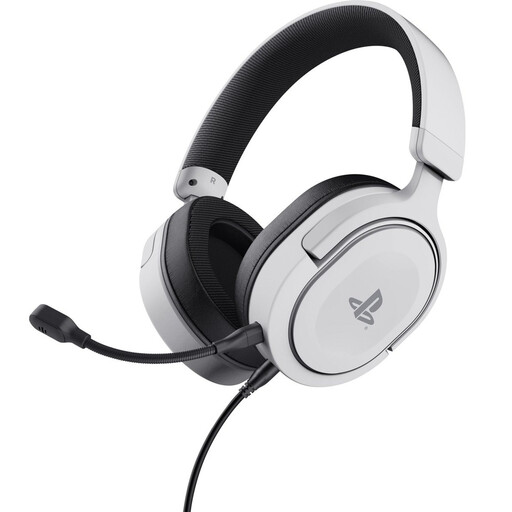
The NTH-100M is an analogue over-ear headset with a detachable microphone, designed for use with a compatible recording setup.
These wired options include analogue headsets with a 3.5mm connection and USB headsets for recording on a computer. For each version, check that the connection is compatible and that your recording software recognises the microphone.
 No image available
An analogue option for voice recordings if your device has a compatible 3.5mm connection.
Detachable, flexible microphone; 1.2 m 3.5mm cable.
Check that your recording device supports the connection.
 No image available
A wired computer headset for anyone looking for a USB-A connection.
The description lists USB Type-A, plug-and-play and on-earcup controls for volume and muting the microphone.
 No image available
A USB headset for recording on a computer when you want to adjust the microphone position.
The description lists an adjustable microphone boom and in-line controls.
 No image available
A wired stereo headset for computer use if a USB connection is suitable.
The description mentions a microphone for communication and in-line controls.
 No image available
A wired USB headset for recording on a computer when you want an adjustable microphone.
The description lists an adjustable microphone and a USB connection.
Don’t assume so: the headset microphone records the wearer’s voice, while the voice you hear through your computer comes from a different audio source. Audacity describes WASAPI loopback for capturing computer audio in Windows, but that won’t automatically record the headset microphone as well. Test the entire recording setup with both voices before you begin.
Select the connected headset microphone as your recording device, position the microphone boom by your mouth and make a short test recording at a normal speaking volume. If you hear distortion or the level is peaking, lower the recording level; if your voice sounds too quiet, check the microphone position and level.
No. According to the Dutch government, there is no fixed period for the statutory guarantee in the Netherlands: you’re entitled to a product that meets what you can reasonably expect from it. If a product is faulty, the retailer is your point of contact; normal wear and tear or damage you cause yourself isn’t automatically covered.
The Municipality of Enschede states in its policy rules, with reference to Article 139a of the Dutch Criminal Code, that making an audio recording of a conversation you’re taking part in is not a criminal offence in the context described. Those municipal rules don’t automatically apply to every practice situation. Ideally, let your practice partner know in advance that you’re recording and agree separately before sharing or publishing an identifiable voice; the rules on sharing and further processing depend on the circumstances.