If you’ll mainly be practising at one computer, choose a wired headset with a connection that’s compatible with your device and a microphone you can position easily. A 3.5mm headset will only work if your device also supports microphone input through that connection. A wireless model is worth considering if freedom of movement matters more to you than pairing and charging. Before you choose, listen back to a test recording: noise cancellation for calls doesn’t automatically mean that pronunciation details will remain clear.
Who is this choice relevant to?
Listening back to your pronunciation
You record short exercises so you can listen back to sounds and consonants. In this case, it’s useful to have a microphone you can position at a consistent distance, and to make a test recording. Shure explains how to position a microphone near the corner of your mouth, while Microsoft Support shows you how to test a microphone in Windows.
Practising with limited connections
You want a compact setup with a laptop, tablet or phone, and need to check whether the chosen USB-A, USB-C or 3.5mm connection also supports microphone input. Logitech, Jabra and EPOS describe different connection options.
Practising in a shared space
You record somewhere background noise may be an issue and want to judge how it sounds in your own recording. A claim about noise cancellation doesn’t prove that every pronunciation detail will be preserved; Audacity also explains the limitations of noise reduction.
What should you look for when choosing?
| What to consider |
What should you check? |
Who should pay particular attention? |
| Listening back to pronunciation details |
Make a test recording using your own voice, then compare it with and without any available noise processing. |
If I want to listen back to sounds accurately, I need to know how my microphone position and recording processing affect my voice. Around 40% of consumers prioritise being able to hear pronunciation details when listening back. |
| Connection to your device |
Check the exact USB type, or whether the 3.5mm connection supports microphone input; test the recording app too. |
If I have few ports or practise on a mobile device, I need to know in advance whether both the headset and app support the microphone. Around 30% of consumers prioritise a suitable, compact connection. |
| Background noise |
Listen to a test recording made in the room where you plan to practise; assess your voice and the background separately. |
If I practise in a shared space, I want to hear whether background noise makes it harder to listen back. Around 20% of consumers prioritise managing background noise. |
| Freedom of movement and comfort |
Check the connection for your device and decide for yourself whether the headset feels comfortable. |
If I want to move around while practising or listen for longer, freedom of movement and fit matter. Around 10% of consumers put these needs ahead of the other considerations. |
Pitfalls to avoid
-
Assuming noise cancellation guarantees accurate pronunciation recordings
A headset described as suitable for calls isn’t necessarily good at capturing subtle differences in pronunciation. Audacity notes that reducing noise can be difficult when speech and background noise are similar in level.
Make a test recording in your own space and listen to the unprocessed version and, if you use it, the processed version.
-
Assuming every version of a model has the same connection
Versions may differ in their USB-A, USB-C, USB-C/A or 3.5mm connections. Jabra also warns that not every USB-C device or app supports audio with the Evolve2 30 SE.
Check the full model version against the ports on your device, and make sure your recording app is compatible before choosing.
-
Choosing a 3.5mm headset based on the connection alone
A 3.5mm socket doesn’t automatically support microphone input. The EPOS PC 5 CHAT has a single plug and is designed for equipment with a suitable audio input.
Check that your device’s connection supports both headphone output and microphone input, then test the microphone.
Brands to consider
Logitech
The H390 is a wired USB computer headset for practising at a desktop computer.
- Logitech lists a positionable microphone boom, in-line controls and a 1.9 m cable for the H390.
- Check whether you’re looking at the USB-A or USB-C version. The product description’s references to video calls aren’t an independent assessment of its suitability for pronunciation recordings.
Jabra
The Evolve2 30 SE is wired, while the Evolve2 65 is a wireless option for anyone looking for greater freedom of movement.
- Jabra describes separate USB and mono or stereo versions of the Evolve2 30 SE.
- Not all USB-C devices or apps support audio with the Evolve2 30 SE. The Evolve2 65 needs to be connected and charged; the quoted battery life figures are manufacturer estimates for different usage scenarios.
EPOS
The PC 5 CHAT is a wired stereo headset with a single 3.5mm plug.
- The EPOS specification sheet lists a 2 m cable and a unidirectional microphone.
- Your device needs a suitable microphone input; the specifications aren’t an independent assessment of recording quality.
Poly
The Blackwire 3320 Stereo is a wired USB headset; check which connection and version you need.
- The HP/Poly specification sheet for the Blackwire 3320 version described lists mute and volume controls, as well as a noise-cancelling microphone.
- According to the specification sheet, the Blackwire 3315 and 3325 have different 3.5mm options; don’t assume these apply to the 3320.
Headsets for a compact practice setup
This selection includes wired headsets with a 3.5mm, USB-A or USB-C connection. For each model, check that the connection and recording app support microphone input on your device.
 No image available
Turtle Beach Airlite Fit, black and white
A wired option for practising with a compatible device that has a 3.5mm connection.
The product description lists a bidirectional microphone boom that flips up to mute.
View at Joybuy
 No image available
Jabra Evolve2 30 SE, USB-A
A wired option for a USB-A setup, provided your recording device and app support the headset.
The product description lists two integrated microphones, stereo speakers and in-line controls. A suitable adapter is recommended for a USB-C port.
View at Joybuy
 No image available
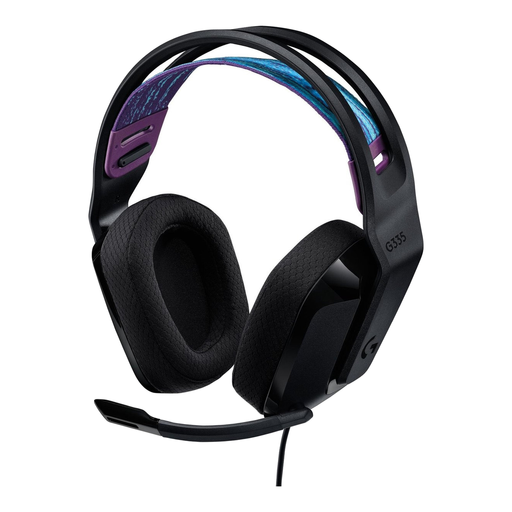
Logitech G G335
A wired option for practising through a compatible 3.5mm connection.
The product description lists a flip-up microphone that mutes when raised. A splitter is recommended for PCs with separate audio connections.
View at Joybuy
 No image available
Razer BlackShark V2 X 7.1 Wired
A wired option for a compatible 3.5mm connection.
The product description lists a cardioid microphone and recommends positioning it around 1–2 inches from your mouth. A splitter is recommended for PCs with separate audio connections.
View at Joybuy
 No image available
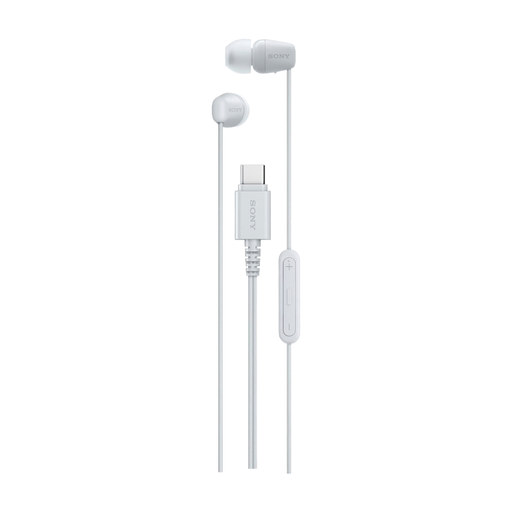
Sony IER-EX15C, USB-C
A compact wired in-ear option if your device and recording app support the USB-C microphone.
The product description lists a built-in microphone and in-line controls. A compatible USB-C device is required.
View at Joybuy
Frequently asked questions
How should I position the microphone for pronunciation practice?
Position the microphone boom as directed by your headset’s instructions, then make a test recording. For its head-worn microphone, Shure recommends placing it near the corner of your mouth rather than directly in front of it, to reduce plosive sounds.
How can I check whether my headset is recording in Windows?
Select the headset under Settings > System > Sound > Input, then start the microphone test. Adjust the input volume if needed. This checks the selected Windows input, but doesn’t automatically check the settings in every recording app.
Will a USB-C headset automatically work with my phone?
No, you can’t assume it will. Jabra says that not all USB-C devices or apps support audio with the Evolve2 30 SE. So check both your device and recording app for the version you’re considering.
What are my rights when buying online in the Netherlands?
For eligible online purchases from a business, the Dutch government says you’ll often have a 14-day cooling-off period; exceptions and the terms of the purchase matter. You also have legal rights if a product is faulty. There’s no fixed statutory guarantee period in the Netherlands; the retailer is your point of contact.


