
Poetry readers who want to preserve vocal nuance
If you alternate between quiet and powerful lines, record both kinds of passage and listen back before recording the entire reading. Audacity recommends checking a test recording for distortion.


Choose a headset microphone that you can position in the same place near your mouth each time, and that’s compatible with the microphone input on your recording device. A wired USB headset is a good choice for recording on a computer without a separate audio interface; an analogue or XLR headset can connect to equipment you already own. Record a few quiet and loud lines first and listen back: a claim about noise reduction for calls doesn’t prove how a poem will sound.
If you alternate between quiet and powerful lines, record both kinds of passage and listen back before recording the entire reading. Audacity recommends checking a test recording for distortion.
With suitable recording equipment and software, you can record and export the result to a folder of your choice. In Audacity, you can choose the folder, file name and file format when exporting.
If you already have an audio interface or separate audio connections, check that both the microphone signal and playback work with your chosen headset and connections.
First check the connection and recording source. Then use a test recording to see whether quiet and loud lines sound the way you want them to. Finally, export a short test file to the folder where you plan to keep your recordings.
| Consideration | What to look for | Who this matters to |
|---|---|---|
| Vocal nuance | Record quiet and loud lines, then check the recording level for distortion. | If I alternate between quiet and powerful lines, I want to be able to hear both clearly on playback. Around 36% of consumers put vocal nuance first. |
| Connection and local file | Check that your computer recognises the microphone as a recording source via your chosen USB, 3,5mm or XLR connection. Then export to a local folder. | I want to connect the headset to my computer and save the recording as a file. For around 29% of consumers, connection and local storage are their main concerns. |
| Background noise | Listen back in the place where you plan to record; ear coverage from the headset doesn’t tell you how much room noise the microphone will pick up. | At home, I want to hear how much noise from my surroundings makes it into the recording. Around 21% of consumers prioritise background noise and playback. |
| Comfort | Check the fit, the space for the cable and whether the microphone boom stays in place when you move. | For repeated takes, I want a comfortable headset that keeps the microphone well positioned. Around 14% of consumers put comfort first. |
Manufacturers often describe these features in the context of calls. That doesn’t establish how quiet lines, vocal nuance or the sound in your room will be captured.
Make a test recording with quiet and loud passages, and assess the recording itself rather than relying on claims about call quality.
A headphone output isn’t automatically a microphone input. Some headsets need a specific cable, splitter or audio interface, and different versions of a model may also vary.
Check the exact model, microphone input, headphone output and specified cable before choosing a headset.
Recording and exporting are separate steps. In Audacity, you choose the folder, file name and file format when exporting.
Export a short test first, open the file from your chosen location and listen back to it.
The H390 is a wired USB computer headset for anyone who wants to get started without a separate interface. Choose the version that suits your computer’s port.
The NTH-100M combines over-ear headphones with a detachable microphone for use with a suitable analogue recording connection.
The BPHS1 is a good fit if you already have a suitable microphone input and a separate headphone connection.
The Evolve2 40 SE is a wired business USB headset. Check whether you need the mono or stereo version, and which USB version is right for you.
This selection includes headsets with microphones for recording and playback. Connections and features vary by model, so check that your device recognises the microphone as a recording source via the connection you plan to use.
 Image unavailable
A wired headset with a detachable microphone for anyone whose recording device has a 3,5mm connection.
The flexible microphone is detachable, and the volume and mute controls are on the earcup. Check that your device’s 3,5mm port also supports microphone input.
 Image unavailable
A good fit if you’re considering a wired USB headset with integrated microphones. Check first that the USB-A version is compatible with your computer.
The product description lists USB-A, two integrated microphones, and volume and mute controls. It also mentions an adjustable headband and memory foam ear cushions.
 Image unavailable
A wired headset with a flexible microphone for use with a compatible device that has a 3,5mm connection.
The product description lists PC compatibility, microphone and volume controls on the cable, and an adjustable headband. Check that the connection also supports microphone input on the device you’ll use to record.
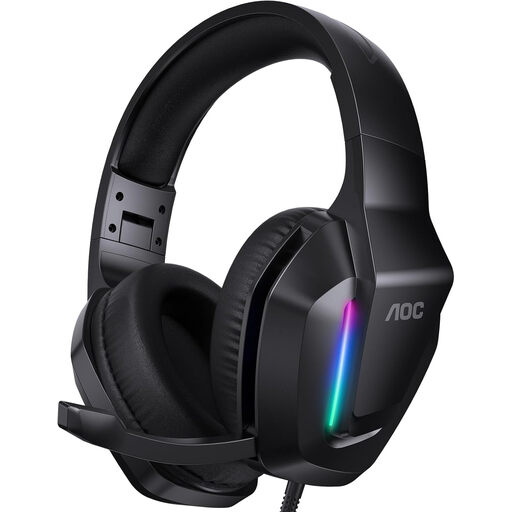 Image unavailable
A good fit if you’re looking for a wired headset with a microphone and a compatible 3,5mm connection.
The product description lists PC compatibility, an adjustable headband and soft ear cushions. The stated weight is 207 g; check that the headset works as a microphone source on your device.
 Image unavailable
A headset with microphones and Bluetooth. The description also lists a USB-C cable for wired use.
An adjustable headband and soft ear cushions are also mentioned. Before recording, check that the connection you choose works as a recording source on your device.
No. Select the headset as the recording source in your recording software, then export the recording to a local folder in a supported file format. Audacity explains both how to connect a microphone and how to export audio.
First, record a short passage that includes both your quietest and loudest delivery, then listen back. Audacity recommends lowering the recording level and trying again if clipping occurs.
Not with just the XLR plug; you’ll need a suitable audio interface. Also check the separate headphone connection and the headset’s exact cable version.
No. A claim about call quality doesn’t prove how a headset captures quiet lines, vocal nuance or the sound in your room. Make a test recording where you plan to record and assess the file by listening back to it.
Don’t assume that recording a poem yourself automatically gives you permission to share it. According to the Dutch government, you may make a private copy of protected work for your own use, but you can’t simply share or publish it. Before publishing, check who owns the rights and whether you have permission or a relevant exception applies.