If you record Dutch-language stories on a computer, choose a headset with a connection that suits your device and a microphone you can position easily. For a longer session, make a short test recording and play it back to check that both quieter and louder sentences sound clear. Noise cancellation on a call headset doesn’t, by itself, prove that it will record your voice naturally.
Who is this choice relevant to?
Storytellers who listen back to check their pronunciation
If you record your Dutch narration to assess your articulation, volume and pauses, first check that you’ve selected the right microphone as your recording source, then make a test recording. Audacity explains how to choose a recording device and check the microphone level.
People practising in the evening in a shared space
If you practise with household noise or audio playing nearby, pay attention to the microphone position, the ear cushions and what your own room sounds like in the recording. A call headset’s noise-reduction feature won’t automatically deal with echo or sound leaking from the headphones.
Storytellers practising for longer sessions
If you record repeatedly and listen back between takes, check that the headband and ear cushions feel comfortable, and that the cable or connection suits your set-up. Adjustability and comfort will depend on the wearer.
What should you look for when choosing?
Wired USB headset
A good fit if: you record on a computer and want a fixed microphone position.
Consider: the cable and USB port affect where you can sit and whether the connection is compatible.
Headset with a 3.5mm connection
A good fit if: your device has a suitable headset or microphone socket.
Consider: check that the port also supports microphone input; you may need a suitable adapter.
Wireless headset
A good fit if: you need to move around while narrating.
Consider: test that the headset works as a recording source and that its connection and battery life suit your session.
For evening recordings, the key things to check are how your voice sounds on playback, whether the connection is compatible and the conditions in your room.
| What to consider |
What to look for |
Who it matters to |
| Hearing your voice clearly on playback |
Position the microphone boom, select the headset as your recording source, then listen back to a short clip with both quieter and louder sentences. |
If you want to assess your pronunciation, volume and pauses, you’ll want to hear what you actually recorded. Around 33% of consumers put clear speech first. |
| Connection and input |
Check your device’s port, the exact USB or 3.5mm connection and which microphone your recording software is using. |
If you want to avoid a headset that plays audio but doesn’t record through its microphone, check the connection first. Around 27% of consumers prioritise a reliable connection. |
| A quiet environment for practising |
Make a test recording in the room where you practise and listen for household noise, echo and sound leaking back from the headphones. |
If you practise in the evening with household noise nearby, you’ll want to hear what makes it into your recording. Around 20% of consumers put a quiet recording environment first. |
| Comfort during longer sessions |
Consider adjustability, the type of ear cushion, pressure on your ears and cable length. |
If you record and listen back for longer periods, you’ll want the headset to remain comfortable. Around 20% of consumers consider wearing comfort their top priority. |
Common mistakes when choosing
-
Assuming noise cancellation means your voice will sound natural
Manufacturers generally describe noise cancellation as a feature for calls. That doesn’t prove how your Dutch narration will sound when you play it back.
Make a test recording in your own practice space and judge the recording itself, rather than relying on the product description alone.
-
Assuming every version has the same connection
Trust lists the Ayda USB and Ayda USB-ENC as separate versions. The connection and included adapter may also vary depending on the headset version you choose.
Before buying, check the full model name, connection and any adapter against the ports on your recording device.
-
Expecting the mute button to fix your recording
The mute button controls the microphone, but it won’t automatically select the right recording source or fix a distorted recording. If a practice recording goes wrong, you may have to record the story again.
Before you start, check the mute setting, selected input and level using a short test sentence.
Brands to consider
Logitech
The H390 is a wired computer headset for anyone looking for a USB version with in-line controls.
- For the USB-A version reviewed, Logitech lists an adjustable microphone boom, a 1.9 m cable and an adjustable headband.
- The connection is specific to the version; call-related specifications don’t prove how naturally it will record a narration voice.
Trust
The Ayda USB versions are wired options for a computer set-up, but they are different variants.
- Trust lists a flip-up microphone with a mute function and a USB-C-to-A adapter included with the Ayda USB.
- The noise-cancelling microphone is listed for the separate Ayda USB-ENC, so check the exact version.
EPOS
The PC 8 USB is a wired stereo headset for computer use, with in-line controls.
- EPOS lists compatibility with PC and Mac, volume control, mute and a noise-cancelling microphone.
- The description focuses on calls and doesn’t show how the headset records narration.
Jabra
The Evolve2 30 range is designed for business use, with ear cushions and a call-focused microphone system to consider.
- Jabra describes two microphones and soft memory foam ear cushions.
- The stated reduction in background noise is a brand claim for calls; check the connection and decide for yourself whether the audio processing suits your recording needs.
HP Poly
The Blackwire 3200 series includes wired business headsets with different connection and wearing options.
- HP documents the Blackwire 3220 USB-C as an on-ear stereo headset with a noise-cancelling microphone.
- Features of that USB-C version don’t automatically apply to every model in the series.
Headsets at Joybuy
These wired headsets are designed for voice recording and hands-on control while practising. Check that each model’s connection is compatible with your recording device.
 No image available
Logitech PC 960 USB
A wired USB option for recording on a computer, with an adjustable microphone boom.
The product description lists microphone noise cancellation, an adjustable headband and in-line controls. Test how your voice sounds in a recording.
Joybuy
 No image available
Trust GXT 490 FAYZO Over-Ear 7.1 USB
A wired USB headset with a flexible, detachable microphone for computer use.
The description lists microphone mute and volume control on the ear cup. Make a test recording to check how your narration sounds.
Joybuy
 No image available
Trust Ayda USB Type-A
A wired USB Type-A headset for anyone who wants to be able to mute the microphone while practising.
The description lists a flip-up microphone with a mute function, volume control and an adjustable headband. Check that your device has a USB Type-A port.
Joybuy
 No image available
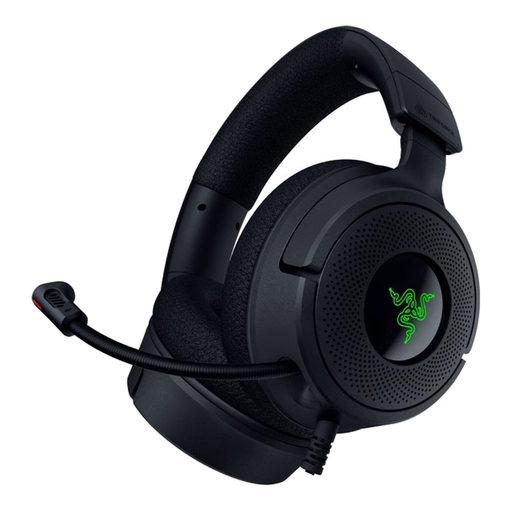
Razer Kraken V4 X
A wired USB headset with a foldable microphone, so you can adjust its position.
The product description lists a cardioid microphone and a 1.80 m cable. Check that the USB connection is compatible with your recording device.
Joybuy
 No image available
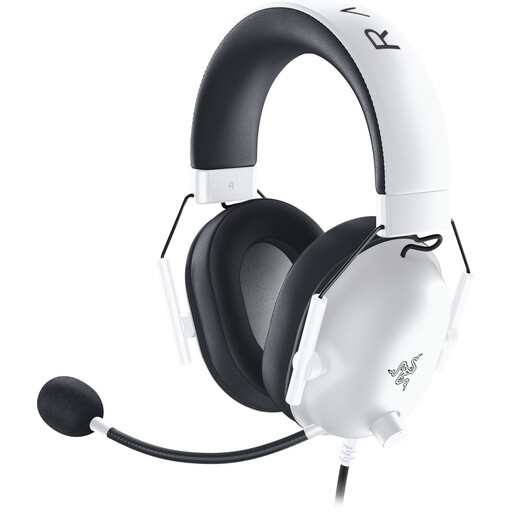
Razer BlackShark V2 X (Xbox Licensed), White
A wired headset with a 3.5mm connection for devices with a suitable microphone input.
The description lists a positionable cardioid microphone, memory foam ear cushions and a weight of 250 grams. Check that your device’s 3.5mm port supports microphone input.
Joybuy
Frequently asked questions
How can you check whether the headset is recording your narration?
Select the headset microphone as your recording device, record a short clip and play it back. Check the input level during a louder sentence; distortion can’t be fully corrected afterwards.
Do you need to hear yourself live through the headset while recording?
No, not if you simply want to listen back to a recording afterwards. If you want to monitor your voice live, check whether your computer or recording software supports input monitoring; Audacity explains the separate settings for this.
What if your laptop has just one 3.5mm port?
Check whether it’s a combined headset port and whether your microphone plug is compatible. You may need a suitable adapter if your microphone has a separate plug.
What are your rights if a headset bought online isn’t suitable or stops working?
Online purchases in the Netherlands may come with a statutory cooling-off period; check the applicable terms and exceptions. The seller must also offer an appropriate solution if a product breaks sooner than you could reasonably expect with normal use.
Can you record your own evening practice without a GDPR legal basis?
According to the Dutch Data Protection Authority, processing carried out solely for personal or household use falls outside the GDPR. This applies to a practice recording kept private; check the relevant privacy rules separately if you publish identifiable information about others beyond a limited private circle or use the recording professionally.


