
Dictating at a fixed workstation
You usually draft emails on one computer and mainly want a microphone that’s easy to connect and select.


If you usually dictate at a fixed workstation, start by looking at a wired headset with a connection that works with your computer. If you want to move around, compare wireless models by their connection, range and charging options. According to Microsoft Support, Dictate in Outlook requires a microphone and a reliable internet connection. A headset alone doesn’t provide dictation software or a feature that your email programme doesn’t offer.
You usually draft emails on one computer and mainly want a microphone that’s easy to connect and select.
You wear your headset for extended periods, so you compare the fit, adjustability and ear cushions as well as the microphone.
You want to be able to walk away from your desk while speaking, so you factor in wireless connectivity and charging.
First, decide whether you’ll stay in one place or want to move around. Then check that the connection and dictation feature work with your computer and email programme.
| What to consider | What should you check? | Who is this important for? |
|---|---|---|
| Clear voice input | Check whether the exact model has a microphone boom and the microphone features you want. Once connected, test the input and microphone level in your dictation programme. | When I dictate at home, I want my voice to be picked up clearly, without assuming that noise cancellation guarantees accurate recognition. Around 29% of consumers give clear voice input top priority. |
| Connection and dictation software | Make a note of your device’s ports and check whether you can select the headset as the microphone input. Also check whether dictation is available in your email programme. | I want to know in advance that the headset will connect and work as a microphone in my programme. Around 23% of consumers prioritise connection and software. |
| Comfort | Compare the fit, adjustability and ear cushions of the exact model. Try the headset on yourself if possible. | If I dictate for extended periods, I want a fit that feels comfortable to me. Around 18% of consumers consider comfort their most important factor. |
| Freedom to move | For wireless models, check the included adapter, stated range, battery life and charging method. Playback time isn’t the same as talk time. | I want to be able to walk away from my desk while dictating without being tied to a cable. Around 18% of consumers prioritise freedom to move. |
| Cost and after-sales support | Check what’s included with the exact model, and look into the seller, returns policy and warranty. | I want to weigh up the headset and included accessories against the support available if there’s a problem or I need to return it. Around 12% of consumers look at cost and after-sales support first. |
A manufacturer may mention microphone noise cancellation, but that doesn’t prove how accurately your dictation programme will recognise speech in your surroundings.
Check the microphone settings and test your usual dictation programme using your own voice and in your own environment.
Your computer may recognise a headset, even if the application you’re using doesn’t have a dictation feature or can’t access the microphone.
Before buying, check that the feature is available in your app and that you can select the headset as an input device. Also check the account and microphone access requirements.
Manufacturers may give separate figures for playback and talk time; these measure different types of use.
Compare figures based on the same usage definition and check the charging options for the exact model.
The H390 is a wired USB-A option for a fixed computer workstation, while the H151 uses a 3.5mm connection.
The Blackwire 3320 Stereo, with a USB-C cable and USB-A adapter, is a wired option if you want to be able to use either connection.
The Evolve2 65 range is a wireless office option worth comparing if you’re looking for a headset with a microphone boom and adapter.
The GO Work 2nd Gen is a wireless office option with a USB-C dongle and other connectivity options described by JLab.
The SpeechOne PSM6000 is a specialist wireless dictation headset worth considering if you dictate frequently and want specific wearing options or a dock.
This selection includes a wireless Bluetooth headset and wired models with USB, USB-C or USB and 3.5mm plugs. Check that each model’s connection and the dictation app work with your device.
 No image available
Could suit your preference for wireless use; check that Bluetooth works with your computer and dictation programme.
The product description mentions Bluetooth, beamforming microphones for calls, an adjustable headband and memory foam ear cushions.
 No image available
Could suit dictation at a fixed computer workstation; check that the USB connection is compatible with your device.
According to the product description, the microphone boom rotates 270 degrees and the USB cable is 1.8 metres long. The description lists compatibility with Windows, Mac and Chromebooks, as well as passive noise cancellation.
 No image available
Could suit dictation at a fixed workstation if you need a USB-A connection.
The product description mentions a noise-cancelling microphone and a flip-up mute function. The headset has volume controls and an adjustable headband with breathable ear cushions.
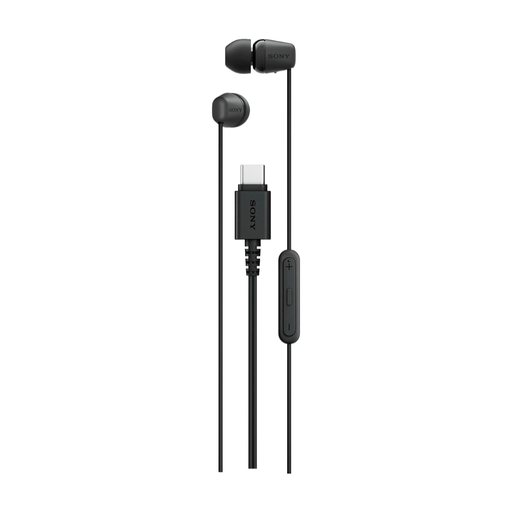 No image available
Could suit you if you’re looking for a wired in-ear headset for a device with USB-C; check that the connection works as a microphone input with your dictation app.
The product description mentions a built-in microphone, an in-line remote and a lightweight design.
 No image available
Could suit a computer with a compatible USB or 3.5mm connection; check which plug supports microphone input.
The product description mentions an omnidirectional noise-cancelling microphone, soft ear cushions and an adjustable headband. Compatibility with PCs and laptops is listed.
Yes, you also need a dictation feature in your email programme or other software. The headset provides microphone input, but doesn’t convert speech into email text by itself. For Dictate in Outlook, Microsoft Support lists a working microphone and a reliable internet connection as requirements. Also check that the feature is available with your version and account.
First, check that the microphone isn’t muted and that the correct input device is selected. Microsoft Support also recommends checking the microphone level and, if necessary, trying a quieter location. Also check whether the app has permission to access the microphone.
Follow the care instructions for the exact model. Philips lists interchangeable magnetic ear and head cushions for the SpeechOne PSM6000; don’t assume other models offer the same feature.
According to the Dutch Government, when you buy as a consumer you’re entitled to a product that meets legal requirements. For distance purchases, you usually have 14 days to change your mind. This cooling-off period is separate from your rights if a product is faulty. Check the terms and exceptions that apply to your purchase.
The headset model itself doesn’t determine how the contents of your emails are processed. Microsoft states that Windows Voice Typing uses online speech recognition, while the Dutch Government points out that organisations must handle personal data carefully. For business or confidential emails, check your organisation’s rules and the dictation service’s terms.