Who is this relevant to?

Diary writers among colleagues

If you dictate with other people nearby, you want the software to pick up your voice clearly. An adjustable microphone boom can help you direct the mic; test the result with a sample dictation at your own desk. Microsoft Support, HP Nederland and Logitech describe features that are relevant to this choice.

Privacy-conscious diary writers

If you dictate personal text, consider the recording mode, microphone access and the speech feature you use. Microsoft Support explains the differences between dictation features, while the Dutch Data Protection Authority notes that identifiable audio recordings can be personal data.

Frequent dictation users in a flexible workspace

If you often change desks or dictate for long periods, weigh up freedom of movement, fit, charging and software compatibility. Philips Dictation describes different ways to wear SpeechOne and explains that its dock must be connected to the computer when recording.

What should you look for?

What to consider What should you check? Who is this important for?
Speech clarity with background voices Position the microphone near your mouth and test your diary app while someone speaks beside you. Microphone noise reduction does not guarantee accurate transcription. When I dictate at a shared desk, I want my own words to be recognised without having to keep correcting the text. Around 36% of consumers put speech clarity first.
Privacy and recording controls Check the mute control, microphone indicator and whether your chosen dictation feature works online. Type sensitive passages or dictate them out of earshot if you do not want colleagues to hear them. If I dictate personal diary entries, I want to know when the microphone is active and how the speech feature works. Around 29% of consumers put privacy and recording controls first.
Connection and dictation workflow Check that USB-A, USB-C or the required receiver is compatible with your computer, and make sure the right microphone is selected in the app. Microsoft Support describes online speech recognition for Voice typing; Voice access on Windows 11 is a separate feature. When I dictate on one computer, I want to plug in and use the right microphone straight away. Around 21% of consumers prioritise a straightforward connection and workflow.
Comfort and freedom of movement Check the fit, adjustability, cable or charging method for the exact model. According to the Philips SpeechOne manual, the dock must be connected to the computer when recording. For longer sessions or changing workspaces, I want to be able to move around and choose a comfortable fit. Around 14% of consumers put comfort and mobility first.

Common pitfalls

  • Confusing listening ANC with a microphone that only picks up your voice

    ANC for your ears and microphone noise reduction are different features. Neither guarantees that background speech will stay out of your dictation.

    Compare the microphone features separately and try a sample dictation while people are talking in the background.

    Removing unwanted text from a dictation takes extra time.

  • Assuming a wireless dictation headset records without its dock

    The Philips SpeechOne manual says the dock must be connected to the computer for recording or configuration. Connecting the headset directly to USB is only intended for charging.

    Before buying, check the exact PSM model, what is included in the box and whether it works with your dictation software.

  • Thinking a headset makes a spoken diary private

    A headset cannot stop someone at the same desk from hearing you directly. Identifiable audio recordings can be personal data, according to the Dutch Data Protection Authority.

    Dictate sensitive passages out of earshot or type them instead. Also check whether your speech feature processes audio online.

Brands to consider

Logitech

Logitech offers wired office headsets such as the H390, as well as wireless models such as Zone Wireless.

  • According to Logitech, the H390 has a positionable, noise-cancelling microphone and is available with either a USB-A or USB-C connection.
  • Logitech describes listening ANC and flip-to-mute for Zone Wireless. Listening ANC does not prove that colleagues will not hear your diary entries; check the connection on the H390 model you choose.

HP Poly

The Blackwire 5200 series comprises wired office headsets in several configurations.

  • HP Nederland lists a noise-cancelling microphone, mute control and PC connection via USB-C with a supplied USB-A adapter for the series.
  • The Blackwire 5210 is mono, while the 5220 is stereo. Check the exact model; claims about call performance do not prove how accurately your dictation software will work.

EPOS

The IMPACT series includes wired office headsets, including the IMPACT 860T ANC.

  • EPOS's technical data sheet lists an adjustable microphone boom with lift-to-mute for the IMPACT 800 series; ANC applies to ANC models.
  • Note the difference between the 860T and 860T ANC. Claims about productivity gains do not tell you how the headset performs for diary dictation.

Philips

SpeechOne is a specialist wireless dictation headset. The model and components you need affect how it connects.

  • Philips lists a dictation microphone, different ways to wear it and replaceable cushions.
  • According to the manual, the dock must be connected to the computer for recording or configuration; connecting the headset directly to USB is only intended for charging. Claims about transcription quality are the manufacturer's statements.

Joybuy products

These product options are wireless headphones and earbuds with a microphone, for anyone considering a wireless model. Before buying, check that the connection, microphone and controls suit your computer and dictation app.
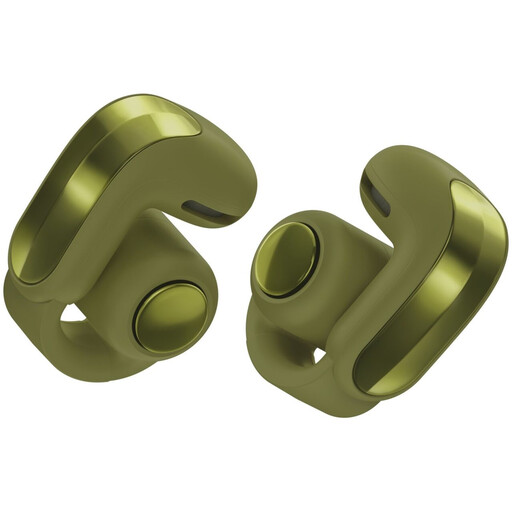
Bose Ultra Open Earbuds 2nd Gen in Olive Green

Bose Ultra Open Earbuds 2nd Gen – Olive Green

The wireless open-ear design may suit you if you are considering open-ear earbuds. Test whether your dictation app uses their microphone as its input; colleagues can still hear text you dictate aloud.

Joybuy
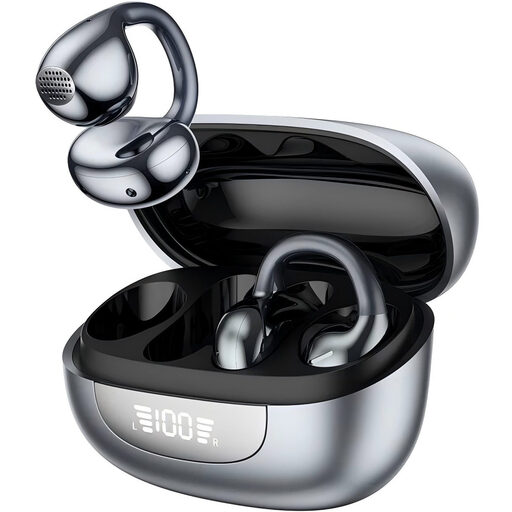
Open-ear headphones with Bluetooth 6.0

Open-ear headphones, Bluetooth 6.0

The product name describes this open-ear model as suitable for office and everyday use. Check that its microphone works as an input in your diary app and that the controls suit the way you dictate.

Joybuy

Sonos ACE over-ear Bluetooth headset in black

Sonos ACE over-ear Bluetooth headset, black

This wireless over-ear model may suit you if you are considering a Bluetooth headset. Check that your dictation app uses its microphone as an input, and remember that a headset cannot stop people nearby hearing what you say.

Joybuy

HyperX Cloud III S wireless gaming headset

HyperX Cloud III S Wireless

According to the product name, this wireless gaming headset has a detachable microphone. Before use, check that the headset and microphone work with your computer and dictation app; a mute function does not replace checking whether the app is still listening.

Joybuy
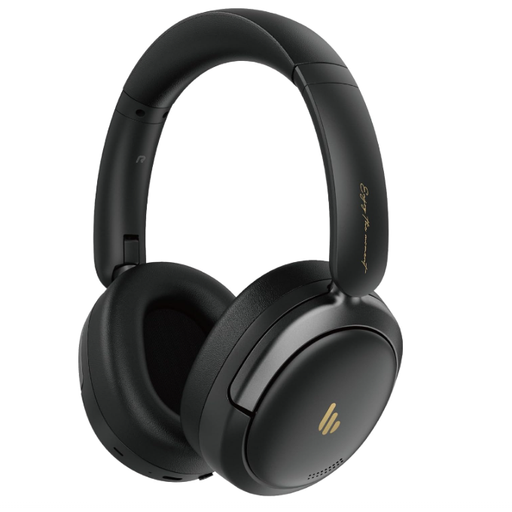
Edifier Atom Max foldable over-ear headset

Edifier Atom Max foldable over-ear headset

A foldable wireless over-ear model may be worth considering if you want to carry a headset between workspaces. Check that its microphone works with your dictation software and that it feels comfortable to wear.

Joybuy

Frequently asked questions

Will a headset automatically work with Windows Voice typing?

No. Microsoft Support says Voice typing requires a working microphone, an internet connection and a cursor in a text box; you can start it by pressing Windows key + H. Check that Windows has selected the headset microphone you want to use. Dutch (Netherlands) is on Microsoft's list of supported languages for this feature.

Can I dictate my diary in Windows without an internet connection?

You can use Voice access on Windows 11 version 22H2 and later, according to Microsoft Support. This is a different feature from Voice typing, which Microsoft says uses online speech recognition and requires an internet connection. Check your Windows version and language, and test it in your own diary app.

How do I stop a shared computer from continuing to record?

Stop dictating in the app you are using, mute the headset if needed, and check the microphone indicator and microphone access settings in Windows. Microsoft Support describes the microphone indicator in the system tray; a mute button on the headset alone does not tell you whether an app is still active.

What returns and warranty rights apply to online purchases in the Netherlands?

For distance purchases, you usually have a 14-day cooling-off period, according to the Dutch government; check the terms of the specific purchase. If a product is faulty, the seller must provide a solution under the statutory guarantee; this is not solely the manufacturer's responsibility.

Can I also record other people's voices at a shared desk?

There is no general yes or no without knowing what you are recording and what you intend to do with it. The Dutch Data Protection Authority says identifiable audio recordings can be personal data. The Authority describes an exception for strictly personal or household use in relation to images; this is not a general ruling on every audio recording. Limit unintended recordings and consider the applicable privacy rules separately if you share recordings or make them for an organisation.
