What should you look for when choosing?
First, check whether the microphone captures your voice clearly against the sounds in your home. Then choose between a fixed wired connection and freedom to move, and consider ear isolation as a separate requirement.
| What to consider |
What should you check? |
Who is it for? |
| Clear speech amid background voices |
Position the microphone as instructed and dictate a test with the usual sounds in your home. Then check the text in your own dictation software. |
If I write while other people at home or appliances are audible, I want to know whether my voice is recognised clearly in my own space. Around 42% of consumers give clear speech top priority. |
| Connection and set-up |
Compare the connection on the exact version with your computer, then select the headset as the input device. The Logitech H390 version reviewed lists USB-A; the Poly Blackwire 3325 Stereo version examined lists USB-C, a USB-A adapter and 3.5 mm. |
If you want to get started without connection or input problems, check that you have the right port and settings. Around 25% of consumers prioritise connection and ease of use. |
| Concentration while writing |
Decide whether you want to hear less background noise, and check this separately from the microphone function. Jabra describes the Evolve2 40 SE as having passive isolation; EPOS distinguishes between ANC and non-ANC versions of the IMPACT 400. |
If household noise distracts me, I want to hear less without assuming this also determines what the microphone records. Around 17% of consumers prioritise concentration above all else. |
| Freedom to move |
For a wireless version, check the adapter and connection to your computer, and remember that it needs charging. A wired version avoids battery management, but keeps you tethered to a cable. |
If I want to get up or walk around while I’m thinking things through, a wireless connection is more appealing; I still want to know whether the battery and pairing suit my routine. Around 16% of consumers consider freedom to move their top priority. |
Joybuy products
This selection of Joybuy products includes wired headsets and a wireless over-ear headphone for situations where a microphone input or fewer distractions may be useful. Test the recording with your own dictation software: product names and microphone specifications alone don’t show how accurately your letter will be transcribed.
 No image available
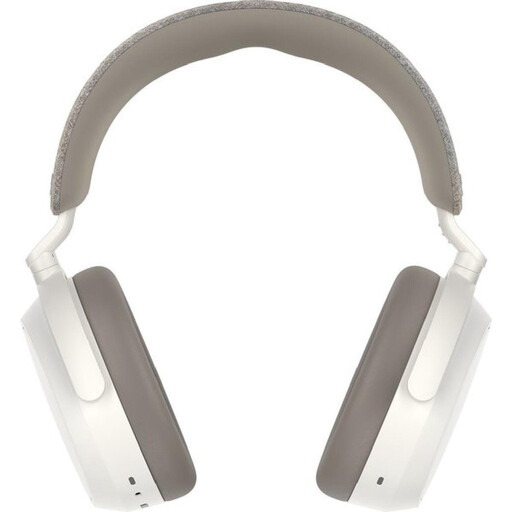
Sennheiser MOMENTUM 4 Wireless, white
Could suit you if you’re looking for wireless over-ear headphones; dictate a test to check how the microphone works with your dictation software.
The product name lists four microphones, noise cancelling, a 60-hour battery and a 3.5 mm cable. These details don’t prove accurate transcription.
View at Joybuy
 No image available
Logitech USB Headset H540, wired
Suitable for a dedicated computer space if you’re looking for a wired headset; check the input setting and dictate a test.
The product name lists a wired USB headset. The cable limits your freedom to move compared with a wireless headset.
View at Joybuy
 No image available
Logitech PC 960 USB, wired
Could be a good option if you’re looking for a USB headset for a dedicated computer space; test the microphone with your own dictation software.
The product name lists a wired USB headset. The cable makes this version less suitable if you want to walk around while thinking things through.
View at Joybuy
 No image available
Logitech H650e Stereo, wired
Suitable for a dedicated workspace if you’re looking for a wired stereo headset; dictate a test before relying on it for a letter.
The product name lists a wired stereo headset. The cable limits your freedom to move compared with a wireless version.
View at Joybuy
 No image available
Logitech H340 USB, black and wired
Could suit you if you’re looking for a USB headset for your computer; check the recording with a short test in your usual surroundings.
The product name lists a wired USB headset. The cable limits your freedom to move compared with a wireless headset.
View at Joybuy
Frequently asked questions
Do you need dictation software as well as a headset?
Yes. The headset provides the microphone input, and the software converts speech into text. For dictation in Microsoft 365 Word, Microsoft Support says you need an enabled microphone, to be signed in and to have a reliable internet connection. Check that the feature works on the device you want to use.
What should you check if words are missing from the dictation?
First, check that the headset is selected as the input microphone and that the input volume is set appropriately. Apple Support recommends a headset microphone when there is noise or echo, and advises reducing background noise as much as possible. Then try a short text in the room where you write your letter.
Is a noise-cancelling microphone the same as ANC?
No. A noise-cancelling microphone and passive ear isolation or ANC are different features: ear isolation and ANC reduce the noise you hear, while the microphone relates to voice recording. EPOS distinguishes between ANC and non-ANC versions of the IMPACT 400; check the exact version.
Is dictation on a Mac always transcribed on the device?
Not necessarily. Apple Support says you can check under ‘Keyboard’ whether voice input and transcripts for general text dictation are processed on the device; features can vary by language and region. Check this setting and the application’s privacy terms before dictating a sensitive letter.
What are your rights in the Netherlands if a headset doesn’t work properly or you don’t like it after buying it online?
With normal use, the product must meet what you could reasonably expect; ACM ConsuWijzer says the seller is responsible for providing a solution if a product is faulty. For an online purchase, you generally have a statutory cooling-off period of up to 14 days after delivery, although exceptions may apply, including to certain unsealed hygiene products. Don’t assume without checking that an opened headset can always—or can never—be returned.


