If you dictate at your computer from time to time, a wired USB headset with an adjustable boom mic is a practical place to start. If you dictate frequently or want to move around, compare a wireless dictation headset too. Whichever you choose, check the connection, whether it works with your software and whether the microphone stays close to your mouth. Noise cancellation for calls alone doesn’t show how accurately speech recognition will transcribe your letter.
Who is this relevant for?
Occasional home dictation user
If you want to dictate a letter on your computer from time to time, look for a straightforward connection and a microphone you can position towards your mouth. Nuance recommends positioning the microphone close to your mouth for speech recognition.
Dictating in a noisy room
If keyboard noise or other voices are distracting, consider the microphone’s direction and the sound insulation around your ears separately. The latter doesn’t automatically tell you what the microphone picks up.
Frequent dictation user
For longer documents, comfort, controls and freedom of movement may matter more. Philips positions the SpeechOne PSM6000 for frequent dictation and speech recognition.
What should you look for when choosing?
Wired computer headset
A good fit if: you usually sit at your desk and want a straightforward connection. Check that the plug fits your computer.
Bear in mind: the cable limits how far you can move.
Headset for a busier workspace
A good fit if: noise in the room distracts you or affects your dictation. Consider microphone direction and sound insulation around your ears separately.
Bear in mind: claims about call quality aren’t comparable measurements of dictation accuracy.
Wireless dictation headset
A good fit if: you dictate frequently, want freedom to move around and value controls on the headset.
Bear in mind: check the exact version, the connection included and how it works with your software.
| What to consider |
What should you check? |
Who does this matter most to? |
| Speech clarity |
Check whether the microphone boom is adjustable, and try dictating a short passage before recording a longer letter. |
When I dictate text, I want to be able to position the microphone properly towards my mouth. Around 36% of consumers prioritise speech clarity for speech recognition. |
| Connection and controls |
Check whether it’s the USB-A or USB-C version, and make sure the microphone is enabled both on the headset and in your dictation software. |
If I want to get started straight away, the connection and controls need to be clear for my computer. Around 27% of consumers prioritise a simple connection and easy-to-use controls. |
| Noise in the room |
Pay attention to the microphone’s direction and make a test recording with the sounds you’d normally hear in your home studio. |
If there are voices or other sounds in my room, I want to know what the microphone picks up. Around 18% of consumers put background noise at the top of their list. |
| Comfort and freedom of movement |
Check the wearing style and what’s included in the box. For wireless use, also compare the connection required and charging options. |
For longer sessions, or if I want to move away from my desk, fit and freedom of movement matter. Around 19% of consumers prioritise comfort or freedom of movement. |
Common mistakes
-
Confusing noise cancellation for calls with dictation accuracy
A manufacturer’s claims about calls don’t show how well dictation software recognises your voice. That can depend on where you position the microphone and the conditions in your room.
Try dictating in your own space and check the text that’s recognised, not just what you can hear through the ear cushions.
Allow time to correct recognition errors in your letter.
-
Assuming every version of a headset is the same
A model range may include different connections and mono or stereo versions. The wrong connection or wearing style may not suit your computer or preferences.
Before buying, check the full variant name, plug and wearing style.
-
Confusing a muted microphone with a microphone enabled in your software
Dragon’s documentation says the microphone must be enabled in the dictation software for you to dictate; the mute control on the headset doesn’t do this automatically.
Check both the mute setting on the headset and the microphone status and input setting in your programme.
Brands to compare
Logitech
The H390 is a general-purpose USB computer headset for anyone who wants to dictate at a computer. Check which USB version suits your computer.
- Logitech lists an adjustable microphone boom and in-line controls.
- The listed features don’t show how accurately it recognises dictated letters.
Philips
Philips positions the SpeechOne PSM6000 for users who frequently dictate documents or use speech recognition.
- The manufacturer lists wireless transmission, different wearing styles and recording controls.
- Check the version and how it works with your software; claims about recognition aren’t an independent comparison for your home studio.
EPOS
According to EPOS, the wired IMPACT 100 series has mono and stereo versions for computer communications.
- EPOS lists a unidirectional microphone, USB-C with a USB-A adapter and control buttons.
- These features don’t prove dictation accuracy; check the connection and exact version.
Jabra
The Evolve2 40 SE is a work headset for anyone who also considers calls and passive sound insulation alongside dictation.
- Jabra describes ear cushions that passively reduce background noise and three microphones for calls.
- This doesn’t prove better recognition accuracy when dictating letters. Also check the exact SE version.
Headsets at Joybuy
These Joybuy picks have a microphone for use with a computer. Check the connection, wearing style and compatibility with your dictation software for each model.
 No image available
Trust GXT 498W Forta gaming headset, white
Could suit you if you’re looking for a wired headset with a flexible microphone for a PC; check that your device has a compatible 3.5mm connection.
Wired via 3.5 mm; the description lists a detachable, flexible microphone and volume and mute controls on the earcup. 50mm drivers are mentioned in the product name.
Joybuy
 No image available
HyperX Cloud III S wireless gaming headset
Could suit you if you’re looking for a wireless headset with a microphone for a PC; check which wireless connection and settings your dictation software uses.
The product name lists a detachable 10 mm boom microphone and PC compatibility. The description lists wireless modes and microphone muting.
Joybuy
 No image available
Trust Ayda wired headset, USB-A
Could suit you if you’re looking for a wired computer headset and the connection matches your device.
The product information lists USB-A with a USB-C adapter cable, an adjustable headband and a microphone with flip-to-mute control. The manufacturer’s description calls it a noise-cancelling microphone for speech; this isn’t a proven dictation test.
Joybuy
 No image available
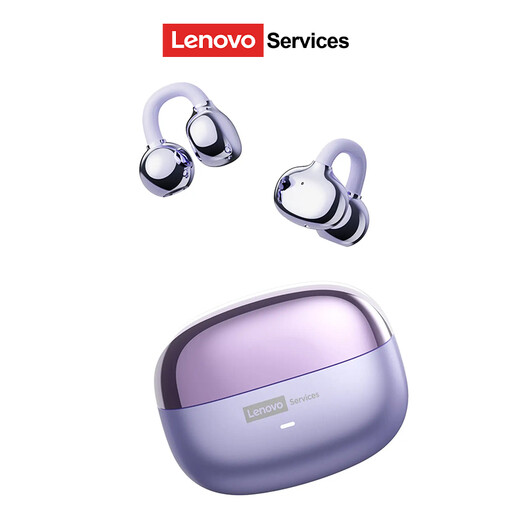
Lenovo LE302 wireless ear-clip headset
Could suit you if you’re looking for a wireless headset with an open-ear design; check that the connection works with your computer and dictation software.
The product information lists an ear-clip design, wireless connectivity and use for office work and calls.
Joybuy
 No image available
Siukie L200 wired gaming headset, USB and 3.5 mm
Could suit you if you’re looking for a wired headset with a microphone; check which of the listed connections is compatible with your computer.
The product name lists USB and 3.5mm plugs and 50mm drivers. The product description lists an omnidirectional microphone, adjustable headband and soft ear cushions.
Joybuy
Frequently asked questions
How do I start dictating once my headset is connected?
Select the headset as your microphone input, position the microphone towards your mouth and check that it’s enabled in your dictation software. Dragon’s documentation says this software setting needs to be enabled separately.
Should I choose a noise-cancelling headset for dictation?
Don’t choose one based on that claim alone: noise cancellation for calls doesn’t prove recognition accuracy for your letter. Check the microphone’s direction and try dictating in the room where you plan to use the headset.
Should I buy extra cover for a headset in the Netherlands?
Not automatically. According to the Dutch government, you have a legal guarantee when you buy a product, and there’s no fixed statutory guarantee period in the Netherlands. If you’re considering extra cover, compare what additional protection it offers.
Is CE marking compulsory for every headset?
You can’t determine that for every headset from the product name alone. According to the Dutch government, CE marking is compulsory for designated product groups; check the information for the exact version.


