For dictating at a fixed computer, a wired headset is a straightforward choice. If you want to move around while dictating or need recording controls, a specialist wireless dictation headset may be a better fit. Check the connection, software and any docking requirements first. A noise-cancelling claim on its own does not prove that a headset will transcribe reports more accurately.
Who is this relevant to?
People dictating at a fixed workstation
If you dictate reports at one computer, you’ll want to keep the microphone close to your mouth and get started without a complicated setup. Nuance highlights the importance of microphone position for speech recognition.
Professionals who dictate frequently
If you dictate regularly, you may need the freedom to move around or controls on the headset or docking station. Philips describes a SpeechOne workflow using a connected docking station and dictation software.
People using shared workspaces
If you move between workspaces or share equipment, it’s worth considering the connections, fit and any replaceable contact parts. These features vary by model and version.
What should you look for when choosing?
Start with the microphone position and how it connects to your computer. Then consider whether the fit and controls suit how often and where you dictate.
| What to consider |
What to look for |
Who is this most important for? |
| Clear recordings |
Check whether the microphone boom is adjustable and test the recording at your own workstation, with the ventilation and background noise you get there. |
If I dictate in a small booth, I want my voice to remain clear despite background noise. Around 33% of consumers prioritise clear voice recordings. |
| Connection and workflow |
Compare the USB-A, USB-C or 3.5mm version with your computer, and check that the required software and, for SpeechOne, the docking station fit your workflow. |
I want to know in advance whether the headset works with my computer and dictation software. Around 27% of consumers put compatibility at the top of their list. |
| Comfort |
Check whether the version is mono or stereo and whether the fit is suitable for longer sessions. If it will be shared, check whether the cushions can be replaced. |
For longer or shared dictation sessions, I want a fit that feels comfortable. Around 20% of consumers prioritise fit and comfort. |
| Simple setup |
Check which components are included, whether separate dictation software is required and how the controls work while you dictate. |
For occasional reports, I want to keep my setup simple and avoid unnecessary steps. Around 20% of consumers make simplicity their main consideration. |
Common buying mistakes
-
Assuming noise cancellation guarantees an error-free transcript
A feature description doesn’t tell you how accurately speech will be recognised in your booth. Ventilation, your voice and the software can all affect the result.
Before you make a decision, record a test dictation using the headset and software you actually plan to use.
If the recording doesn’t meet expectations in practice, you may need to spend extra time correcting the report.
-
Choosing based only on the brand or product line
A product line may include mono, stereo, USB-A or USB-C versions. The line name alone doesn’t always tell you whether the connection and fit are right for your workspace.
Check the full model number and connection against your computer before ordering.
-
Overlooking the recording workflow for a wireless dictation headset
According to the Philips manual, the SpeechOne’s direct USB connection is for charging. To record, the docking station must be connected to the computer, and you’ll need dictation software.
Check in advance which components you need and whether the workflow suits your existing software.
Brands to consider
Philips
The SpeechOne PSM6000 is a specialist wireless headset range for dictation and speech recognition.
- Philips lists a rotatable microphone boom, different wearing styles and replaceable cushions.
- According to the Philips manual, the docking station must be connected to the computer to record, and dictation software is required. Philips’ claim about clear transcripts is not an independent comparison.
Jabra
The Evolve2 40 SE is a wired office headset range with separate mono, stereo and USB versions.
- Jabra’s product specifications distinguish between the versions and include details such as wearing weight and a two-year warranty.
- Check the full model number: the specifications don’t provide measured dictation accuracy.
Poly
The Poly Blackwire 5220 version 8X231AA is a wired stereo office headset.
- HP Poly lists USB-C, a USB-C/A adapter and a 3.5mm connection for this version. The product specifications also mention a noise-cancelling microphone and a mute control.
- These connections apply to this specific version; meeting certifications don’t prove better report transcription.
Logitech
The H390 is a wired computer headset with a microphone boom and in-line controls.
- Logitech describes in-line mute and volume controls, and lists a noise-cancelling microphone for calls.
- The H390 is available in different platform versions. Claims about calls aren’t a dictation test, so check the connection and test the recording yourself.
Headsets at Joybuy
This Joybuy selection includes headsets with microphones for voice use, including wired and wireless gaming models. Before using one to dictate reports, check that its connection and recording workflow are right for your computer.
 No image available
Skullcandy Slyr Pro Multi-Platform Gaming Headset, Black Digi-Hype - Black/Red
This wired over-ear gaming model may suit you if you’re looking for a headset with a microphone for voice use. Test the recording in your booth and check that the connection works with your computer.
View at Joybuy
 No image available
HyperX Cloud III S Wireless Gaming Headset, Black
This wireless gaming model may suit you if freedom of movement is important. Check that the wireless connection works with your computer, then make a test recording using your own dictation software.
View at Joybuy
 No image available
Kingston USB Hi-Fi Headphones with Microphone
This USB model may suit a fixed computer setup. Check that the USB connection is compatible and test the microphone with the software you use for reports.
View at Joybuy
 No image available
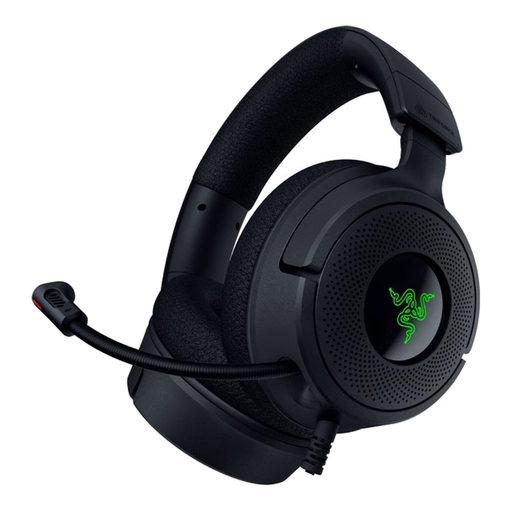
Razer Kraken V4 X Wired Gaming Headset
This wired gaming model may suit you if you’d rather not use a wireless connection. Check that it connects to your computer, then assess the microphone with a test dictation in your own booth.
View at Joybuy
 No image available
Razer BlackShark V2 X 7.1 Wired Gaming Headset, Black
This wired gaming model may suit you if you’re looking for a headset with a microphone for voice use. Check that the connection is compatible with your computer, then make a test recording with your own software.
View at Joybuy
Frequently asked questions
Where should I position the microphone boom when dictating?
Point the microphone towards your mouth and make a test dictation at your own workstation. Nuance says positioning it near your mouth is important for speech recognition; the Philips manual also advises pointing the microphone towards your mouth.
Can I use a Philips SpeechOne with just a USB cable to record?
No. According to the Philips manual, the headset’s direct USB connection is for charging. To record, the docking station must be connected to the computer, and you’ll need dictation software.
What ongoing costs or service terms should I check?
Check whether your recording workflow requires separate software and which components are included. Jabra lists a two-year warranty for the Evolve2 40 SE; this applies to that product line and says nothing about other headsets or software costs.
Can I process a report containing personal data using an online transcription service without taking any extra steps?
Not without assessing how the data will be processed. The Dutch Data Protection Authority says that processing personal data requires an appropriate legal basis and suitable security. If an organisation uses a cloud service, it must also assess the responsibilities of the parties involved. This is relevant when the report contains personal data.


