
Meeting leader using the room’s sound system
You want to move around while people at the back of the classroom hear you through the existing speakers. So first check that the receiver can connect to the PA system.


First, decide where your voice needs to be heard: by people in the room through the PA system, by online attendees through the computer, or by both. Then choose a system with a suitable receiver and connection. If you’re going wireless, also check the frequency variant, power supply and channels available at your venue. A headset microphone or USB receiver won’t amplify your voice in the classroom by itself.
You want to move around while people at the back of the classroom hear you through the existing speakers. So first check that the receiver can connect to the PA system.
You’re speaking to people in the room as well as online attendees. Check how the microphone signal reaches the computer and how sound in the room is played through the speakers separately.
Two people regularly need to use their own headsets, either at the same time or taking turns. Check whether the system can handle two signals and whether a two-channel system suits your setup.
Best suited to: moving around while people in the room hear you through an amplifier or active speaker.
Bear in mind: you’ll need a compatible audio input, a power supply for the receiver and a frequency that can be used at your venue.
Best suited to: using the computer as the microphone input for online attendees while moving away from your laptop.
Bear in mind: USB doesn’t automatically connect you to the room’s speakers; check both audio routes.
Best suited to: two meeting leaders each needing their own microphone during the same meeting.
Bear in mind: two transmitters need more connections, power and channel management. You won’t need a second channel if one microphone is enough.
| What to consider | What should you check? | Who is this important for? |
|---|---|---|
| Sound through the speakers | Check that the receiver’s output is compatible with an input on your existing PA system and that you have the cable you need. | If I’m speaking to the club through the existing speakers, I want to know first whether the receiver will connect to them. Around 36% of consumers give audibility through the PA system top priority. |
| Moving around freely | Look for a portable transmitter and battery power, and check the frequency variant. The stated range under ideal conditions doesn’t guarantee it will work in this room. | If I want to move around while leading the meeting, the microphone needs to move with me and the sound needs to keep working. Around 29% of consumers prioritise freedom of movement. |
| Online attendees | Check how it connects to the computer and how people in the room will hear the sound as well. | If online attendees need to hear me, I want to test the microphone with the computer and meeting setup first. Around 14% of consumers give this online audio connection top priority. |
| Two speakers | Check whether you really need two microphones and whether the PA system can receive two signals. | If two meeting leaders each need their own headset, I want to know whether the system can handle both signals. Around 21% of consumers prioritise having two usable microphones and managing them. |
A receiver provides an audio signal, but it doesn’t amplify it for the group by itself. Unless it’s connected to a suitable amplifier or active speaker, people won’t automatically hear you through the PA system.
Before you buy, check the input on your existing speaker or PA system and compare it with the receiver’s output.
The frequency band can vary between variants, and the frequencies available may differ from one location in the Netherlands to another.
Make a note of the full model variant and check which frequencies are available at your venue with the Dutch Authority for Digital Infrastructure (RDI).
A computer connection doesn’t automatically provide a working connection to the speakers for people in the room.
Before the meeting, test separately whether someone at the back of the room and an online attendee can hear the sound.
A system with two transmitters and headsets requires more components to connect and power with batteries.
First decide how many people will need their own microphone during the same meeting.
The U308 BPH is a wireless headset set for one speaker; the U308 BPH 2 is the two-channel version for two headsets and bodypacks.
The XSW 1-ME3-E comprises a headset, bodypack and stationary receiver for connecting to a PA system.
The XPD2 Headset is designed to use a computer as its audio input; the separate XPD2m Presentation is a different system for two speakers.
According to Shure Netherlands, the BLX14/PGA31 comprises a PGA31 headset, BLX1 bodypack and BLX4 receiver for voice amplification.
This selection includes headsets for computer and online calls, including wired models. It also features a voice amplifier with a lavalier microphone, which isn’t a headset. If you want sound through the speakers in the room, always check that your chosen setup can connect to them.
 No image available
An option if you’re looking for a wireless headset with a microphone for computer or online calls.
The product description lists Bluetooth, a USB-A Bluetooth adapter and a stated range of up to 30 m.
 No image available
An option for computer and online calls if a wireless headset with a microphone system suits the way you work.
The product description lists eight microphones, beamforming, Bluetooth and connection to two devices.
 No image available
A wired option if you don’t need to move far from your computer while speaking.
The product information lists a 0.95 m cable, a 3.5 mm connection and a LINK controller for USB.
 No image available
An option for online meetings if a wired headset suits your computer setup.
The product information lists USB-A and USB-C, a 180 cm cable, volume control and a flip-up mute microphone. The cable length limits how far you can move from the connection.
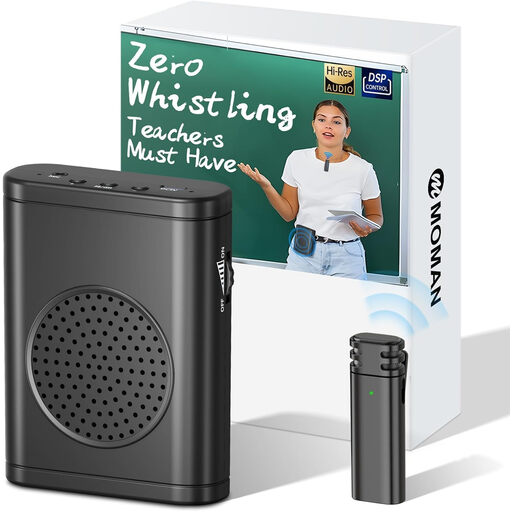 No image available
This set may be worth considering if voice amplification in the room is your priority, but the included microphone is a lavalier, not a headset.
The product description lists an output power of 30 W.
If people in the room need to hear your amplified voice, the receiver must be connected to an amplifier or active speaker. Check that it’s compatible with the input on your existing system; the Shure BLX manual explains how to connect the receiver to a mixer or amplifier.
Follow the instructions for your specific model and test the complete setup beforehand. The Shure BLX manual covers connecting the receiver to the power supply and PA system, inserting the batteries, and synchronising the transmitter and receiver.
No, this doesn’t apply to every frequency variant. According to the Dutch Authority for Digital Infrastructure, some bands require a licence and available frequencies vary by location. Check the exact band and location against the latest RDI information before using the transmitter.
Check whether you need a suitable cable for your receiver and PA system, and remember that the transmitter may need batteries. According to ACM ConsuWijzer, online consumer purchases generally come with a cooling-off period of up to 14 days after delivery, subject to exceptions. In the Netherlands, the statutory guarantee doesn’t have a fixed duration: it depends on how long you can reasonably expect the product to last, and the seller is responsible.