What should you look for when buying?
Start with microphone position and connectivity. Then consider the fit and how the dictation tool handles personal content.
| What to consider |
What should you check? |
Who is this important for? |
| Your voice amid classroom noise |
Position the microphone close to your mouth and test a short piece of text from the seat you intend to use. |
If I’m speaking in a noisy classroom, I want my voice to remain clearly recognisable. Around 33% of consumers put intelligibility first. |
| Connection and dictation tool |
Check whether USB-A or USB-C matches the device port. If you use Chromebook dictation, check the language setting too. |
Those who first want to know whether the headset and dictation tool work with the school device prioritise compatibility. Around 27% of consumers have this as their primary concern. |
| Fit and controls |
Check whether the headband is adjustable and whether the microphone or mute control is within reach on the exact version. |
If a pupil will wear the headset and use its controls while writing, a good fit and easy muting are important. Around 20% of consumers put these first. |
| Personal diary content |
Assess how the dictation tool processes data separately from the headset, including how pupils’ data is handled. |
If the school processes personal diary content through a dictation tool, I want to know how that data is handled. Around 20% of consumers put this concern first. |
Google Chromebook Help states that Chromebook voice typing won’t work if the spoken language doesn’t match the device language. The Dutch Data Protection Authority explains that a school needs a lawful basis when processing pupils’ data and must inform pupils and parents.
Headsets at Joybuy
This Joybuy selection includes wired headsets with microphones. Check the connection and controls for each model before choosing one for a school device.
 No image available
Turtle Beach Recon 70, Green Camo, wired, 3.5 mm
An option for dictating from a fixed position, provided the device has a compatible 3.5 mm connection.
The microphone boom can be positioned near your mouth and flipped up to mute. The product name lists PC, PS5, Switch 2 and Xbox Series X|S; check the ports on the school device. For devices with separate audio and microphone ports, the product information says an extension cable is included.
View at Joybuy
 No image available
Jabra Evolve2 30 SE
An option if you’re looking for a USB headset and it has a compatible connection for the school device.
The product information lists two microphones, USB-A with a USB-C adapter and an adjustable headband. Check which connection the device you’re using requires.
View at Joybuy
 No image available
Kingston USB Hi-Fi headphones with microphone
A USB option if you want to take the stated cable length and output level into account; these figures don’t determine dictation accuracy.
The product information lists an adjustable headband, a 1.8 m USB cable and a maximum output of 94 dB. Windows, Mac and Chromebook are listed as compatible devices. Check that a suitable USB port is available.
View at Joybuy
 No image available
Trust Ayda, wired headset, USB-A, black
An option if you’re looking for a wired microphone with mute and volume controls on the headset.
The product information lists a noise-cancelling microphone that flips up to mute, an adjustable headband and volume control on the ear cup. It connects via USB-A and comes with a USB-C adapter cable; check what the device requires.
View at Joybuy
 No image available
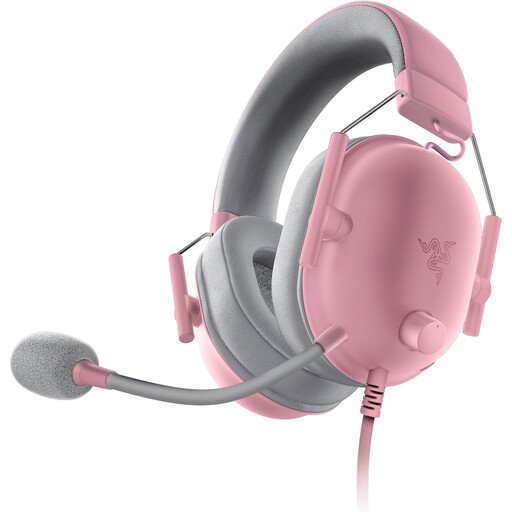
Razer BlackShark V2 X Quartz
An option if the device has a compatible 3.5 mm connection and you want to be able to mute the microphone with a button.
The product information lists a cardioid microphone, a mute button on the ear cup and memory foam ear cushions. Check that the 3.5 mm connection is compatible with the device.
View at Joybuy
Frequently asked questions
Will any headset work straight away with dictation on a Chromebook?
No. First check that the connection is compatible, then test the microphone with the dictation tool you’ll be using. Google Chromebook Help states that voice typing won’t work if the spoken language doesn’t match the device language.
How should you position and use the microphone while speaking?
Adjust the headband and, if the microphone is adjustable, keep it close to your mouth while speaking. Jabra gives this as a usage tip for the Evolve2 30. Then try a short piece of text and check the transcript.
Does a school have to ask parents for consent for every spoken diary?
There’s no general answer without knowing what personal data is involved, the purpose and which dictation tool is being used. According to the Dutch Data Protection Authority, a school needs a lawful basis under the GDPR to process pupils’ data. Consent is one possible lawful basis, but it isn’t automatically the only one. The school must also inform pupils and parents.
What if a headset bought as a consumer product in the Netherlands develops a fault?
If a product is faulty, the seller must provide a solution. The Dutch government states that the Netherlands has no fixed statutory warranty period of two years. Check any manufacturer’s warranty and its terms separately.


