Choose a headset microphone with a boom arm you can position beside your mouth, and check that its connections work with your recording equipment. A complete headset lets you record and monitor through the same device, while a standalone headworn microphone may need a separate listening solution and a compatible input or transmitter. Shure recommends positioning the microphone beside your mouth to reduce plosive sounds. Make a test recording with your own voice and set-up, too.
Who is this relevant to?
Voice actor who needs a consistent microphone position
You record several takes and want the capsule to stay in a consistent position beside your mouth when you move your head. An adjustable boom arm and a test recording can help you assess the position. Shure recommends placing the microphone beside your mouth to reduce plosive sounds.
Home recorder working around background noise
You want to account for unwanted noise and make a considered choice between a directional broadcast microphone, a gaming headset or a standalone omnidirectional headworn microphone. The polar pattern alone won’t tell you how the recording will sound in your room.
PC user who wants to use voice filters
You want to edit your recording on a PC, so you check both the connection and whether the filters you want are available. Logitech says the wired G PRO X’s advanced Blue VO!CE features are available on PC only, via G HUB.
What should you look for?
| What to consider |
What should you check? |
Who is it important for? |
| Microphone position |
Check whether the boom arm is adjustable. Record a sentence with p and b sounds while positioning the capsule beside your mouth. |
If I’m recording several takes, I want to keep the microphone in the same place as I move and assess plosive sounds. Around 36% of shoppers put microphone position first. |
| Background noise and raw audio |
Check the polar pattern of the exact model and listen to an unprocessed test recording in the set-up you plan to use. |
When there’s background noise, I want to hear how my voice and the unwanted sounds come across together before I start. Around 29% of shoppers say this is their top priority. |
| Connections and features |
Check the connections on the exact model, the inputs on your recorder or PC, and any system requirements for software filters. |
If I want to use my recording equipment or PC filters, the whole recording chain needs to work together. Around 21% of shoppers start by checking connections or PC processing. |
| Comfort and monitoring |
Check whether headphones are included and whether the fit and ear cushions feel comfortable to you. |
For longer takes, I want to monitor my recording without compromising on comfort. Around 14% of shoppers put comfort and monitoring ahead of the other considerations. |
Common buying mistakes
-
Positioning the microphone directly in front of your mouth because closer is always better
A microphone placed directly in the airflow can pick up plosive sounds. Shure recommends positioning the SM35 beside your mouth, but the right adjustment depends on the microphone you’re using.
Look for a boom arm you can position beside your mouth, then test it with the loudest line you plan to record.
An unsuitable position could mean making extra test recordings or recording takes again.
-
Assuming a standalone headworn microphone is a complete headset
The RØDE HS2 is a standalone headworn microphone, not a pair of headphones. RØDE says it needs a microphone input with plug-in power or a compatible transmitter.
Before buying, decide how you’ll connect the microphone and how you’ll monitor your recording as you speak.
You may also need separate headphones and a compatible microphone input or transmitter.
-
Choosing voice filters without checking the system requirements
Logitech says the wired G PRO X’s advanced Blue VO!CE features are available on PC only, via G HUB.
Check that the processing you want works on the system you’ll actually be recording on.
-
Assuming the manufacturer’s warranty is the full statutory warranty in the Netherlands
The Dutch government says there’s no fixed statutory warranty period in the Netherlands; a manufacturer’s warranty is in addition to your statutory rights.
Check what any additional cover includes, and don’t rely solely on a stated manufacturer’s warranty.
Brands to consider as a reference
Audio-Technica
Audio-Technica says the BPHS1 combines a broadcast headset with a directional microphone for speech.
- Audio-Technica lists a rotatable microphone boom, a cardioid dynamic microphone, replaceable cable and ear cushions, plus separate XLR and 6.3 mm connections.
- Make sure both connections are compatible with your recording equipment. The described speech quality is a manufacturer claim, not an independent recording comparison.
Logitech G
Logitech G says the wired G PRO X combines a gaming headset with voice processing features for PC.
- Logitech lists an external USB sound card and Blue VO!CE filters.
- According to Logitech, the advanced features are available on PC only, via G HUB. That alone doesn’t tell you how an unprocessed character voice recording will sound.
HyperX
HyperX describes the wired Cloud III as a gaming headset with several connection options.
- HyperX lists a 10 mm microphone, a built-in mesh filter, a mute indicator, and 3.5 mm, USB-A and USB-C connections.
- The manufacturer describes the microphone primarily for voice chat and calls. Make a test recording before deciding how it sounds for a character voice.
beyerdynamic
beyerdynamic describes the wired MMX 300 PRO as a closed-back gaming headset with a cardioid condenser microphone.
- The manufacturer lists a cardioid microphone, velour ear cushions and replaceable parts.
- Claims about speech intelligibility and comfort aren’t the same as an independent recording test. Check the connection on the exact model.
RØDE
RØDE describes the HS2 as a standalone headworn microphone for anyone who already has a way to monitor their audio.
- RØDE lists an adjustable boom arm, an omnidirectional capsule and a 3.5 mm TRS output.
- According to RØDE, it requires a microphone input with plug-in power or a compatible transmitter. The HS2 doesn’t include headphones.
Joybuy products
These are complete gaming headsets with a microphone, for anyone who wants to monitor their recording through the same headset.
 No image available
Turtle Beach Stealth 600 Gen 3 Xbox, purple
Worth considering if you want to record wirelessly and combine your headphones and microphone.
The product name lists a flip-up microphone, wireless connection and compatibility with Xbox, PlayStation, PC, Steam Deck and mobile devices.
Joybuy
 No image available
Turtle Beach Recon 70 PlayStation, white
A good fit if you’re looking for a wired gaming headset that lets you record and monitor through one device.
The product name lists a 3.5 mm connection, a flip-up microphone and compatibility with PC, PS5, Switch 2 and Xbox Series X|S.
Joybuy
 No image available
Turtle Beach Airlite Fit, blue and red
A wired headset to consider if you want to listen through the same headset while recording.
The product name lists a 3.5 mm connection, a flip-up microphone and compatibility with Nintendo Switch, PC and mobile devices.
Joybuy
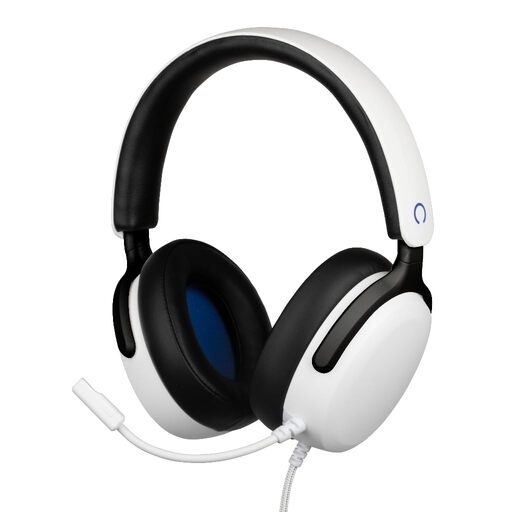 No image available
Konix Nexus over-ear gaming headset for PS5, white
An option if you’re looking for a wired headset with a flexible microphone that you can position close to your mouth.
The product name lists 40 mm drivers, a 3.5 mm connection and a 1.5 m cable.
Joybuy
 No image available
Razer Kraken V3 X, black
A gaming headset with a microphone to consider if you want one device for recording and monitoring.
Check that this model’s connection and microphone position work with your recording equipment and the speaking distance you want.
Joybuy
Frequently asked questions
Where should you position a microphone for close-up recording?
Position the capsule beside your mouth rather than directly in front of it, then make a test recording. Shure recommends this position for the SM35 to reduce plosive sounds. Adjust the microphone to suit your model and voice.
Can you connect the Audio-Technica BPHS1 directly to any laptop?
Not without checking the connections. Audio-Technica lists a 3-pin XLR plug for the microphone and a 6.3 mm plug for the headphones. Check that your laptop or recording equipment has compatible inputs.
How should you look after a headset after recording?
Follow the instructions for the model you’re using. For the SM35, Shure recommends letting perspiration dry completely before putting the microphone away. This isn’t automatically care advice for other headsets.
What rights apply when buying online from a business in the Netherlands?
According to the Dutch government, distance purchases usually come with a 14-day cooling-off period, although there are exceptions. You’re also entitled to a product that works as it should. The Dutch government says there’s no fixed statutory warranty period in the Netherlands. A manufacturer’s warranty doesn’t replace your statutory rights.


