
Vandaag of morgen in huis

Kwaliteit gegarandeerd

Welkomstaanbiedingen ontgrendelen: GRATIS bezorging | Tot 80% korting | Gratis 30 dagen JoyPlus-proefperiode
Download de app
A headset with a microphone may seem easy to choose, until you find yourself dealing with an unclear voice, a cable that is too short or ear cushions that become uncomfortable after an hour. For video calls, customer service, Microsoft Teams and working from home, sound quality and price are not the only important factors. The connection, fit and microphone design also determine whether a headset suits your working day.
The term noise cancelling may refer to the sound you hear, but it can also mean noise reduction for the microphone. These are different functions. A headset with active noise cancelling can reduce ambient noise for the wearer, while the microphone will not automatically filter out all background noise.
Therefore, check each aspect separately:
According to product descriptions from various brands, microphones can reduce background noise. Treat this information as a product claim made by the brand, and also check user experiences, settings and compatibility.
A wireless headset gives you freedom of movement, but it runs on a battery. The stated usage time may vary between listening to music, making calls, using noise cancelling and switching noise cancelling off. A model with long playback time may therefore offer a shorter talk time.
Pay attention to:
For a fixed workstation, a wired headset may be more practical. There is no need to charge it, and a USB or 3.5mm connection often works straight away.
Good music playback says little about the quality of your voice during a meeting. For customer service or a call centre, a flexible microphone boom is often more useful than a small built-in microphone. A mute function, volume control on the cable or a dedicated Teams button can also save time.
A USB headset processes sound digitally via the computer. This can be useful for laptops without a 3.5mm port. Do check whether the connection is USB-A or USB-C. Some models are supplied with an adapter or controller.
A Bluetooth headset is suitable for laptops, tablets and phones, but you must pair it with the device first. For Microsoft Teams, check whether the specific model is Teams-certified and whether functions such as answering, muting and ending calls are supported.
A 3.5mm connection is simple and widely compatible, but modern smartphones do not always have this port. USB-C earphones, such as an in-ear headset with a microphone, are a compact solution.
For long working days, weight, pressure on your ears and adjustability are more important than appearance alone. On-ear models rest on your ears and are often lighter. Over-ear models surround your ears, but may feel warmer. In-ear earphones are compact, but the fit varies considerably from person to person.
Look at:
A headset for the office does not need to be the same as one for commuting. A call-centre worker may benefit from a lightweight model with one earpiece, while a hybrid worker may prefer stereo sound and Bluetooth.
For video calls, the position of the microphone is at least as relevant as the speakers’ frequency range. A microphone boom positioned close to your mouth can pick up your voice more consistently. A flip-to-mute function or mute button means you do not have to search through software settings manually during a call.
Also check certification for your software. A model that, according to the product information, is certified for Microsoft Teams, Zoom or Skype for Business may offer specific control functions. However, operation may depend on the operating system, firmware and application being used.
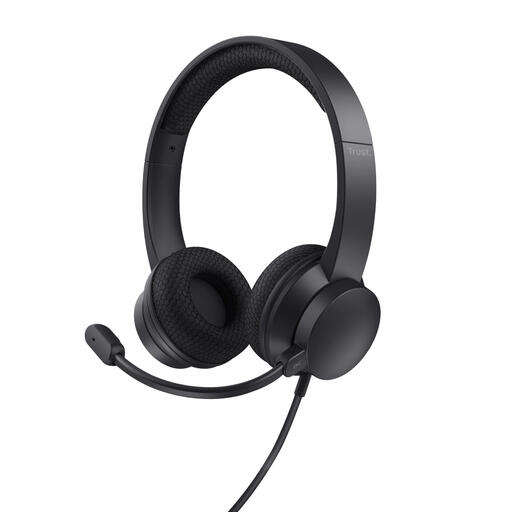
Why it suits this profile: This wired headset is designed for video calls and online meetings. The USB-A connection and supplied USB-C adapter offer flexibility when using laptops and PCs.
There is no Bluetooth connection or battery to manage. According to the product description, the microphone has noise cancelling and can be flipped up to mute it.
USB-A and USB-C, 1.8-metre cable, volume control and a weight of 141 grams.
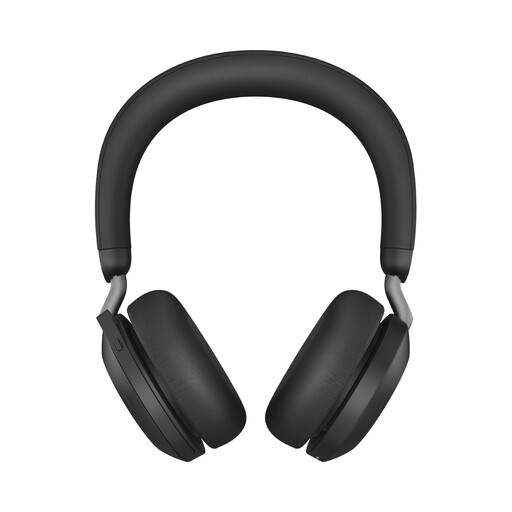
Why it suits this profile: This wireless model is designed for hybrid workers who switch between a laptop and phone and need flexibility throughout the working day.
The product information states that it offers adjustable active noise cancelling, Bluetooth and connection to two devices. However, check your preferred USB-A or Bluetooth configuration beforehand.
Bluetooth 5.2, range of up to 30 metres, up to 36 hours of audio without ANC and Microsoft Teams certification.
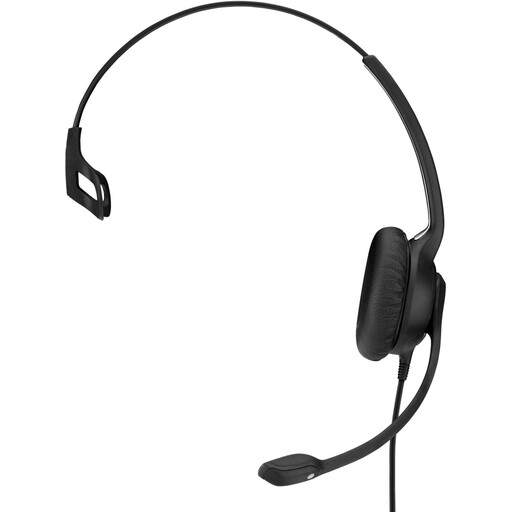
Why it suits this profile: This single-sided USB headset is designed for office and contact-centre use. You keep one ear free for colleagues or ambient sound.
The fixed USB connection eliminates battery concerns. The flexible microphone boom and stated noise-cancelling microphone are suited to frequent calls.
Weight of 58 grams, 2.9-metre cable, inline controls and extra ear cushions according to the product description.
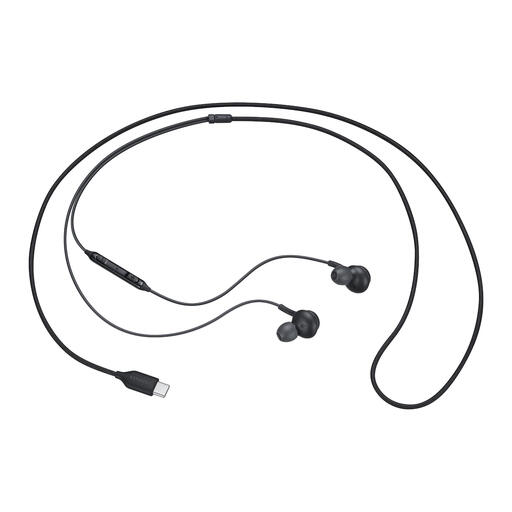
Why it suits this profile: These earphones with a microphone are lightweight and compact, and connect directly via USB-C to compatible smartphones, tablets and laptops.
The wired USB-C connection requires neither charging nor Bluetooth pairing. Check beforehand whether your device supports audio via USB-C.
In-ear design, built-in microphone, mute function and a weight of 18.35 grams.
We have put together a complete, up-to-date list of products that fully meet these strict selection criteria and the applicable European safety regulations.
Always check the ports on your laptop or phone, software compatibility and the returns and warranty terms before buying. Statutory guarantees in the European Union give consumers at least two years of legal protection for many electronic products; additional terms may vary by retailer and product.
Often, yes. Many USB models use plug-and-play, but in Windows, macOS or meeting software you may still need to select the correct input and output source manually. Also check whether your laptop has USB-A or USB-C.
Its lifespan depends on use, storage and maintenance. With wired models, the cable and plug are often the components subjected to the most strain. With a wireless headset, the battery also plays a role. Keep the headset dry, do not pull on the cable and use a case or designated place when you are not wearing it.
As well as the purchase price, a wireless headset uses electricity while charging. The cost is generally limited, but you do need to allow for charging, battery ageing and a replacement adapter if necessary. A wired headset does not require regular charging, which can make it practical for a fixed workstation.
