
Expressive home reviewer
Speaks softly at times and with emphasis at others, and wants to check the loudest passages before recording the full review. Audacity explains how to monitor the level while recording.


First, choose a headset that works with your recording device. Then, make a test recording to check that your loudest delivery doesn’t distort; Audacity recommends checking the recording level during your loudest passage. A USB headset can make connecting to a computer simpler, while a headset with separate audio connections may require a suitable interface or mixer. Connection details and manufacturer claims alone can’t tell you how natural your voice will sound, so listen to a test recording yourself.
Speaks softly at times and with emphasis at others, and wants to check the loudest passages before recording the full review. Audacity explains how to monitor the level while recording.
Uses gestures or moves while speaking, and wants to be able to position the microphone boom in relation to their mouth. Audio-Technica describes the BPHS1 as having an adjustable boom.
Wants to record directly onto a computer and needs to check that the connection suits the available port and microphone input. Logitech describes the H390 as a USB computer headset.
| What to consider | What should you check? | Who is this important for? |
|---|---|---|
| Recording at different speaking volumes | Record your loudest passage, check the recording meter and listen back. Audacity gives around −6 dB as a guide for the highest peaks. | If I speak both softly and emphatically, I want to hear whether the recording captures both well before I carry on. Around 36% of consumers prioritise recording at different speaking volumes. |
| Microphone position | Check whether the boom is adjustable, then make a test recording with the microphone where you would position it while speaking. | If I move around or use gestures, I want to position the microphone properly in relation to my mouth. Around 29% of consumers give microphone position top priority. |
| Connection to your recording setup | Check the exact headset version, the ports available and the connection route for the microphone and headphones. | If I want to record on my existing computer, I need to know whether the headset will connect to it and make sure I connect the signal route correctly. Around 21% of consumers give connectivity top priority. |
| Comfort and listening back | Consider the fit and ear cushions, and check that you can listen back through your chosen connection. | For a longer recording session, I want the headset to feel comfortable and to be able to review my recording. Around 14% of consumers give comfort and listening back top priority. |
Logitech describes the H390 as suitable for calls and meetings, among other uses. That product description isn’t a comparative test of expressive book reviews.
Make a test recording with both soft and emphatic passages, then listen back to see whether the sound suits your delivery.
The BPHS1, NTH-100M and H390 use different connection setups. Sennheiser states that the HMD 26 is supplied without a cable.
Before choosing, check the exact version, the cable supplied and the connections at both ends of the signal route.
According to Audacity, a signal set too high can clip, and that distortion can’t be undone afterwards.
Test your loudest passage and adjust the level before recording the full review.
The NTH-100M combines headphones with a detachable microphone, making it an option for speaking and listening back.
The BPHS1 is a broadcast headset with a positionable microphone, designed for a setup with separate audio connections.
The H390 is a USB computer headset for anyone looking for a straightforward connection to a computer.
The HMD 26, article number 700318, is a modular broadcast headset for use with compatible recording equipment.
This selection from Joybuy includes headsets with microphones for speaking and listening back. Check that the connection on each version is compatible with your recording device.
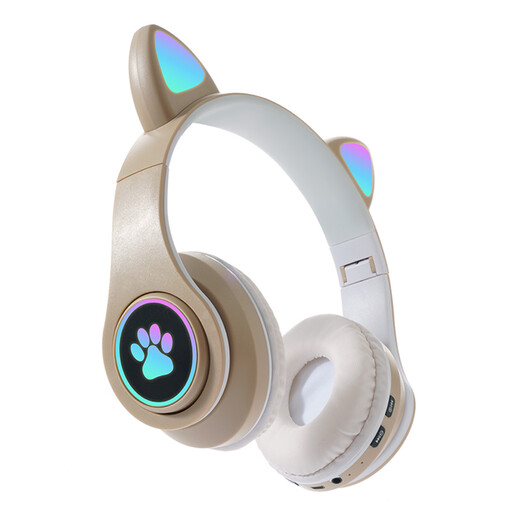 No image available
The product information lists a built-in microphone and listening through the headset.
The stated listening connections are Bluetooth and wired AUX.
The product name lists three modes and a foldable design.
 No image available
According to the product information, this wired USB headset is designed for PC and combines stereo audio with a microphone.
The description lists a cardioid microphone.
 No image available
The detachable microphone boom makes this headset an option if you want to be able to remove the microphone after recording.
The product name lists Bluetooth and 2.4GHz connections, along with USB-A and USB-C connections.
 No image available
According to the product information, this mono headset is designed for listening with one ear; bear that in mind when listening back to a review.
The product information lists Bluetooth and a USB-A Bluetooth adapter included in the box.
 No image available
The product information lists a wired headset with a microphone, for anyone looking for a headset with a cable.
It has a 3.5 mm connection. According to the description, if your PC has separate microphone and headphone ports, you’ll need the included splitter cable.
First, record your loudest passage and check the recording meter. Audacity gives around −6 dB as a guide for the highest peaks; then listen back to check that the recording sounds good.
No, it depends on the headset connection and your laptop’s ports. According to its manual, the RØDE NTH-100M requires the supplied TRRS cable; the Logitech H390 is a USB headset, while the Audio-Technica BPHS1 uses separate XLR and 6.3mm connections.
Listen back for distortion and unwanted noise, and check that the headset still feels comfortable. Follow your model’s manual when cleaning or removing the ear cushions; RØDE, for example, explains how to remove and clean the NTH-100M’s cushions.
For online consumer purchases, you generally have a 14-day cooling-off period from delivery, with some exceptions. ACM ConsuWijzer also explains that your statutory guarantee is separate from any manufacturer’s guarantee: if a product doesn’t do what you could reasonably expect under normal use, the seller is responsible for providing an appropriate solution.
A review doesn’t give you free rein to publish long passages or an entire book. Subject to certain conditions, the Dutch Copyright Act makes an exception for quotations in a review. Keep any quotation relevant and limited to what’s necessary, and credit the author and source. Permission may be needed for other public uses of copyright-protected material.