Choose a headset microphone that you can position by your mouth and that works with the input on your recording device. A wired USB headset is a practical option if your computer has a suitable port; an analogue headset may work if your device has the right combined socket. Make a short test recording first and play it back to check the microphone position and recording level.
Who is this guide for?
Speakers who want to check how clearly they speak
If you record your book review several times, you’ll want to play it back and check that your words, sentence stress and consonants come across clearly. Logitech and RØDE explain how to position the microphone on their models, while Audacity recommends checking the recording level.
Laptop users who want an easy way to get started
If you’re practising at a computer, checking that you have a suitable USB port is a practical first step. Also select the headset as the input device in your recording software; Audacity explains how to check the input and recording level.
Speakers recording several takes in a row
For longer practice sessions, fit, controls and the ability to play recordings back all matter. Logitech and Jabra describe adjustable or comfortable features on certain models, but fit is a personal choice.
What should you look for when buying?
Wired USB headset
Choose this option: if you practise on a computer with a suitable USB port and don’t need to move around freely.
Bear in mind: you’ll be limited by the cable and available port. Noise cancellation designed for calls doesn’t tell you how your recording will sound.
Analogue headset with TRRS
Choose this option: if your device has a compatible combined headset socket and you want to use your headphones and microphone through it.
Bear in mind: the RØDE NTH-100M needs the supplied TRRS cable for the microphone to work, so check your device’s socket.
Wireless headset
Choose this option: if you also want to use the headset away from your usual recording spot and have checked that it connects to your recording device.
Bear in mind: you may not need wireless for a fixed recording spot. Check the connection with a test recording.
Before deciding on comfort or extra features, first check the connection and microphone input. Then record a short passage using your normal speaking voice, including clear p and b sounds, and play it back.
| What to consider |
What should you check? |
Who is this for? |
| Clear voice recordings |
Check whether the microphone boom is adjustable and make a test recording with p and b sounds. |
If I record a review several times, I want to be able to check that my words and consonants remain clear. Around 33% of consumers put clear speech first. |
| Compatible connection |
Compare the port with the exact headset version, and check whether the recording app recognises the microphone as an input. |
When I record on my own computer or device, I want to know that both the microphone and headphones will work. Around 27% of consumers give device compatibility top priority. |
| Wearing comfort |
Compare on-ear and over-ear designs, adjustment options and the fit of the model you’re considering. |
When recording several takes, I want to be able to keep wearing the headset comfortably; fit can vary from person to person. Around 20% of consumers put wearing comfort first. |
| Playback and controls |
Check the input and recording level in your software, then play back a short recording. |
If I want to review a take and record it again if needed, I want to be able to check the recording easily. Around 20% of consumers give playback and controls top priority. |
Common buying pitfalls
-
Assuming every USB-C or 3.5mm socket supports the microphone
Jabra warns that not every mobile USB-C device or app supports audio with the Evolve2 30 SE. RØDE states that the supplied TRRS cable is needed to use the microphone on the NTH-100M.
Before ordering, check the exact model version, connection and compatibility with your device and recording app.
-
Assuming noise cancellation for calls means your review recordings will sound good
A feature described for calls doesn’t, on its own, tell you how a voice recording will sound in your room. Microphone position and recording level also play a part.
Record a short passage with quiet and loud sections, then play it back before recording the full review. Audacity recommends checking the recording level beforehand.
-
Assuming there’s a fixed two-year statutory warranty
The Dutch government explains that there is no fixed statutory warranty period in the Netherlands; what matters is what you can reasonably expect from the product.
Keep your proof of purchase and report any fault to the seller. When considering a paid extended warranty, check what it offers beyond your statutory rights.
Brands to compare
Logitech
The H390 is a wired USB computer headset to consider if your computer has a suitable port.
- Logitech describes an adjustable headband, a positionable microphone boom and in-line controls.
- Check whether the version you choose has USB-A or USB-C. The manufacturer’s claim about noise cancellation for calls is not an independent assessment of review recordings.
EPOS
The wired PC 8 USB is a stereo headset for PC or Mac with in-line controls.
- EPOS describes in-line volume and mute controls, as well as a noise-cancelling microphone.
- Check the full product number: EPOS also lists a PC 8 USB with product number 504197. The same product name doesn’t prove that different versions are identical.
Jabra
The Evolve2 30 SE is a wired headset for which choosing the right USB version is important.
- Jabra describes memory foam ear cushions and a dual-microphone system for calls.
- According to the Jabra manual, not all mobile USB-C devices or apps support an audio connection with this model.
RØDE
The NTH-100M is an analogue over-ear headset to compare if voice recording and playback are important to you.
- RØDE positions the microphone for clear speech and to reduce plosive sounds; this is not an independent recording comparison.
- According to RØDE, the supplied TRRS cable is needed to use the microphone. Check that your device has a suitable socket.
HP Poly
The wired Blackwire 3200 series includes different wearing styles and connection options.
- HP describes mono and stereo versions, as well as several connection options within the series.
- These features don’t all apply to a single model. First choose the exact version and connection before comparing specifications.
Joybuy products for recording and practising
This selection includes wired USB and 3.5mm headsets, plus a wireless headset to compare for recording and playback from a fixed position.
 Image unavailable
Logitech PC 960 USB headset
A wired USB headset to consider if you practise on a computer with a suitable USB port. Check the microphone input and fit before you get started.
Joybuy
 Image unavailable
Logitech H340 USB headset, black
This wired USB headset is a good choice if you want to practise on a computer. Check that your device has a suitable USB port and that your recording app recognises the microphone.
Joybuy
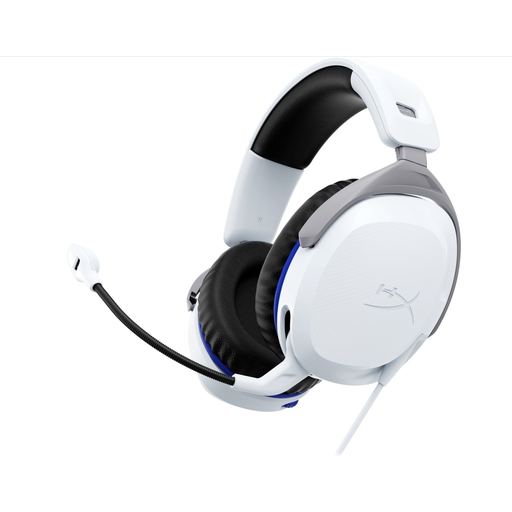 Image unavailable
HyperX Cloud Stinger II wired gaming headset, white, PS5/PS4
A wired headset to compare if your device has a suitable connection for both the microphone and headphones. Check the connection before buying.
Joybuy
 Image unavailable
Jabra Evolve2 55 wireless stereo headset
A wireless headset to consider if you also want to use it away from your usual recording spot. Check the connection to your recording device and make a test recording.
Joybuy
 Image unavailable
Razer Blackshark V2 X 7.1 wired gaming headset
A wired headset to compare if your recording device supports a connection for both the microphone and headphones. Check your computer’s inputs.
Joybuy
Frequently asked questions
How do you set up your headset before practising your book review?
Connect the correct plug and select the headset as the input device in your recording software. Make a short test recording to check the level, position the microphone boom by your mouth, then play the recording back before you continue practising.
Do you need to maintain your headset after every practice session?
Check that the microphone boom is still in the right position, and put the cable away without pulling or twisting it sharply. Follow the care instructions for your chosen model, including guidance on cleaning and any replaceable parts.
What are your rights when buying a headset online?
When you buy online from a business in the Netherlands, you’ll often have a 14-day cooling-off period; check which terms apply to your purchase. You’re also entitled to a product that works properly under your statutory rights. The Dutch government states that there is no fixed two-year statutory warranty period in the Netherlands, and that you can contact the seller if a product is faulty.
Can you record your own book review if other people can be heard?
According to the Dutch Data Protection Authority, a private recording made solely for personal or household use falls outside the GDPR. If you process or publish identifiable personal data about others beyond that private context, you must consider which GDPR rules and legal basis apply. Consent is one possible legal basis, but it isn’t automatically the only one.


