
Practising to listen back to your voice
You record passages to assess how clearly you speak and how you deliver them. An adjustable microphone boom and a short test recording matter more than a general claim about sound quality.


If you mainly practise sitting at your laptop, choose a headset with a connection that’s compatible with your laptop and a microphone you can position easily. Record a short passage and listen back to it. If you want to walk around as you read, Bluetooth can be useful, but remember that you’ll need to pair and charge the headset.
You record passages to assess how clearly you speak and how you deliver them. An adjustable microphone boom and a short test recording matter more than a general claim about sound quality.
You want to get started straight away and first check which port and microphone input your laptop has.
You walk around as you practise and don’t mind pairing and charging a wireless headset beforehand.
Good for: practising at your laptop when you have a suitable USB-A or USB-C port available.
Bear in mind: the cable limits how far you can move from your laptop; USB-A and USB-C are different versions.
Good for: a laptop with a suitable headset socket that also supports microphone input.
Bear in mind: a 3.5mm model is not the same as a USB version, even if they belong to the same product family.
Good for: practising while moving around, if your laptop supports Bluetooth.
Bear in mind: you’ll need to pair and charge the headset before you start.
| What to consider | What to look for | Who it’s for |
|---|---|---|
| Listening back to your voice | Check whether you can position and mute the microphone. Select the right input on your laptop, then listen back to a test passage. | If you want to hear how your reading sounds, prioritise the recording and microphone positioning. Around 36% of consumers in this practice scenario prioritise being able to hear their voice clearly on playback. |
| Connection and input | Check your laptop’s port and the exact version: USB-A, USB-C, 3.5mm or Bluetooth. Then test which microphone your recording app uses. | If you want to get started without connection problems, check both the connection and the selected recording input first. Around 29% of consumers give laptop compatibility top priority. |
| Comfort | Compare the fit, adjustability and ear cushions. Mono leaves one ear uncovered; stereo covers both ears. | When you’re practising several passages in a row, comfort is what matters most. Around 21% of consumers prioritise comfort during longer practice sessions. |
| Freedom to move | Check whether your laptop supports Bluetooth, and remember that you’ll need to pair and charge the headset. | If you want to walk around as you read, a cable can get in the way. Around 14% of consumers give freedom to move top priority. |
A product specification doesn’t automatically tell you how your voice will sound in your room or recording app.
Make a short recording in your usual practice space and listen back to it before practising the whole review.
Products with similar series names can have different connections or versions. Choosing the wrong version could mean you need a suitable adapter or a different model.
Compare the full model name, plug and included accessories with the connections on your laptop.
Your computer or recording app may use a different microphone as its input. A mute setting can also prevent recording.
Check the selected input and mute setting, then play back a test recording before starting your full practice session.
The H390 is a wired computer headset available with USB-A or USB-C; the Zone 300 is a Bluetooth option for anyone who moves around while reading.
The Ayda family has different connection types; the Ayda USB-ENC is an on-ear USB headset for PC use.
The Blackwire 3200 series includes wired headsets for laptop use in different styles.
These wired headsets offer USB or 3.5mm connection options. Check which connection and microphone input are compatible with your laptop.
 No image available
A wired option to compare if you want to use an adjustable microphone while practising.
3.5mm connection and included USB audio adapter; directional microphone boom that flips up to mute; over-ear design with memory foam ear cushions.
 No image available
A wired USB option if your laptop has a suitable USB-A port.
Stereo version with USB-A, two built-in microphones, and volume and mute controls. The description also mentions an adjustable headband and memory foam ear cushions.
 No image available
A wired USB option if you want to adjust and mute the microphone while practising.
USB connection, adjustable microphone boom and mute indicator. The description mentions soft ear cushions.
 No image available
A wired USB headset to compare if you want to adjust the microphone while practising.
USB connection, adjustable microphone and stereo audio. The description mentions a lightweight design, adjustable headband and soft ear cushions.
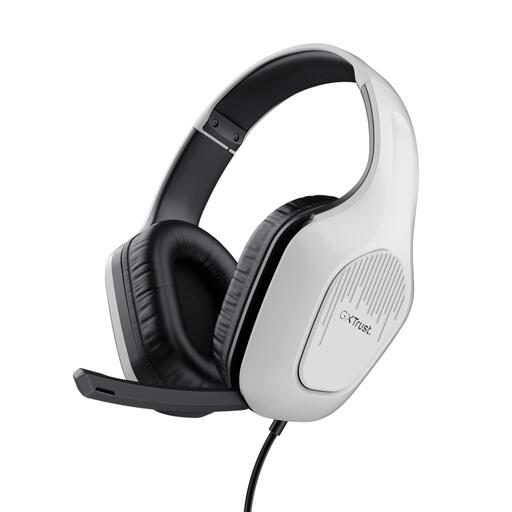 No image available
A wired 3.5mm option if your laptop has a suitable socket for microphone input.
3.5mm connection, 2-metre cable, foldable microphone and mute control. The description mentions an adjustable headband and over-ear design.
On a Windows laptop, select the microphone you want to use as the input and run a microphone test. Check the input setting in your recording app too; the steps for Windows don’t necessarily apply to other operating systems.
Adjust the headband and position an adjustable microphone boom level with your mouth. Logitech specifically recommends this position for the H390. If you have recording problems, also check the connection and mute setting, and follow your model’s cleaning instructions.
For many consumer purchases made remotely from a business, the statutory cooling-off period is 14 days, with some exceptions. The Dutch government outlines this general rule; check which terms apply to your purchase and distinguish any longer retailer returns policy from your statutory rights.
Private practice and public sharing are not the same thing. The Dutch government says that you can’t simply make copyright-protected books available to the public without permission. This doesn’t mean you have general permission to read out any amount of text in a review. Check the rights for your specific publication.
First, check which rules apply before publishing information about other people. The Dutch Data Protection Authority says that, in principle, you may only publish with consent. Whether a particular recording contains personal data and which legal basis applies depends on the circumstances.