If you mainly practise at a computer, start with a wired headset that has the right connection and lets you record and play back your voice. The recording app—not the headset alone—creates and saves the file. Then choose based on microphone position, comfort and freedom of movement, and test a recording in both languages. Call specifications don’t tell you how your speech will sound.
Who is this choice relevant to?
The speaker who listens back to their recordings
You record both languages so you can listen back to your pronunciation, pace and transitions. Look for a selectable microphone input and make a test recording. Microsoft Support explains how to select and test microphones in Windows.
The speaker who practises for long sessions
You wear the headset for several full rehearsals and want to be able to adjust the fit and microphone position. Logitech and Jabra describe models with adjustable parts or ear cushions, but the final fit is a personal matter.
The speaker who practises standing up
You want to move around while delivering your speech. Compare the freedom of movement a cable allows with a wireless connection, which you’ll need to test in advance with your recording device and software.
What should you look for in a headset microphone?
First, make a short recording in both languages and check that the microphone works as an input. Then compare the connection, fit and freedom of movement for the way you practise.
| What to consider |
What should you check? |
Who should pay particular attention? |
| Clear voice recordings |
Record both languages, listen to quieter passages too, and check louder sections for distortion. |
If you want to listen back to your pronunciation and pace, you’ll want to hear whether your voice is recorded clearly in both languages. Around 36% of consumers prioritise clear voice recordings. |
| Connection and file |
Check the plug, microphone input and which input the recording app uses. |
When you practise on your own device, you’ll want a headset that works as a microphone and a file you can find again later. Around 29% of consumers prioritise a suitable connection and a locally saved recording. |
| Comfort while practising |
Assess the fit during a full rehearsal and check whether the headband and microphone are adjustable. |
For several full speeches, you’ll want to wear the headset comfortably and position the microphone properly. Around 21% of consumers prioritise comfort during longer practice sessions. |
| Freedom of movement |
Test how far you can move with the cable, or check that the wireless microphone works as an input. |
If you deliver your speech standing up and use gestures, you’ll want room to move without interrupting the recording. Around 14% of consumers prioritise this. |
Avoid common buying mistakes
-
Assuming call noise cancellation proves speech recording quality
A manufacturer’s description of noise cancellation during calls doesn’t show how a locally recorded speech sounds in two languages.
Record in the room where you practise and listen for quiet consonants and louder passages.
-
Assuming different versions have the same connection
A USB, USB-C or 3.5mm connection on one version doesn’t confirm that another version will work with your recording device.
Compare the full product name and plug with your device’s port and microphone input.
-
Not checking where your practice recording is saved
Microsoft notes that recordings in the Windows Sound Recorder app described disappear if you uninstall the app.
Make a short test recording first, check where you can find it, and save important files somewhere you choose.
Brands to compare for this choice
Logitech
The H390 is a wired computer headset for practising in one place, with controls on the cable.
- Logitech describes an adjustable headband, a positionable microphone boom and on-cable volume and mute controls.
- Check which USB version you’re buying. Claims about clear calls aren’t an independent test of speech recording.
Trust
The Ayda range includes wired USB versions and a separately described wireless version. Always compare the full model name.
- For the Ayda USB-ENC, Trust describes controls on the earcup and a flip-up microphone that mutes when raised. The wireless version allows you to move around and has a rechargeable battery.
- Trust listed the wireless version as coming soon; this doesn’t tell you whether it’s currently available. Noise-cancellation claims relate to calls.
Jabra
The wired Evolve2 30 SE is an office-focused option for comparing ear cushions and microphone features for repeated practice.
- Jabra describes two microphones and memory foam ear cushions.
- The description of ambient noise reduction relates to calls and doesn’t confirm how a locally recorded speech will sound. Check the connection on the version you’re considering.
EPOS
The PC 8 USB is a wired stereo computer headset for anyone looking for simple volume and mute controls.
- EPOS lists on-cable controls and compatibility with PC and Mac.
- The manufacturer’s microphone description relates to calls. Assess the fit and recording quality for your speech yourself, and check the version’s product number.
Headsets at Joybuy
Here you’ll find wired USB and 3,5mm headsets, plus a wireless headset for practising and listening back. Check that the connection and microphone input are compatible with your device. The recording app creates and saves the file.
 No image available
Jabra Evolve2 75 USB-A MS Teams Black
A wireless option if you want more freedom to move while practising and can test the microphone with your recording device.
The product description mentions Bluetooth, a USB-A Bluetooth adapter, three microphones and memory foam ear cushions. The stated battery life is up to 37 hours; wireless use means you’ll need to recharge it.
View at Joybuy
 No image available
Logitech PC 960 USB
A wired USB option for practising at a computer with a compatible USB connection.
The description mentions a positionable microphone boom and on-cable volume and mute controls. The cable limits your freedom of movement compared with a wireless headset.
View at Joybuy
 No image available
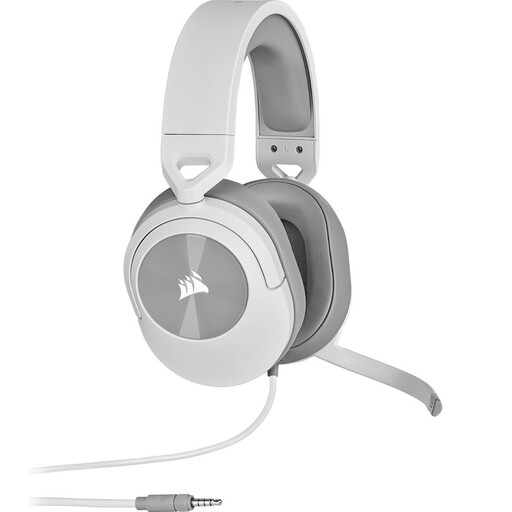
Corsair HS55 Stereo Gaming Headset White 3,5 mm
A wired option if your device has a compatible 3,5 mm microphone input.
The description mentions an omnidirectional microphone and a flip-up microphone that mutes when raised. If your device has separate headphone and microphone ports, the description says you’ll need to use the included Y-splitter. The cable is 1,8 m long.
View at Joybuy
 No image available
Kingston USB Hi-Fi Headphones with Microphone
A wired USB headset to consider if your device has a compatible USB connection.
The description mentions a flexible microphone boom that rotates through 270 degrees and an adjustable padded headband. The USB cable is 1,8 m long, which limits your freedom of movement.
View at Joybuy
 No image available
Trust Ayda wired headset with USB Type-A, black
A wired headset for practising at a computer with a compatible USB Type-A connection.
The description mentions a USB-C adapter cable, volume controls on the earcup and a flip-up microphone that mutes when raised. The cable is 1,8 m long, which limits your freedom of movement.
View at Joybuy
Frequently asked questions
Does a USB headset automatically save your speech as a local file?
No, you’ll need a recording app for that. Check in the app which microphone is selected and where the recording is saved. Microsoft says that recordings in the Windows Sound Recorder app described appear in the app and disappear if you uninstall it.
How can you test whether both languages are recorded without distortion?
Record a clip with both normal and louder passages, then listen back to it. Audacity Support recommends checking the recording meter and lowering the level if a test at normal volume reaches the yellow or red zone between −9 dB and 0 dB.
What can you do if your headset microphone doesn’t record sound in Windows?
Check that the headset is connected, the right microphone is selected under Input and mute is switched off. Microsoft Support describes a test in the input settings that lets you play back your recording.
What warranty and cooling-off period apply to online purchases in the Netherlands?
According to the Dutch government, you’re entitled to a product that works properly and can contact the seller if there’s a fault; there’s no fixed statutory warranty period. For online consumer purchases, a 14-day cooling-off period applies in many cases. Check whether these terms apply to your purchase.
Can you record a practice speech if other people can be heard in it?
Don’t assume you can always record others or share the recording without their permission. What applies depends on the circumstances, including whether people can be identified and how the recording is used. The Dutch Data Protection Authority discusses exceptions for personal or household use of images, but that guidance doesn’t establish which rule applies to every audio recording.


