If you mainly practise on a computer, choose a wired headset with a microphone connector that matches an available port. If you already have a mixer or audio interface, a headset with separate XLR and headphone connections, or a TRRS setup, may be suitable, but check which cables and power are required first. Record both language passages and listen back: claims about call microphones do not automatically tell you how your podcast intro will sound.
Who is this for?
Solo creator checking their pronunciation
You record the intro yourself in two languages and want to assess pronunciation, plosive sounds and vocal levels in a test recording. Microphone positioning and listening back are practical things to consider; Audio-Technica and RØDE both highlight the importance of microphone placement.
Creator with just a computer
You want to practise without an existing mixer and need to check that both the headset plug and the computer’s microphone input are compatible. Logitech describes the H390 as a USB-A computer headset.
Creator with a recording interface
You already use a mixer or interface and want to connect a microphone and headphones using suitable connections. An XLR microphone input does not automatically make any headset plug compatible; check which cables and any adapters you need.
What should you look for?
USB computer headset
A good fit if: you mainly practise on a computer and the USB connector matches an available port.
Keep in mind: a headset designed for calls is not automatically right for the sound you want from your intro; assess a test recording.
Broadcast headset with separate connections
A good fit if: you already have a mixer or interface with suitable microphone and headphone connections.
Keep in mind: according to its EU product sheet, the Audio-Technica BPHS1 has an XLR microphone connection and a separate 6.3 mm headphone plug; it does not connect directly via USB.
Headset with a TRRS connection
A good fit if: your device supports both microphone and headphone audio via the required TRRS connection.
Keep in mind: the RØDE NTH-100M requires the supplied TRRS cable; for the XLR setup described, RØDE also specifies a splitter and an adapter that provides plug-in power.
Wired gaming headset
A good fit if: you also want to use the headset for calls or gaming, as well as practising.
Keep in mind: HyperX describes the Cloud III microphone as being for voice chat; make your own recording to see if it works for your intro.
| What to consider |
What should you check? |
Who should consider this? |
| Clarity in both languages |
Record both passages, listen for consonants and vocal levels, and try a different microphone position if needed. |
If you’re recording the intro yourself in two languages, you’ll want to hear whether your pronunciation and vocal levels come across clearly in both passages. Around 36% of consumers say clarity is their top priority. |
| Connection to your recording device |
Note which ports are available and check that both the microphone and headphones work with them; also see whether you need a cable, splitter or adapter. |
If your main concern is making sure the microphone works with your computer, mixer or interface, the entire connection chain is crucial. Around 29% of consumers say device compatibility is their biggest concern. |
| Noise in your practice space |
Make a test recording where and when you plan to practise, and listen to the quiet moments between sentences too. |
If background noise makes your practice space challenging, you’ll want to know what actually ends up in your recording. Around 21% of consumers prioritise reducing this kind of interference. |
| Comfort and controls |
Check that the headset feels comfortable, the microphone is easy to position and you can tell when it is muted. |
When recording multiple takes, you’ll want a headset you can wear comfortably and controls that are easy to use. Around 14% of consumers say being able to practise comfortably for repeated takes is their top priority. |
Things to watch out for when buying
-
Assuming a headphone plug means the microphone will work too
The Audio-Technica BPHS1 has separate microphone and headphone connections. For the XLR setup described with the RØDE NTH-100M, RØDE also specifies particular connection components and plug-in power.
Before buying, check the whole connection chain: microphone input, headphone output and any power requirements.
Some setups require a suitable splitter, adapter or recording interface.
-
Assuming call noise cancellation means podcast-quality audio
Jabra and HyperX product information describes their microphones as being for calls or voice chat. This is not an independent assessment of a recording of your bilingual intro.
Record a short passage in the room where you plan to practise and listen back before settling on your setup.
-
Expecting one headset to record everyone equally well
A headset microphone sits close to the person wearing it. That does not mean it will record someone further away just as clearly.
If several people are recording the intro, make a separate test recording for each speaker and decide what recording setup you need.
Recording multiple speakers may require additional recording equipment or a separate microphone for each person.
Brands to consider
Logitech
The H390 we looked at is a USB computer headset worth considering if you mainly practise on a computer.
- Logitech lists USB-A, a microphone boom and in-line controls for this model.
- Its positioning for calls does not tell you how a bilingual podcast intro will sound.
Audio-Technica
The BPHS1 is a broadcast headset to compare if you already have recording equipment with suitable connections.
- The EU product sheet lists a dynamic cardioid microphone, a replaceable cable and separate XLR and headphone connections.
- Its separate connections make for a different setup from a direct USB connection to a computer.
RØDE
The NTH-100M combines headphones with a detachable microphone; RØDE lists podcasting among its uses.
- RØDE describes how to position the microphone to reduce plosive sounds.
- The microphone works with the supplied TRRS cable. For the XLR mixer setup described, RØDE specifies a splitter and an adapter that provides plug-in power.
Jabra
The Evolve2 40 SE is an office headset to consider if practising and online calls go hand in hand.
- Jabra lists three microphones and passive isolation for this headset.
- These are manufacturer descriptions of call use, not an independent comparison of podcast recordings. Check the connection on the specific model.
HyperX
The wired Cloud III is an option if you also want to use a gaming headset for calls.
- HyperX lists 3.5 mm, USB-C and USB-A connections, on-earcup controls and a mute indicator.
- The manufacturer describes the microphone as being for voice chat; assess your intro by making a test recording yourself.
Headsets on Joybuy
This selection focuses on wired headsets for practising on a computer; check that the connection on each model is compatible with your device.
 No image available
Logitech H340 USB headset, black
A wired USB headset to consider if you practise on a computer and its connection matches an available port.
The product information lists an adjustable noise-cancelling microphone and an adjustable headband.
Joybuy
 No image available
Kingston USB Hi-Fi headphones with microphone
A USB headset to consider if you want to adjust the microphone position while practising.
The product information lists a flexible microphone boom that rotates through 270 degrees and compatibility with Windows, Mac and Chromebooks.
Joybuy
 No image available
Trust Ayda wired headset, USB-A
A computer headset to consider if you want to be able to mute the microphone during repeated takes.
The product information lists USB-A, a USB-C adapter cable and a flip-up microphone that acts as a mute control.
Joybuy
 No image available
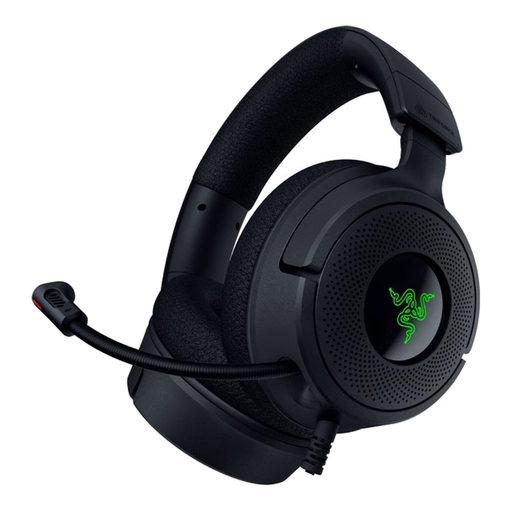
Razer Kraken V4 X wired gaming headset
A wired gaming headset to consider if you want to use its microphone controls and connection options as well as practise with it.
The product information lists USB-C and USB-A, and a foldable cardioid microphone.
Joybuy
 No image available
EPOS Sennheiser Impact SC 230 USB MS II
A USB headset to consider if you practise on a computer and want to position the microphone boom to suit you.
The product information lists a flexible microphone boom, in-line controls and a weight of 58 grams.
Joybuy
Frequently asked questions
How can you test whether a headset works for both languages?
Record both spoken introductions with the microphone in the same position, then listen back for vocal levels, pronunciation and plosive sounds. Audio-Technica’s product sheet explains that microphone position can change the sound; RØDE describes positioning the microphone to reduce plosive sounds.
Can you connect a headset with an XLR microphone plug directly via USB?
Not with the XLR plug alone. According to its EU product sheet, the Audio-Technica BPHS1 has a separate XLR microphone connection and a 6.3 mm headphone plug; check that your mixer or interface can connect and output both signals.
What do you need to connect the RØDE NTH-100M to a mixer with an XLR microphone input?
According to RØDE, you’ll need the supplied TRRS cable and a splitter; the XLR setup described also requires a suitable adapter that supplies the microphone with the required plug-in power.
What can you do if the headset doesn’t work properly after you buy it?
When used normally, a product in the Netherlands must meet what you could reasonably expect from it. According to ACM ConsuWijzer, if a product is faulty, the seller must offer a suitable solution free of charge. For online consumer purchases, you generally have a 14-day cooling-off period from delivery, subject to legal exceptions; check what applies to your purchase.
Can you publish a practice intro online if other people’s voices are recognisable?
Before publishing, check the relevant privacy rules. The Dutch Data Protection Authority says that in most cases you need consent to publish other people’s personal data online; an exception may apply to limited personal or household use. Separate copyright rules also apply to protected music or text.


