What should you look for?
First, check the connection on your recording device. Then decide whether a recording headset or a simpler headset for calls is better suited to what you expect from the recording.
| What to consider |
What should you check? |
Who should prioritise this? |
| Clarity and plosive sounds |
Check whether you can position the boom beside the corner of your mouth, then make a short test recording. |
I want to record my voice up close without distracting plosive sounds, so I pay attention to microphone placement. Around 40% of consumers prioritise clarity without plosive sounds above all else. |
| Connection to your device |
Check the port and whether your device supports a headset microphone through that connection. |
I want to make sure the microphone works with my recording device before I start. Around 30% of consumers prioritise a compatible device connection. |
| Comfort while reading aloud |
Compare the fit, adjustability and design of the ear cushions. |
For a longer story, I want the headset to stay comfortable, so I consider the fit as well as the microphone. Around 20% of consumers prioritise wearing comfort above all else. |
| Equipment you’ll need |
Check whether your chosen connection requires any extra equipment or setup. |
I want to know in advance whether my recording setup needs anything extra. Around 10% of consumers prioritise avoiding unnecessary extra equipment. |
Headsets at Joybuy
These headsets have microphones for voice use. For each version, compare the connection and the described microphone positioning with your reading setup.
 Image unavailable
Trust GXT 498W Forta gaming headset for PS5, white
The description lists a flexible, detachable microphone and soft ear cushions, useful if you want to position the microphone and wear the headset for longer.
Wired with a 3.5 mm cable; the description also lists a pop filter. Check whether your recording device supports a headset microphone through this connection.
View at Joybuy
 Image unavailable
Turtle Beach Atlas 200 PC gaming headset, black
The description lists a boom microphone that you lower when speaking, which is worth considering if you want to position the microphone close to your mouth.
Wired with a 3.5 mm connection; the description lists an included USB adapter and memory foam ear cushions. Check that your device supports the microphone through the connection you choose.
View at Joybuy
 Image unavailable
Logitech H340 USB headset, black
The adjustable microphone and USB connection to a computer may suit a simple recording setup with a compatible USB port.
Check whether your computer supports the headset microphone through the available USB connection.
View at Joybuy
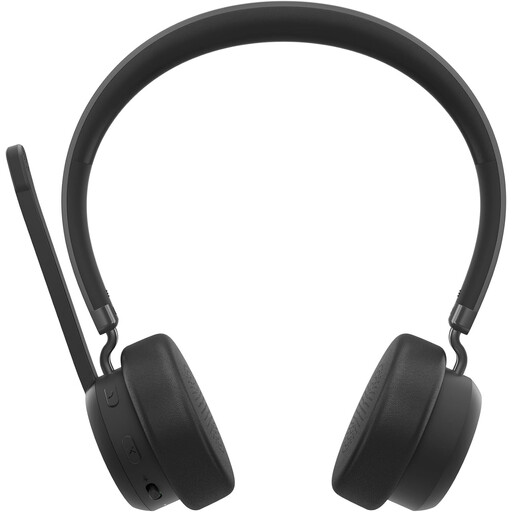 Image unavailable
Lenovo 4XD1Q30302 wireless headset
The foldable microphone and over-ear design are worth considering if you want to record wirelessly and wear the headset for longer.
The description lists Bluetooth 5.3 and a weight of 137 g. Check whether your recording device can use the headset as a microphone via Bluetooth.
View at Joybuy
 Image unavailable
Razer Blackshark V2 X 7.1 wired gaming headset, black
The description lists a boom microphone and a recommended distance of around 1–2 inches from your mouth. Check whether this position works for your voice with a test recording.
Wired with a 3.5 mm connection. The description lists a cardioid microphone and memory foam ear cushions.
View at Joybuy
Frequently asked questions
Where should you position the microphone when reading aloud?
Start beside the corner of your mouth, not directly in front of it. Shure recommends this placement for its headset microphone to reduce plosive sounds. Make a short test recording to check whether it also works with your headset and speaking volume.
Can a headset with a 3.5 mm plug always record on your phone or laptop?
No. Check whether your device supports a headset microphone through that port. According to Audio-Technica, the ATH-M20xSTS has a 3.5 mm TRRS plug and comes with USB-C and USB-A adapters. That doesn’t automatically mean every connection will work with every device.
Can you share a recording of a published children’s book online?
Don’t assume that you can. The Dutch Government distinguishes between a private copy for personal use and distributing or making copyrighted work available to the public; you need the creator’s permission to do the latter.
What cooling-off period applies to an online purchase?
According to the Dutch Government, purchases made remotely from a business often come with a 14-day cooling-off period. Check the terms and exceptions that apply to your specific purchase.
How should you care for your headset after recording?
Follow the care instructions for your chosen model. Shure lists a replaceable ear cushion and windscreen for the BRH31M; these features don’t automatically apply to other headsets.


