Choose a headset microphone that you can position securely near your mouth, and make sure both the microphone and headphones connect to your recording equipment. A USB headset can be handy if you record directly to a computer, while headsets with a 3.5 mm connection and broadcast headsets offer different connection options. Also check whether power is required, which cables you need and how the headset fits. These recommendations are based on manufacturer documentation, not an independent ranking of recording quality.
Who is this choice relevant to?
Narrators who prioritise clear speech
If you record audio description, you want your narration to fit clearly between the dialogue. The NPO describes audio description as spoken information about what is shown on screen. A test recording can help you assess how your voice sounds in your own space.
Narrators with an existing recording setup
If you already have a computer, recorder or audio interface, check that it can connect to both the microphone and the headphones. Depending on the headset, you may also need a splitter, the right cable or a suitable power supply.
Narrators who want to monitor audio while recording
If you want to check the audio from the picture or listen back to your recording, your device’s headphone output also needs to be usable. And if you’ll be recording while seated for a long time, think about how the headset fits.
What should you look for when choosing?
Wired USB headset
A good fit if: you record directly to a computer and want a USB connection. The Jabra Evolve2 40 SE is available in USB-A and USB-C versions.
Worth noting: Jabra positions this model as a business call headset; that positioning doesn’t prove how your recordings will sound in your own setup.
Headset with a combined 3.5 mm connection
A good fit if: your device has a suitable combined headset socket and you want to speak and listen through the same headset.
Worth noting: RØDE specifies the supplied TRRS cable for the NTH-100M. Separate ports or an XLR connection require different connecting components.
Broadcast headset with separate connections
A good fit if: your recording setup has a suitable microphone input and headphone output.
Worth noting: check the exact connector version and cable; the beyerdynamic DT 297 PV MK II is supplied without a connection cable.
When recording while seated, the connection, microphone position and ability to monitor audio are practical starting points for choosing a headset.
| What to consider |
What should you check? |
Who is this important for? |
| Clear voice recordings |
Check the position of the microphone boom, whether there’s a windscreen, and the result of a test recording in your own space. |
If I want my descriptions to be easy to follow, I look for a stable microphone position and listen back to my voice. Around 33% of consumers put speech clarity first. |
| Connection to your equipment |
Compare the exact headset version with the available ports and check whether you need a splitter, cable or power supply. |
If I want to keep using my existing computer, recorder or interface, I check both connection routes in advance. Around 27% of consumers prioritise compatibility above all else. |
| Monitoring audio while recording |
Check whether your device supports a microphone input and headphone output at the same time, and test this in your recording software. |
If I want to hear the audio from the picture or my recording while I’m narrating, I check whether the headphone output works alongside the microphone connection. Around 20% of consumers put monitoring first. |
| Comfort and maintenance |
Look at adjustability and fit, and check whether the cables or ear cushions can be replaced. |
For seated recording sessions, I want a headset that stays comfortable and is easy to adjust. Around 20% of consumers consider comfort their main buying priority. |
Common buying mistakes
-
Relying only on terms such as ‘broadcast’ or ‘noise-cancelling’
Manufacturers’ product descriptions aren’t an independent, like-for-like comparison of how your voice will sound when recorded in your space.
Check the connection first, then make a test recording. Shure recommends placing the microphone near the corner of your mouth, rather than directly in front of it, to reduce plosive sounds.
-
Assuming the right plug means full compatibility
A headset may need separate connections for the microphone and headphones. The microphone may also require a specific power supply.
The beyerdynamic DT 297 needs a separate connection cable; the XLR connection route described by RØDE for the NTH-100M requires a suitable adapter.
Before buying, compare your device’s microphone and headphone inputs with the exact headset version, the power requirements and the components included.
-
Assuming you can monitor audio during every recording
Having headphones doesn’t guarantee that your recording device supports a microphone input and headphone output at the same time.
Check both signal routes on your recorder or in your software, and test recording and playback together.
Brands to consider
RØDE
According to RØDE, the NTH-100M combines over-ear headphones with a detachable headset microphone. It’s worth considering if your equipment supports the required 3.5 mm connection.
- RØDE documents the supplied TRRS cable and splitter for the connection routes described.
- The XLR connection route described requires a suitable adapter that supplies the required plug-in power. RØDE’s description of the microphone as broadcast-quality is a brand claim, not an independent comparison.
Audio-Technica
The BPHS1 is a broadcast headset with closed-back over-ear earcups and an adjustable dynamic microphone boom.
- Audio-Technica Europe lists the BPHS1 as having a 3-pin XLR microphone plug, a 6.3 mm headphone plug, and replaceable cables and cushions.
- The BPHS1-XF4 has a different connection version. Check the full model details before connecting the headset to your equipment.
Jabra
The wired Evolve2 40 SE offers a USB connection for use with a computer; Jabra primarily positions this model as a business call headset.
- The manual describes USB-A and USB-C versions, as well as mono and stereo variants.
- Jabra’s claims about call performance aren’t an independent assessment of audio description recordings. Check you have the right version and make a test recording.
beyerdynamic
The DT 297 PV MK II is a closed-back broadcast headset with a cardioid condenser microphone, designed for use with a suitable professional connection.
- European product information lists versions with different headphone impedances.
- According to beyerdynamic, DT 297 versions are supplied without a connection cable. Check the exact version and choose the right cable.
Joybuy products for this recording setup
These Joybuy products are wired headsets with a USB or 3.5 mm connection and a microphone, for narrators working with a computer or other suitable recording equipment. Check which connection is right for your setup for each model.
 No image available
Corsair HS55 Stereo Gaming Headset - White - 3.5mm
A good option if your recording equipment has a suitable 3.5 mm connection and you want to record and listen through the headset.
The product description lists stereo headphones, an omnidirectional microphone and a 3.5 mm connection. A Y-splitter is included for separate microphone and headphone ports; the stated weight is 273 g.
The description mentions memory foam ear cushions and an adjustable headband.
View at Joybuy
 No image available
Jabra Evolve 30 II MS Stereo
A good option if you’re looking for a wired headset with a microphone and your computer setup supports one of the connection routes listed.
The product description lists a 3.5 mm connection and a LINK MS controller for USB connection. Check which route you’ll use with your recording device.
The description mentions stereo headphones with on-ear earcups.
View at Joybuy
 No image available
Trust Ayda Wired Headset, USB-A, Black
A good option if you want to connect directly to a computer using USB-A or use the USB-C adapter included.
The product description lists a microphone, USB-A and a USB-C adapter.
The description mentions an adjustable headband and ear cushions.
View at Joybuy
 No image available
Razer BlackShark V2 X 7.1 Wired Gaming Headset
A good option if your device has a suitable 3.5 mm connection and you want to combine a microphone with stereo headphones.
The product description lists a cardioid microphone and a 3.5 mm connection. A splitter is included for separate microphone and headphone ports.
The stated weight is 240 g; the description mentions memory foam ear cushions.
View at Joybuy
 No image available
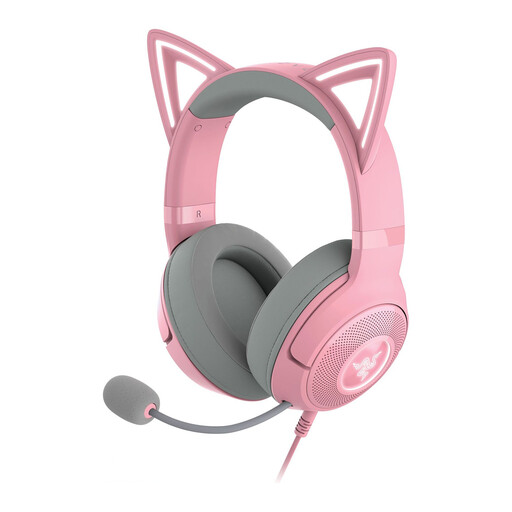
Razer Kraken Kitty Edition V2 - Quartz
A good option if your recording device has a suitable USB connection and you want a detachable microphone.
The product description lists USB connectivity and a detachable microphone.
The description mentions memory foam ear cushions and an adjustable headband.
View at Joybuy
Frequently asked questions
Where should you position the microphone boom when recording?
Position the microphone near the corner of your mouth, not directly in front of it. Shure recommends this position to reduce plosive sounds. Then make a test recording, as the best position also depends on your voice and equipment.
Can a headset with a 3.5 mm plug connect directly to your XLR input?
Not without the right connection and power supply. For the NTH-100M, RØDE describes using the supplied TRRS cable and, for the XLR connection route described, a suitable adapter that supplies the required plug-in power.
Which connecting components should you check before buying?
Check whether you need a separate cable, splitter or adapter. According to beyerdynamic, the DT 297 is supplied without a connection cable; the XLR connection route described by RØDE for the NTH-100M requires a suitable adapter. Which components are right for you depends on the version you choose and your recording equipment.
What cooling-off period applies to online purchases?
The Dutch Government Information Service states that many distance purchases from a business come with a 14-day cooling-off period, although exceptions apply. Before buying, check who the seller is and what returns information is provided with your order.


