Choose a microphone to suit your recording environment and connections. A complete headset is practical if you want to monitor your recording as you speak, while a standalone headworn microphone may suit you if you already have separate headphones. Then make a test recording with both soft and emphatic passages, and check that the microphone and any power supply are compatible with your recorder or computer. This advice is based on manufacturers’ specifications, not on a comparative recording test.
Who is a headset microphone suitable for?
Voice artist who wants to retain expression
You switch between calm and emphatic sentences and want to assess how the microphone position and any voice filters affect the sound. RØDE and Logitech describe adjustment options for their models; compare the results for yourself with a test recording.
Creator who wants to monitor their recording
You want to hear your recording as you speak, so you may be looking for a combination of microphone and headphones with connections that suit your equipment. Audio-Technica describes the BPHS1 as a headset with separate microphone and headphone connections.
Voice artist with an existing audio setup
You already have a recorder, mixer or headphones and mainly want to check which connector, microphone power supply and any additional equipment you need. Connection options vary by model and version, as described in the manufacturer documentation from RØDE, Audio-Technica and Shure.
What should you look for when choosing?
For audio description, your choice will largely depend on how you record: assessing vocal expression, monitoring as you speak, connecting to existing equipment or wearing a headset for extended periods.
| What to consider |
What should you check? |
Who this matters to |
| Voice and expression |
Whether the microphone is adjustable, and how it sounds in a test recording with both soft and emphatic passages. |
I vary between soft and emphatic sentences in my script and want to assess the microphone position and filters with my voice. Around 33% of consumers give vocal expression the highest priority. |
| Monitoring |
Whether the headset has ear cups, and whether the recording and listening connections suit your equipment. |
If I want to hear what is being recorded as I speak, I need a suitable headset and microphone combination. Around 27% of consumers prioritise monitoring with minimal interference. |
| Connection and power |
The microphone input, headphone output, connector type and whether plug-in power is required. |
I want to keep using my existing recorder or mixer, so I need to know which connections and power supply my setup requires. For around 20% of consumers, compatibility with existing equipment is the top priority. |
| Fit and maintenance |
How it fits over a realistic recording session, how adjustable it is and whether parts are replaceable on the specific version. |
If I’m recording for a long time, I want to check that the headset is comfortable and that its parts can be replaced. Around 20% of consumers prioritise comfort and maintenance. |
Buying pitfalls to avoid
-
Mistaking a standalone headworn microphone for a complete headset
The Shure WH20 is a headworn microphone; its manual does not describe integrated headphones. If you want to monitor your recording, you’ll need to arrange that separately.
Before you buy, decide how you want to listen while speaking.
If you don’t already have headphones for monitoring, you’ll need to add them to your setup.
-
Assuming every headset works with every microphone input
The Audio-Technica BPHS1 has separate microphone and headphone connections. For the RØDE NTH-100M, RØDE describes a suitable adapter that supplies plug-in power when using an XLR microphone input. beyerdynamic supplies the DT 297 variants without a connection cable.
Before choosing a model, note the exact input, output, connector type and power requirements of your equipment.
Depending on your setup, you may also need a suitable adapter, interface or connection cable.
-
Confusing voice filters with better delivery
For the wired PRO X, Logitech describes features including compression and de-essing; according to Logitech, its advanced features require a PC with G HUB. This doesn’t establish whether the processing will suit your voice and delivery.
Compare the same passage with and without processing before deciding whether to use the filters.
Brands and models to consider
RØDE
The NTH-100M combines a wired headset with a detachable microphone for recording and monitoring.
- RØDE describes a splitter included in the box for separate 3.5mm connections.
- For an XLR microphone input, RØDE describes a suitable adapter that supplies plug-in power; check the connections on your own equipment.
Audio-Technica
The BPHS1 is a closed-back broadcast headset with a dynamic boom microphone.
- Audio-Technica’s EU specifications list an adjustable cardioid microphone and replaceable cable and ear pads.
- The BPHS1 has an XLR microphone connection and a 6.3 mm headphone connection; the BPHS1-XF4 is designed for a different connection.
beyerdynamic
The DT 297 PV MK II is a closed-back broadcast headset for use with a compatible professional audio setup.
- According to beyerdynamic, the microphone has a cardioid polar pattern; the headphones are available in 80 and 250 ohm versions.
- All DT 297 versions are supplied without a connection cable. First check which cable suits your equipment.
Logitech G
The wired PRO X is a PC-focused headset for anyone who wants to try out voice filters.
- Logitech describes Blue VO!CE filters, including compression and de-essing.
- According to Logitech, the advanced features only work on PC via G HUB. Decide for yourself whether the processing suits your recording.
Shure
The WH20 series consists of standalone dynamic headworn microphones for anyone who can already monitor their recording separately.
- The Shure manual describes an adjustable headband and several connector types.
- The WH20 is not a complete headset with headphones. Check which connector type suits your input.
Headsets with microphones at Joybuy
These Joybuy products are headsets with microphones for anyone who wants to monitor their recording as they speak. Check that each model’s connection suits your recording equipment.
 No image available
Trust GXT 498W Forta, white
A wired headset option for monitoring your recording as you speak; check in advance that the microphone and headphone connections suit your recording equipment.
View at Joybuy
 No image available
Turtle Beach Airlite Fit, black/white
A wired headset option for monitoring spoken content as you record; check that the connection and microphone suit your recording setup.
View at Joybuy
 No image available
Razer Kraken V3 X, black
A headset option for monitoring your recording as you speak; check that the connection and microphone are compatible with your recording device.
View at Joybuy
 No image available
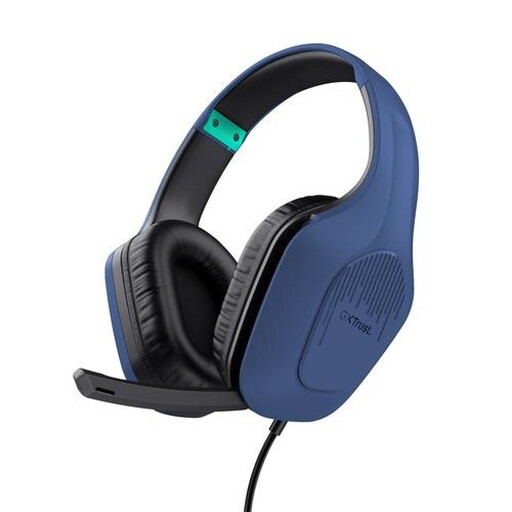
Trust GXT 415B Zirox
A wired headset option for monitoring your recording as you speak; check that the connection suits your recording equipment.
View at Joybuy
 No image available
Trust Ayda, USB Type-A
A headset option for computer use and monitoring as you speak; check in advance that the connection suits your recording equipment.
View at Joybuy
Frequently asked questions
Should I choose a headset with headphones or a standalone headworn microphone?
If you want to monitor your recording through the same headset as you speak, choose a complete headset with connections that suit your equipment. If you already have separate headphones, a standalone headworn microphone such as the Shure WH20 may be an alternative.
Can the RØDE NTH-100M connect directly to an XLR mixer?
Check the connection and power requirements before connecting the RØDE NTH-100M to an XLR microphone input. RØDE describes a suitable adapter that supplies plug-in power; the splitter included in the box first separates the microphone and headphones.
How can I assess plosive sounds and changes in vocal tone?
Adjust the microphone boom and make a test recording with both soft and emphatic passages. RØDE describes positioning the NTH-100M to reduce plosive sounds; Shure’s general guidance explains that the distance from a directional microphone can affect the sound. The result will depend on your voice and setup.
Which cable or adapter might I overlook?
For the beyerdynamic DT 297 PV MK II, check which connection cable suits your equipment, as beyerdynamic supplies all versions without a cable. To connect the RØDE NTH-100M to an XLR microphone input, RØDE describes a suitable adapter that supplies plug-in power.


