
Speaker with online attendees
You want your contribution to come across clearly via a laptop, and to be able to mute yourself without searching for software buttons in the half-light. Check the connection and controls on the exact headset model.


A personal headset with a microphone is most useful if you’re speaking online via a laptop. If several people in the room need to speak, room audio is more suitable, while you may not need a headset at all for an entirely in-person lecture. Then choose based on the connection, controls you can locate easily beforehand, and whether you want to cover one or both ears. A headset microphone won’t automatically pick up questions from across the room.
You want your contribution to come across clearly via a laptop, and to be able to mute yourself without searching for software buttons in the half-light. Check the connection and controls on the exact headset model.
You’re listening through a device but don’t want to miss the speaker or questions from the audience. Compare a single-ear model that leaves one ear free, or an open-ear design, with a headset that covers both ears.
You need to decide whether only you, or other people in the room too, need to be heard online. If several people in the room are taking part, the room’s audio set-up needs attention, not just your headset.
For this lecture, it helps to start by deciding which need matters most to you. Then check that the audio set-up is suitable for everyone who needs to be heard online.
Suitable when: you’re speaking via a laptop or want to listen to online audio privately.
Consider: the microphone is designed to pick up your voice and won’t automatically capture questions from other people in the room.
Suitable when: several people in the room need to be heard online during a hybrid meeting. You may not need a headset for an entirely in-person lecture.
Consider: room audio needs to be set up for the room and meeting service. Microsoft Support describes room equipment as a separate audio source.
| What to consider | What to look for when buying | Who is this important for? |
|---|---|---|
| Making my voice clear online | Check the microphone and mute controls. Check in your meeting app that the correct microphone is selected. | If I’m speaking online, I want my contribution to come across clearly; around 36% of consumers prioritise being heard clearly when they speak. |
| Staying connected with the room | Decide whether you want to leave one ear free or try an open-ear design. Before the event starts, test whether you can hear both the room and online audio. | If you want to keep hearing the speaker and anyone asking questions in the room, look for a suitable design; around 29% of consumers prioritise staying connected with the people in the room. |
| Connection and controls | Check that the exact model is compatible with the available port or wireless connection. Practise using the controls and test the audio beforehand. | If I don’t want to search for buttons in low light, I want to know in advance how the headset connects and mutes; around 21% of consumers prioritise confidence in the connection and controls. |
| Wearing comfort and listening volume | Consider the fit and design. Start at a low volume and take listening breaks when needed. | If you’ll be wearing the headset for a long time, you’ll want a comfortable fit and a pleasant listening volume; around 14% of consumers prioritise wearing and listening comfort. |
A headset microphone is designed for the person wearing it. If other people in the room also need to be heard online, the room’s audio set-up needs to be suitable for that.
Decide in advance who needs to be able to listen remotely and, if necessary, test voices from the places where people will be speaking. Microsoft Support treats room equipment as its own audio source.
A hybrid discussion with several speakers may need additional room audio.
Trust distinguishes between the Ayda USB PC and the Ayda USB-ENC PC. So the name Ayda alone isn’t enough to identify the connection and model.
Before buying, compare the full model name, connection and included accessories.
Noise reduction around the ears and microphone features serve different purposes. A closed-back design may not be ideal if you also need to hear people in person.
Choose a design based on whether you mainly need to hear online audio, the room, or both.
The H390 is a range of wired headsets for personal use via USB.
The Ayda USB PC and Ayda USB-ENC PC are wired options for speaking personally via a computer.
The Blackwire 3200 series offers wired headset options, while the Voyager 4300 UC series includes wireless mono and stereo models.
The Evolve2 40 SE is a range of wired personal headsets.
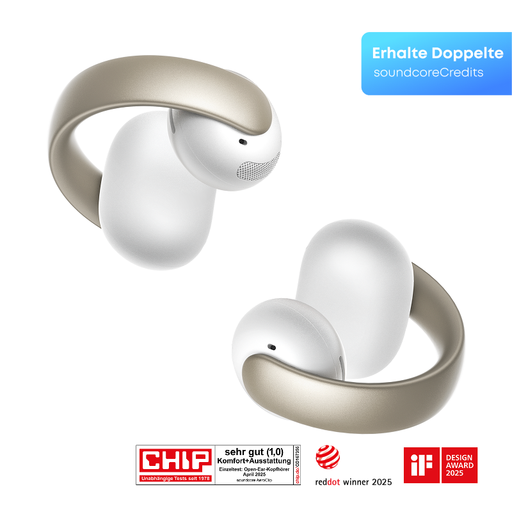
SoundForm ClearFit is an open-ear alternative for anyone who wants to listen wirelessly while staying aware of their surroundings.
These Joybuy products are suited to speaking or listening personally during a lecture. Choose based on the connection, design and whether you want to keep hearing the room.
 No image available
A wired personal headset to consider if you’re speaking via a computer and want to use the controls on the cable.
The product name specifies a wired USB model; check that your device has a compatible USB port.
 No image available
The mono model is an option if you want to leave one ear free to hear what’s happening in the room; check that the connection is compatible with your device.
The product name specifies mono and USB-A. If using it wirelessly, remember that it will need charging and pairing.
 No image available
An open-ear model to consider if you want to stay aware of your surroundings while listening wirelessly.
The product name specifies True Wireless Stereo and open-ear. Bear in mind that you’ll still be able to hear ambient sound.
 No image available
A wired in-ear option for personal use if your device has a compatible USB Type-C connection.
The product name specifies a wired in-ear headset for calls and music.
 No image available
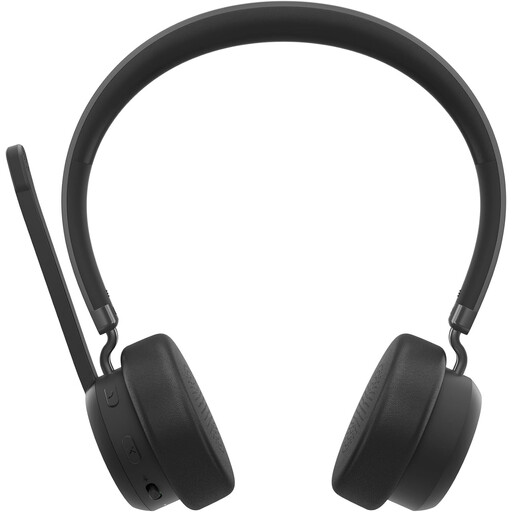
A wireless personal headset to consider if you want to move around during a call; remember that it will need charging and pairing.
The product name specifies a wireless headband headset for calls and music.
Not necessarily. First decide whether you need to speak or listen via a device, and whether you need a personal listening device. If several people need to be heard online, suitable audio equipment for the room is different from a personal headset.
For a Teams meeting, you can choose the audio source before joining and select the connected microphone and speaker in your device settings. Check that the microphone isn’t muted too. For other apps, check the relevant settings separately. Microsoft Support explains these audio settings for Teams.
Start at a low volume and pay attention to both the sound level and how long you’ve been listening. The World Health Organization identifies both as factors in the risk posed by loud sounds and recommends taking listening breaks; this information is not a legal volume limit for a specific product.