Who is this choice relevant to?

Narrators recording for long sessions

If you record long passages, you can assess adjustability and fit over a full session. RØDE describes comfort features on the NTH-100M, but the manufacturer's description is no substitute for trying the fit yourself.

Narrators using recording equipment

If you use a mixer or audio interface, check that both the microphone and headphone connections are compatible. Audio-Technica specifies separate microphone and headphone plugs for the BPHS1.

Narrators starting out with a laptop

If you want to record without much extra equipment, check that your computer has the right USB or combined headset connection. The Logitech H390 is a USB headset; check the connection on the version you choose.

What should you look for when choosing?

Wired USB headset

Suitable for: recording on a computer without a separate audio interface.

Keep in mind: check that the USB version works with your computer, and listen back to your voice; the manufacturer describes the Logitech H390 primarily as a headset for calls.

Headset with a TRRS connection

Suitable for: a device with a compatible combined headset socket or suitable separate ports.

Keep in mind: use the specified TRRS cable with the RØDE NTH-100M. For an XLR microphone input, RØDE describes an adapter that supplies plug-in power.

Broadcast headset with separate connections

Suitable for: a recording setup with compatible microphone and headphone connections.

Keep in mind: check the cable and your equipment. The beyerdynamic DT 297 PV MK II is supplied without a connecting cable; the Shure BRH31M has a single earpiece, so you can still hear sounds around you.

What to consider What to look for Who should consider this?
Voice recording Check that the microphone is adjustable, and record both normal and loud sentences. Set the recording level so the meter does not reach its upper limit. When I record a long passage, I want to be able to listen back to my voice clearly and avoid clipping. Around 31% of consumers prioritise voice monitoring.
Comfort Assess pressure and warmth during a session similar to your recording. Also check the fit if you wear glasses. When I narrate for a long time, I want the headset to remain comfortable. Around 31% of consumers prioritise long-wearing comfort.
Connections Compare your device's inputs and outputs with the exact headset version and its cable. If I want to use my existing laptop, mixer or interface, both the microphone and headphone signals need to connect properly. Around 25% of consumers prioritise this compatibility.
Additional components Check what comes with the version you choose and what you need to record and listen back. If I want to get started easily, I want to know in advance whether I need another cable, adapter or interface. Around 13% of consumers prioritise a setup that needs few extra connection components.

Pitfalls to avoid

  • Assuming every 3.5 mm plug also connects the microphone

    Combined TRRS connections and separate ports carry microphone and headphone signals in different ways. So a plug fitting the socket does not guarantee that your computer will receive the microphone signal.

    Compare the ports with the cable supplied with the exact version. Use the TRRS cable specified by RØDE for the NTH-100M.

    Depending on your connections, you may need a compatible splitter or adapter.

  • Choosing a broadcast headset without checking the whole recording setup

    An XLR microphone does not connect directly to a standard USB port. The beyerdynamic DT 297 PV MK II is also supplied without a connecting cable.

    Before buying, check the microphone input, headphone output, cable version and any power requirements.

    Depending on your equipment, you may also need an audio interface or a separate connecting cable.

  • Assuming a description such as noise-cancelling means the headset is suitable for narration

    Logitech describes the H390 as a headset for calls. That does not tell you how your voice will sound in the room where you record; the recording level also matters.

    Record a representative travel-guide paragraph and listen back before starting a long take.

Brands to compare

RØDE

The NTH-100M is an over-ear headset with a detachable microphone, designed for uses including content creation and for use with a compatible combined headset connection.

  • RØDE describes the NTH-100M as having adjustable features and comfort features.
  • Assess the fit for yourself. For connecting the microphone to XLR, RØDE describes an adapter that supplies plug-in power.

Audio-Technica

The BPHS1 is a closed-back stereo broadcast headset for a recording setup with compatible professional connections.

  • Audio-Technica specifies an adjustable dynamic cardioid microphone, detachable cable and replaceable earpads.
  • Check that the separate 3-pin XLR microphone plug and 6.3 mm headphone plug work with your equipment.

Logitech

The H390 is a wired computer headset for a USB recording setup.

  • Logitech lists in-line controls and a microphone boom.
  • The product description focuses mainly on calls; check the USB version and listen back to your voice recording.

Shure

The BRH31M is a single-sided broadcast headset for anyone who wants to hear sounds around them while monitoring.

  • Shure specifies a dynamic cardioid microphone and replaceable parts.
  • The single earpiece leaves one side uncovered; also check the connection on the exact version.

beyerdynamic

The DT 297 PV MK II is a closed-back broadcast headset with a condenser microphone, designed for a compatible professional recording setup.

  • beyerdynamic lists a detachable cable and replaceable earpads.
  • The headset is supplied without a connecting cable; choose a cable and connection to suit your equipment.

Joybuy products for wired computer recording

These wired headsets are designed for a computer setup with a compatible USB or 3.5 mm connection. Check whether each model's microphone connection works with your recording device.
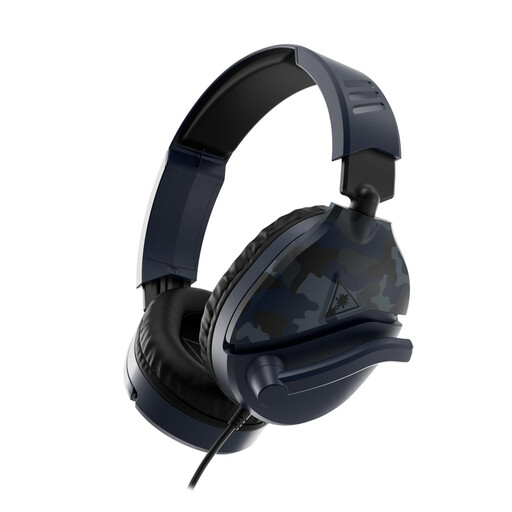
Turtle Beach Recon 70 wired gaming headset, Blue Camo

Turtle Beach Recon 70, Blue Camo

This wired headset may suit a computer setup with a compatible 3.5 mm connection.

The product name lists a 3.5 mm connection and a flip-to-mute microphone; check that the connection also sends the microphone signal to your device.

Joybuy

Turtle Beach Airlite Fit wired headset, Blue/Red

Turtle Beach Airlite Fit, Blue/Red

This wired headset may suit a recording device with a compatible 3.5 mm connection.

The product name lists a 3.5 mm connection and a flip-up microphone that mutes when raised. Check that your device can record from the microphone through this connection.

Joybuy

Corsair HS55 Stereo headset, White, 3.5mm

Corsair HS55 Stereo, White, 3.5 mm

This wired headset may suit a recording device with compatible 3.5 mm ports.

The product name lists a 3.5 mm connection. The product information also mentions an included Y-splitter; check that the connections match your device.

Joybuy

Kingston USB Hi-Fi headphones with microphone

Kingston USB Hi-Fi headphones with microphone

This USB headset may suit a computer setup with a compatible USB connection.

The product information lists a 270-degree rotating microphone boom and an adjustable padded headband. Check that the USB connection works with your computer.

Joybuy

Trust Ayda wired USB headset with headband

Trust Ayda wired USB headset

This wired USB headset may suit a laptop or computer setup with a compatible connection.

The product information lists USB-A with a USB-C adapter cable, microphone controls and volume control on the earcup. Check which connection your device uses.

Joybuy

Frequently asked questions

Should you hear yourself through the headset during a long recording?

Monitoring can help you check your recording. First select the right microphone and headphones in your recording software, put on the headphones and start at a low volume before enabling monitoring. Monitoring through speakers can cause feedback.

How can you stop your whole recording from clipping?

Before you record a take, speak your loudest sentences too and check the recording meter. Audacity warns that audio reaching the upper limit can clip, and that clipping cannot be undone afterwards.

Which parts can you replace or clean?

Follow the instructions for the exact model. RØDE describes removable cushions for the NTH-100M; Audio-Technica lists replaceable earpads and a cable for the BPHS1. This does not mean that parts are interchangeable between models.

Do you need extra components for a professional headset?

That depends on your recording device and the headset connections. You may need an audio interface, adapter or connecting cable. The beyerdynamic DT 297 PV MK II is supplied without a connecting cable; for connecting the NTH-100M microphone to XLR, RØDE describes an adapter that supplies plug-in power.

Do you have a cooling-off period when buying online in the Netherlands?

According to the Dutch government, in many cases a 14-day cooling-off period applies to eligible distance purchases from a business, subject to exceptions. This does not tell you what the returns policy is for a specific offer.
