Which setup is right for you?

Individual online learner

You speak and listen through a laptop, so clear speech and a compatible connection are important when choosing a headset. Logitech describes the H390 as a headset for computer use, while Jabra describes the Evolve2 30 SE as a personal headset.

Joining on behalf of a group

You’re in a room with other learners while someone joins remotely. Consider whether room audio would work better than a personal headset; Microsoft Support and Jabra offer guidance on shared audio and speakerphone placement.

Teacher looking for voice amplification

You want to speak hands-free to people in the room. Shure describes the WH20 as a microphone that connects to compatible audio equipment, so check the input and the rest of your equipment first.

What should you look for?

Personal USB headset

Suitable when: you’re taking an online lesson individually and speaking and listening yourself.

Bear in mind: a headset designed for one person won’t necessarily pick up everyone sitting around the table.

Shared room audio

Suitable when: several people in the room need to join in through the same online connection.

Bear in mind: Jabra recommends placing the Speak2 40 in the centre of the table, 0.5 to 2.3 metres from each participant.

Headset microphone for voice amplification

Suitable when: you’re a teacher who wants to speak hands-free to people in the room, and compatible audio equipment is available.

Bear in mind: Shure describes the WH20 as a microphone for use with a compatible microphone input or transmitter, not as a complete computer headset.

What to consider What to look for Who should pay particular attention?
How clearly your speech comes across Check the microphone position, mute controls and which microphone is selected in your meeting app. I want to be easy to understand during speaking exercises. Around 36% of consumers prioritise how clearly their own speech comes across.
Several people around the table Decide who needs to be heard remotely. For shared audio, check the placement and distance from all participants. If several learners are joining through one connection, I want their voices to come through clearly at the other end too. Around 29% of consumers want the whole group to be heard.
Connecting to your equipment For a computer, check which USB connection you need. For voice amplification, check the microphone input and connector. I want to connect my chosen equipment to what’s already available in the classroom. Around 21% of consumers prioritise connectivity.
Style and controls Choose mono or stereo to suit your needs, and consider where the mute button is and how the headset fits. During a lesson, you may want to keep one ear free or mute the microphone quickly. Around 14% of consumers prioritise fit and controls.

Common buying mistakes

  • Choosing a personal headset when everyone at the table needs to join in

    A microphone designed for one person won’t necessarily pick up the voices of other learners around the table.

    First, decide whether only you or everyone in the room needs to be heard remotely. If you’re using a speakerphone, check the recommended placement for your setup.

  • Treating a headset microphone for a sound system as a complete USB headset

    Shure describes the WH20 as connecting to a microphone input or transmitter. That’s a different use from a computer headset with earcups.

    Before buying, check your entire audio setup, the available input and the connector type.

  • Assuming a connection on one model is available across an entire range

    HP lists a 3.5 mm connection only for the Blackwire 3315 and 3325, so models within the same range can differ.

    Check the exact model and version against the connections on your computer or audio equipment.

Brands to consider

Logitech

The H390 USB-A is a wired computer headset for individual online use.

  • According to Logitech, this version has an adjustable microphone, an in-line mute control and a 1.9 m cable.
  • Check that your computer has a USB-A port; this headset isn’t designed to pick up audio from a group around a table.

Jabra

The Evolve2 30 SE is a personal headset, while the Speak2 40 is a separate speakerphone for shared audio.

  • Jabra describes the Evolve2 30 SE as having two microphones and provides placement guidance for the Speak2 40.
  • Check whether you need a personal headset or audio for everyone around the table, and whether the recommended placement will work in your room.

HP Poly

According to HP Poly, the wired Blackwire 3300 series includes mono and stereo versions for computer use.

  • The series has a flexible noise-cancelling microphone.
  • According to HP, the 3.5 mm option is available only on the Blackwire 3315 and 3325. Don’t assume every version has this connection.

EPOS

The IMPACT 100 MS Stereo USB-C+A is a wired personal headset supplied with a USB-C-to-USB-A adapter.

  • EPOS lists an in-line control, a unidirectional microphone and a weight of 76 g for the stereo version.
  • These are the manufacturer’s specifications for this version, not the result of a measured comfort comparison with other headsets.

Shure

The WH20 is a headset microphone that connects to a compatible microphone input or wireless transmitter.

  • Shure documents several connector versions.
  • The microphone doesn’t provide headphone audio and isn’t a complete sound system without compatible equipment.

Joybuy products for these setups

This selection includes personal headsets for individual online lessons and a speakerphone for shared audio around the table.

Jabra Evolve2 30 SE headset

Jabra Evolve2 30 SE

A personal headset for speaking and listening online on your own. Check that the connection on your chosen version is compatible with your computer.

View at Joybuy

Logitech PC 960 wired USB headset

Logitech PC 960 USB Headset

A wired USB headset for individual computer use. Check that the connection is compatible with the device you use for your lesson.

View at Joybuy

Logitech H340 USB headset, black, wired

Logitech H340 USB Headset, Black, Wired

A wired USB headset with a microphone for speaking and listening online on your own. Check that your device has the right connection.

View at Joybuy

Jabra Evolve2 65 USB-A Black MS Mono

Jabra Evolve2 65 USB-A Black MS Mono

A mono headset for individual online use. Check that the USB-A connection and fit suit your computer and lesson setup.

View at Joybuy
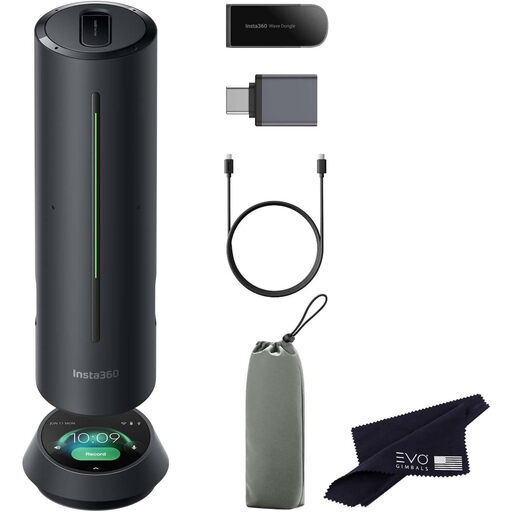
Insta360 Wave AI Conference Speakerphone, Black

Insta360 Wave AI Conference Speakerphone, Black

A speakerphone to consider when several people in the same room share one online connection. Check that the intended placement and audio setup are suitable for your lesson.

View at Joybuy

Frequently asked questions

Can I use a personal headset so everyone around the table can be heard?

Don’t assume so. If everyone needs to join in through one online connection, consider room audio and the placement of a shared microphone. Jabra recommends placing the Speak2 40 in the centre of the table, 0.5 to 2.3 metres from each participant.

How can I prevent echo if several laptops in the same room join the online lesson?

According to Microsoft Support, keep just one microphone and speaker setup active at a time in the room. Select the audio equipment you intend to use before the lesson and, if you use Teams, make a test call.

Can I connect a headset microphone for voice amplification directly to my laptop?

It depends on the connection and equipment, so don’t assume it will work without checking. Shure describes the WH20 as connecting to a compatible microphone input or wireless microphone transmitter. Check the connector on your chosen version and the equipment available.

What are my rights when buying online in the Netherlands?

For eligible online consumer purchases, you generally have 14 days to change your mind, according to the Dutch government. The product must also match the agreement; the Netherlands has no fixed statutory guarantee period, according to the Dutch government. If a product is faulty, contact the seller.
