If being clearly heard is your priority during a language lesson, focus on the microphone and mute controls. If you struggle to hear the tutor, assess the fit or ANC for your ears separately. Logitech and Yealink describe microphone noise cancellation, while Yealink lists passive isolation and EPOS lists ANC for specific models. A wired headset avoids the need to charge it but limits how far you can move; a wireless one needs charging. And none of these manufacturers’ specifications guarantees that every voice in your office will disappear.
Who should consider this?
Learners who often speak aloud
You want your tutor and fellow learners to hear your pronunciation, without colleagues’ conversations in the background. Focus on the microphone boom, mute controls and microphone noise cancellation; Logitech and Yealink describe these microphone features for the models mentioned.
Learners who struggle to hear the tutor
You need a quieter listening experience to follow words and differences in pronunciation. Compare the ear cushions and any ANC separately from the microphone specifications; Yealink lists passively isolating ear cushions, while EPOS lists hybrid ANC for the IMPACT 860 ANC.
Learners who work in different places
You’ll need to weigh up a cable for a fixed spot against the freedom to move around wirelessly. Check which port your computer has and whether you can charge a wireless headset; Logitech, EPOS, Jabra and HP describe a range of wired and wireless models.
What should you look for when buying?
First decide whether you mainly want to be heard clearly by the group or to hear the tutor better. Then check the connection and whether the headset suits the way you take part in lessons.
| What to consider |
What should you check? |
Who is this important for? |
| Being heard clearly |
Check the microphone boom, microphone noise cancellation, mute function and a test recording in your lesson app. |
If I practise speaking aloud while colleagues are talking, I want the group to hear my pronunciation. Around 33% of consumers say being heard clearly is their main reason for buying. |
| Hearing the tutor clearly |
Compare passive isolation with ANC, and check whether the exact model has ANC. |
If I need to follow spoken explanations and differences in pronunciation, I don’t want background noise to distract me too much. Around 27% of consumers prioritise a quieter listening experience. |
| The right connection |
Check for USB-A or USB-C, whether you need an adapter, and the input and output settings in your lesson app. |
If I want to use the headset with a work computer, I need a connection that suits the device and that I’m allowed to use. Around 20% of consumers put a reliable connection first. |
| Freedom to move and a comfortable fit |
Consider whether you’ll be walking around during lessons; check the fit and ear cushions, and how you’ll charge it if it’s wireless. |
If I need to leave my desk during a lesson, I don’t want a cable to restrict me. For longer lessons, comfort matters too. Around 20% of consumers prioritise freedom of movement and comfort. |
Common buying mistakes
-
Confusing microphone noise cancellation with ANC for your ears
A microphone feature affects the sound sent to other people. It doesn’t automatically mean you’ll hear the tutor better.
Check microphone noise cancellation and passive isolation or ANC as separate features of the exact model.
-
Comparing maximum battery life without considering the settings
HP lists up to 25 hours of talk time for the Poly Voyager Focus 2 with ANC and the call indicator switched off. That maximum therefore doesn’t apply with every setting.
Compare battery life using the features you plan to use during lessons, and check which accessories are included with the model.
Wireless use means charging; during a lesson, you may need to charge the headset or temporarily switch to a wired connection.
-
Assuming models with very similar names are the same headset
Models can differ in ANC, connections and accessories. For example, the Jabra Evolve2 65 Flex is not necessarily the same model as the Evolve2 65 MS Stereo.
Compare the full model name, connection and included components before treating products with different descriptions as identical.
Brands to consider
Logitech
The H390 is a wired USB option for a fixed lesson setup. Compare the USB-A and USB-C versions against the connection you need.
- Logitech lists a noise-cancelling microphone and in-line controls for the H390. For the USB-A version, Logitech specifies a 1.9 m cable.
- These specifications don’t mention ANC for the listener; check separately whether you can hear the tutor clearly.
Yealink
The UH37 Dual is a wired office headset for comparing microphone features and passive isolation.
- Yealink lists two noise-cancelling microphones, passively isolating ear cushions and a busylight.
- The isolation mentioned is passive; the product information doesn’t list ANC.
EPOS
The IMPACT 860 ANC is a wired option if you want to combine ANC with microphone noise cancellation.
- For the IMPACT 860 ANC, EPOS lists USB-C with a USB-A adapter, hybrid ANC and microphone noise cancellation.
- EPOS also offers versions without ANC. Check the full model name: the stated specifications don’t independently establish how well it will perform in your office.
Jabra
The Evolve2 55 is a wireless office headset to consider if you want to move around during lessons.
- Jabra lists ANC and noise-cancelling microphones for the Evolve2 55.
- Jabra distinguishes between mono, stereo and connection options. Check the version you’re considering; product descriptions of comfort or performance aren’t independent comparisons.
HP Poly
The Voyager Focus 2 is a wireless stereo option with a microphone boom for office communications.
- HP lists three ANC settings and Acoustic Fence.
- According to HP, the maximum 25 hours of talk time applies when ANC and the call indicator are switched off. Check the model and included accessories too.
Products for speaking and listening
This selection ranges from a wired headset with a boom microphone to wireless headphones and earbuds. For each product, check whether the microphone and connection are suitable for speaking actively in your lesson app.
 No image available
JBL Quantum 300 wired gaming headset, black
For a wired lesson setup, you can match the connection to your device: this headset has a 3.5 mm connection and is listed with a USB audio adapter.
The boom microphone flips up to mute. The description mentions use with a PC and other devices; check that your chosen connection is compatible.
View at Joybuy
 No image available
Bose QuietComfort Ultra Bluetooth headphones, black
If your main aim is to reduce background noise while listening, the product information lists active noise cancellation with Quiet and Aware modes.
Bluetooth and microphones for hands-free calls are also mentioned. Check whether the microphone is suitable for taking an active part in your language lesson.
View at Joybuy
 No image available
Sonos ACE Bluetooth over-ear headset, black
If you want to listen and speak wirelessly during a lesson, the product information lists voice-focused microphones that reduce background noise.
The description also mentions ANC and an Aware mode for listening, as well as connecting to two devices at once. Check whether the features suit the way you use your lesson app.
View at Joybuy
 No image available
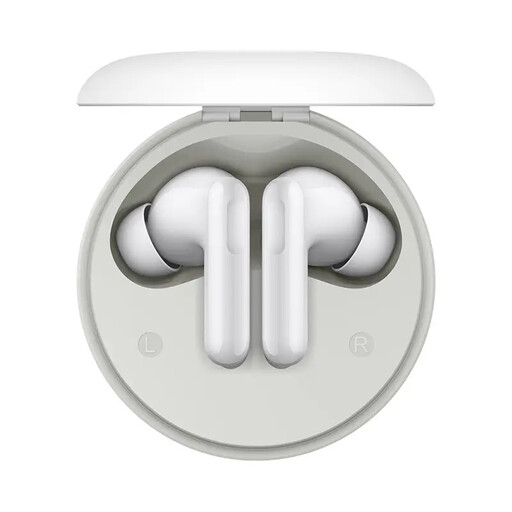
HONOR Earbuds A Pro, 12.4mm, 49dB ANC
These wireless earbuds focus on listening features; before buying, check separately how you can use them to speak in your lesson app.
The product name lists Bluetooth, 49dB active noise cancellation and a 12.4mm driver. The description also mentions a transparency mode.
View at Joybuy
 No image available
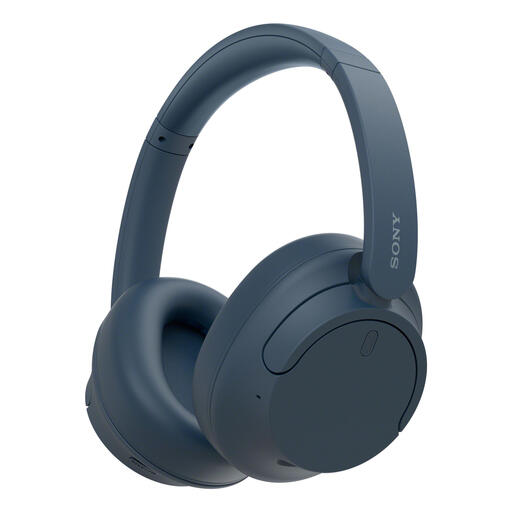
Sony WH-CH720N wireless Bluetooth headphones, blue
For wireless listening and joining conversations, the product information lists ANC and microphones in the ear cups.
According to the description, ANC can be adjusted across 20 levels. Multipoint connectivity and a weight of 192 g are also listed; check that it will connect to your lesson device.
View at Joybuy
Frequently asked questions
Is noise cancellation for the microphone the same as ANC for my ears?
No. Manufacturers describe microphone noise cancellation as a feature that affects the voice sent to other people; ANC in the ear cups is designed to reduce the sound you hear. Check which of these features the exact model has.
How do I set up a USB headset before my first lesson?
Connect the right USB version, then select the headset as both the microphone and speaker in your operating system and lesson app. Check the mute function and make a short test recording. If you have problems, the Logitech guide also recommends checking the connection and input and output settings.
What should I check for maintenance and long-term use?
Check whether the ear cushions are replaceable on your exact model, and follow the instructions for cleaning the ear cushions and microphone boom. EPOS lists replaceable ear cushions for the IMPACT 860 ANC; this doesn’t apply to other headsets.
What are my rights when buying online in the Netherlands?
For online consumer purchases, you generally have up to 14 days after delivery to change your mind, subject to legal exceptions. ACM ConsuWijzer also explains that if a product doesn’t do what you could reasonably expect under normal use, you have rights against the seller; there is no general fixed two-year end date for the statutory guarantee.


