What to look for in a headset with a microphone
First, decide who will be speaking and from where. Then consider comfort and how the headset connects to the device you’ll use to join the call.
| Consideration |
What to look for when buying |
Who is this important for? |
| Being clearly heard when you speak |
Check the microphone position and mute controls, and test the microphone in your calling app. |
If I want to ask questions myself, my voice needs to come through clearly and I want to be able to mute quickly; around 36% of consumers say being clearly heard is their main concern. |
| Listening comfort |
Consider the fit, adjustability and volume controls; if possible, try the headset during a call of a similar length. |
If I’ll mainly be listening, the headset needs to feel comfortable and I want to adjust the volume easily; around 29% of consumers prioritise listening comfort. |
| Connection |
Compare the plug on the exact version with the available port or wireless options on your device. |
If I want to join without connection problems, the version needs to work with my device; around 21% of consumers put connection first. |
| Several speakers in one room |
Check whether the microphone can pick up voices from all speaking positions, and look out for active audio devices that could cause echo. |
If other people in the same room also need to be heard remotely, I want to know whether the room set-up will pick up their voices; around 14% of consumers say joining from one room is their main concern. |
Joybuy headsets for calls
These Joybuy products are personal headsets with microphones for participants who want to speak and listen. Check that the connection and controls on each version suit your device and the call.
 No image available
JBL Quantum 300 wired gaming headset, black
The flip-up microphone is designed for individual use; check that the connection works with your device.
3.5mm connection and USB audio adapter. The product description mentions a directional microphone, muting by flipping the microphone up, and memory foam ear cushions.
Joybuy
 No image available
Sennheiser MOMENTUM 4 Wireless, black
A wireless option if you want to move around during the call; check that your device supports Bluetooth.
The product information lists Bluetooth, four microphones for calls, an included 3.5mm audio cable and 60 hours of battery life.
Joybuy
 No image available
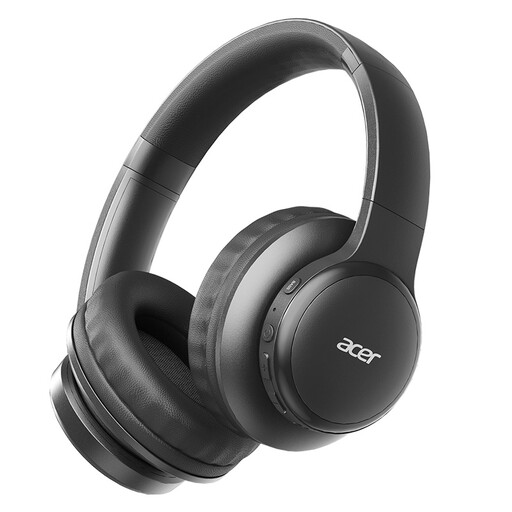
Acer OHR559 OWS wireless headphones
A wireless option for listening and making calls; check that it connects to your device.
The product title lists Bluetooth 5.3, a USB-C charging port and a foldable design. The product description mentions microphone technology for voice calls.
Joybuy
 No image available
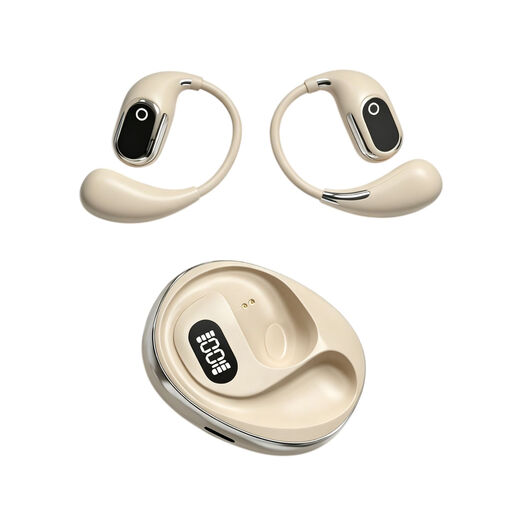
OWS on-ear headphones with microphone
The product title mentions a built-in microphone for people who want to speak and listen.
The title lists a condenser microphone, binaural mode and a charging case with Type-C. The product description mentions translation and on-location recording.
Joybuy
 No image available
Jabra Evolve2 30 SE headset
A wired headset for speaking and listening; check that the USB-A connection works with your device.
The product information lists USB-A, stereo ear cups and in-line controls. It also mentions two microphones, mute and call controls, an adjustable headband and memory foam ear cushions.
Joybuy
Frequently asked questions
Can one headset make everyone beside me clearly audible?
Don’t assume it can. If several people need to speak from the same room, assess microphone coverage at each speaking position and check the audio set-up. In larger rooms, one microphone may not pick up voices from elsewhere.
How can you check your headset before a call?
Connect or pair the right version and test the microphone on your device. Try the mute controls too. If there are several devices in the same room, check that no more than one unnecessary audio connection is active.
What can you do if your headset breaks too soon during normal use?
According to ACM ConsuWijzer, in addition to any manufacturer’s warranty, you have a legal guarantee from the seller if the product doesn’t meet what you could reasonably expect from it. This doesn’t mean that every headset has a fixed legal guarantee period of exactly two years.
Can you return a headset bought online in the Netherlands?
According to ACM ConsuWijzer, online purchases generally come with a statutory cooling-off period of up to 14 days after delivery, subject to legal exceptions. Before unpacking and trying the product, check the conditions that apply to it and to the return.


