
Callers who want to be heard clearly
If there’s noise around you, you’ll want to position the microphone well and mute it quickly. Logitech and Trust describe these features on specific models, but actual voice quality depends on your situation.


Start by choosing a headset with a microphone that works with your calling device and is easy to position and mute. A wired USB headset suits calls from one place, provided your device has a compatible port. Bluetooth gives you more freedom to move around, but you’ll need to pair and charge it. Zoom advises avoiding backlighting on camera: a headset won’t change the lighting on your face.
If there’s noise around you, you’ll want to position the microphone well and mute it quickly. Logitech and Trust describe these features on specific models, but actual voice quality depends on your situation.
Your choice depends on your device’s connection and whether you’ll stay in one place or want to move around during the call. Check the connection on the exact headset variant.
If you’re sitting by a bright window, assess your camera view and lighting separately from your headset. Zoom advises avoiding backlighting for a clear camera view.
First, check that the headset works with your calling device and that its microphone is easy to use. Then consider whether your main concern is being heard clearly, having freedom to move around or improving your image by the window.
| What to consider | What should you check? | Who is this important for? |
|---|---|---|
| Being heard clearly and muting | Check how you can position and mute the microphone; try it out in your own room beforehand. | If there’s background noise at home, I want to be able to position the microphone well and mute it quickly. Around 36% of consumers put clear calls and muting at the top of their list of reasons to buy. |
| Connecting to your device | Check the port on your computer or phone and the plug on the exact variant. Choose Bluetooth only if it works with your device and calling app. | I want a headset that works straight away with the device I use for calls, without an unsuitable plug. Around 29% of consumers give device compatibility their top priority. |
| Being visible by the window | Check your camera view first; try sitting somewhere else or reducing the daylight. Zoom advises avoiding backlighting for a clear camera view. | If a bright window behind me makes my face look dark, I want to adjust the light or my position first. Around 21% of consumers see being visible by the window as the main reason to look for a solution. |
| Comfort and freedom to move | Consider the fit and how much room the cable gives you. With a wireless headset, you’ll also need to factor in charging. | I want to sit comfortably or move around during the call without a cable getting in my way. Around 14% of consumers put comfort or freedom of movement first. |
A headset with a microphone won’t change the lighting on your face. Zoom advises avoiding backlighting in your camera view.
Check your image first and, if possible, try sitting somewhere else or reducing the daylight.
A product range may include variants with different plugs, so a headset might not connect directly to your device.
Before ordering, compare the full product name, connection and included components with your device.
If the port isn’t compatible, you may need a different variant or a suitable adapter.
A microphone feature that reduces background noise doesn’t mean you’ll hear less of the noise around you.
Choose separately based on microphone controls and the ear cushions or wearing style you prefer; try the voice transmission in your own room.
ACM ConsuWijzer distinguishes between the statutory guarantee and an extended warranty from the seller or manufacturer.
Check what an extended warranty covers before you pay for it.
An extended warranty costs extra, so compare its cover with the rights you already have.
The H390 is a wired option for computer use, while the Zone 300 is a Bluetooth headset for anyone who wants more freedom to move around.
The Ayda USB-ENC is an on-ear computer headset with a wired connection and a flip-up microphone.
The Evolve2 30 SE is a range of wired headsets for anyone who wants to use their headset for both calls and listening.
The Blackwire 3200 series includes wired headsets in mono and stereo styles.
This selection focuses on wired headsets for computer and phone calls. Check whether USB-A, USB-C or 3.5 mm is compatible with your device for each model.
 No image available
A wired option for computer calls if you’re looking for an adjustable microphone boom and mute controls.
The product description lists USB, in-line volume and mute controls, and a mute indicator. It also mentions an adjustable headband and soft ear cushions.
 No image available
A wired headset for computer calls if you want an adjustable microphone.
The product description lists USB plug-and-play, an adjustable microphone and a lightweight, adjustable headband.
 No image available
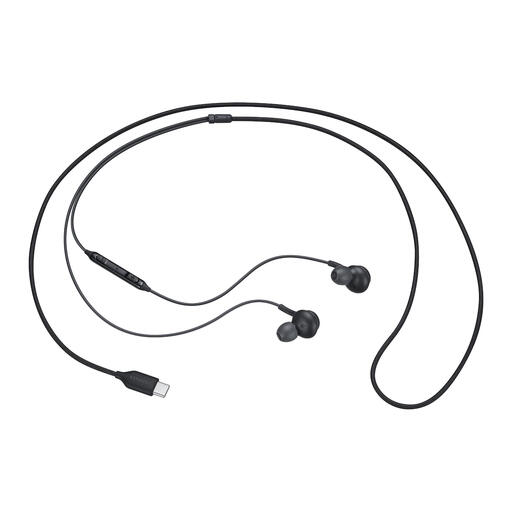
A wired in-ear option for calls if your device uses USB Type-C.
The product information lists a built-in microphone, mute controls on the cable and ear tips in different sizes.
 No image available
A wired headset for video calls if your computer has a compatible USB Type-A port and you want to be able to mute the microphone.
The product description lists on-ear controls, an adjustable headband and a flip-up mute microphone.
 No image available
A wired option for calls if your device has a compatible 3.5 mm connection.
The product information lists an adjustable microphone and in-line controls for muting it.
No. Check your camera view, avoid backlighting where possible, and try reducing the daylight or sitting somewhere else. This is separate from your choice of microphone.
First, check the connection on the exact variant and your device. For the Logitech H390 variant described, plug the USB-A connector into an available port on your computer. Then select the right microphone and speaker in your calling app, and test speaking and muting.
Yes. Logitech states that the Zone 300 offers up to 16 hours of talk time after a full charge; this is a manufacturer figure. Before your call, check the charge and make sure the headset is paired with your calling device.
When you buy online from a business, you generally have a 14-day cooling-off period after delivery, subject to exceptions, according to ACM ConsuWijzer. You’re also entitled to a product that, under normal use, meets what you could reasonably expect. An additional manufacturer’s warranty doesn’t replace this statutory right.
Electronic devices placed on the EU market must meet the applicable product safety requirements and carry the required CE marking, according to the Dutch government. Check the marking and product information for the exact variant; these don’t constitute a performance test of the microphone.