Choose a wired headset with a boom microphone that you can position close to your mouth, and a connection that works with your recording device. In a quiet room, a basic USB headset may be enough. If there are conversations in the background, you could consider a model with a noise-cancelling microphone, but a manufacturer’s claim doesn’t prove that it will record Dutch pronunciation more clearly. Make a short test recording first and check how clear it sounds and whether the recording level is right.
Who is this buying guide for?
Independent language learner
Records short speaking exercises while seated and wants to listen back to their own voice. Keeping the microphone in a consistent position and making a short test recording can help. Logitech and Audacity offer practical guidance on positioning and recording.
Learner practising in a shared space
Sometimes records with other voices in the background and mainly wants to check that their own speech remains clear in a test recording. Trust and Audacity offer pointers on choosing a microphone and testing it in your practice space.
User with long practice sessions
May combine speaking exercises with online calls, so comfort, mute controls and wearing style are worth considering. Jabra and HP describe features and variants that may help you make your choice.
What should you look for when buying?
Start by considering what your practice space and device need. Then make a short test recording to check whether the microphone captures the sound you want.
| What to consider |
What should you check? |
Who is this important for? |
| Clarity |
Position the boom microphone near your mouth, select the headset as your input device and check the level with a test recording. |
If I want to listen back to my pronunciation, my voice needs to be clear and the signal mustn’t peak. Around 36% of consumers put the clarity of their own voice first. |
| Background noise |
Test the headset where you practise, with the background noise you’d normally expect to hear there. |
In a shared space, I want to check whether other voices affect my recording rather than relying on a product description alone. Around 29% of consumers give managing background noise the highest priority. |
| Connection and input |
Check whether it uses USB-A or USB-C, which port your device has, and whether your recording app uses the headset microphone. |
If I practise on a specific device, I want to make sure both the headset and the recording app recognise the microphone. Around 21% of consumers start by checking device compatibility. |
| Comfort |
Look for adjustability and, where available, a choice between mono and stereo. |
For repeated or longer sessions spent sitting down, I want a fit and wearing style that I find comfortable. Around 14% of consumers put comfort first. |
Common pitfalls
-
Choosing a headset based on the Ayda name alone
Trust sells several versions under this name, including model 25088 Ayda USB and model 25089 Ayda USB-ENC. The name alone doesn’t tell you which connection or microphone version you’ll get.
Check the model number, connection and stated microphone features of the version you want to order.
-
Assuming the loudest recording is the best
Audacity explains that recording at too high a level can cause clipping. Once this distortion has occurred, it can’t be undone afterwards.
Make a test recording and lower the level if the meter reaches its maximum.
-
Assuming noise cancellation means better pronunciation recordings
Descriptions of noise cancellation refer to microphone features for voice communication. They don’t prove that individual Dutch sounds will be captured more clearly.
Assess the sound in your own practice space and listen back to a short test recording before choosing this feature.
-
Assuming there is a fixed statutory guarantee period
The Dutch government states that there is no fixed statutory guarantee period in the Netherlands. Any manufacturer’s guarantee is separate from your statutory rights if a product is faulty.
Keep your proof of purchase and contact the seller if you have a problem with a faulty product.
Brands to consider
Logitech
The H390 is a wired computer headset worth considering for desk-based practice.
- Logitech lists an adjustable headband, a positionable boom microphone, and volume and mute controls for the H390.
- The Dutch product page offers USB-A and USB-C options, so check which version you’re buying. The stated product features don’t prove that Dutch pronunciation will be recorded more accurately.
Trust
The Ayda range includes several wired versions. The USB-ENC version is worth looking at if there’s often background noise.
- For model 25089, Trust describes a noise-cancelling microphone, an adjustable headband and a flip-up mute function.
- Model 25088 Ayda USB is a separate version. The description of noise reduction isn’t an independent recording comparison for speaking exercises.
Jabra
The Evolve2 40 SE is a wired business headset for anyone who combines speaking exercises with frequent calls.
- Jabra lists three microphones, passive noise isolation and a mute function on the boom microphone.
- These are product claims for calls, not proof of better recordings of Dutch pronunciation. Check the exact USB and wearing-style version.
Poly
The Blackwire 3200 series includes wired business headsets with different connection and wearing-style options.
- HP describes adjustable fits and mono or stereo options within the series. For the Blackwire 3220 Stereo USB-C with USB-C/A adapter, HP lists a noise-cancelling boom microphone.
- That connection and microphone specification don’t automatically apply to every version in the Blackwire 3200 series.
Headsets at Joybuy
These wired headsets are options to consider for desk-based speaking exercises. Check which connection works with your recording device.
 No image available
Trust GXT 490 FAYZO USB Type-A, white
The wired USB connection and flexible microphone make this an option for desk-based practice.
The product description lists a detachable microphone, volume control and mute control. It describes the microphone as noise-cancelling; this isn’t a recording comparison for Dutch speaking exercises.
View at Joybuy
 No image available
JBL Quantum 120, wired, black
This headset could suit you if your recording device has a compatible 3.5mm connection.
The product description lists a detachable cardioid microphone and microphone controls. The stated microphone and noise-cancelling features are product claims, not proof of better recordings of Dutch pronunciation.
View at Joybuy
 No image available
Trust GXT 415 Zirox, wired
The fixed cable and foldable microphone are practical features to consider for desk-based practice.
The product information lists a 2-metre cable, a 3.5mm connection, volume control and microphone mute. Your device needs to have a compatible 3.5mm connection.
View at Joybuy
 No image available
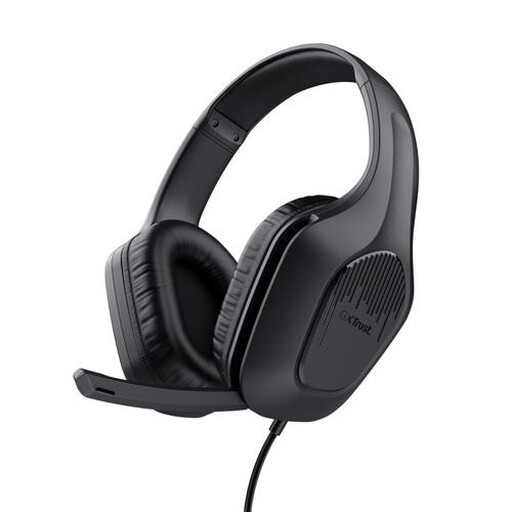
Trust Ayda, USB Type-A
The wired connection and mute control could be useful during seated speaking exercises.
The product information lists USB Type-A with a USB-C adapter cable, volume control and a flip-up microphone mute. Trust describes the microphone as noise-cancelling; check the results with a test recording.
View at Joybuy
 No image available
Razer BlackShark V2 X 7.1, wired
This headset is an option if your device has a compatible 3.5mm connection and you want a microphone mute button.
The product information lists a cardioid microphone, volume control and microphone mute. The instructions recommend keeping the microphone around 1–2 inches from your mouth.
View at Joybuy
Frequently asked questions
How can I tell if I’m actually recording through the headset?
Select the headset as the microphone in your recording software, speak at a normal volume for a few seconds and listen back to the recording. Check the level meter and lower the recording level if the signal is too high; Audacity recommends this as a recording practice.
Will a USB-C headset work with any phone or tablet that has USB-C?
No, don’t assume that it will. Jabra notes that not every USB-C device or app supports the Evolve2 40’s audio connection. Check compatibility with your device and app, as well as the exact headset version.
What rights do I have when buying online in the Netherlands?
According to the Dutch government, many applicable online purchases from a business come with a 14-day cooling-off period. You can also contact the seller if a product is faulty; the Dutch government states that there is no fixed statutory guarantee period. Check the terms that apply to your specific purchase.
Can I record a practice partner’s voice and share the recording?
That depends on the situation, so agree with your practice partner in advance whether you can record and, if relevant, share the recording. The Dutch Data Protection Authority explains that a legal basis is required where the GDPR applies, but this general guidance doesn’t determine whether a particular private recording or publication is permitted.


