
Practising speaker who listens back to recordings
You want to assess your own voice clearly. An adjustable microphone and a short test recording help you check its position and sound before a long recording.


Start with a headset that works with your recording device and feels comfortable to wear during a long session. A wired USB headset may suit computer recordings. If you switch between devices or want replaceable ear cushions, check the exact model and connections carefully. Always make a short test recording first: product specifications can’t tell you how your Dutch pronunciation will sound when recorded.
You want to assess your own voice clearly. An adjustable microphone and a short test recording help you check its position and sound before a long recording.
If you wear your headset for long periods, fit, ear cushions and freedom of movement all matter. The manufacturer’s description is no substitute for trying it on yourself.
If you want to switch between, for example, a computer and a mobile device, check both the connection and whether your device and recording app support the headset. Jabra states that not all USB-C devices or apps support the audio connection for the Evolve2 40.
First, check that the headset and recording app work with your device, and that the fit is comfortable for you during long sessions. Then test the microphone position, recording level and controls with a short clip.
| What to consider | What should you check? | Who should pay extra attention? |
|---|---|---|
| Listening back to your voice | Adjust the microphone according to the model’s instructions, then use a test recording to check for distortion and words being cut off. | When I listen back to my pronunciation, I want to be able to assess both quiet and loud words. Around 33% of consumers prioritise how clearly their own voice can be heard. |
| Comfort during long recordings | Consider adjustability, wearing style and ear cushions. Also check whether the cushions are replaceable if that matters to you. | When I practise for a long time, I want a fit that won’t distract me. Around 27% of consumers give comfort the highest priority. |
| Connection and compatibility | Check the exact model, the port and whether your recording app recognises the headset as an input source. | When I record on more than one device, I want to be sure the microphone also works with my app. Around 20% of consumers prioritise device compatibility. |
| Control over your recording | Test the mute function and recording level. If you use Audacity, export a backup afterwards. | During a long recording, I don’t want to discover afterwards that the microphone was muted or the sound was distorted. Around 20% of consumers focus mainly on control during and after recording. |
A product description mentioning noise cancellation won’t tell you how your Dutch pronunciation will sound in your room.
Before a long recording, make a short one using both quiet and loud words, then listen back.
Connections vary by model and version, and some devices or apps don’t support the audio connection.
Check the full model details, the port and the input source selected in your recording app.
An unnoticed mute setting or clipping can make a long recording less useful. Audacity recommends checking the level with a test recording.
Before you start, check the mute setting and level meter, then make a backup afterwards.
The H340 and H390 are wired computer headsets for use with a compatible USB-A connection.
The Blackwire 5200 series is worth considering if you’re looking for a wired headset and want to compare wearing styles.
The ATH-M20xSTS StreamSet is worth a look if you want a boom microphone and multiple connection options.
The Evolve2 40 range may be worth considering if you’re looking at a wired headset with a microphone close to your mouth.
This selection of Joybuy products includes headsets with microphones for voice use, covering both wired models and a wireless version. Check each model’s connection and compatibility with your recording device and app.
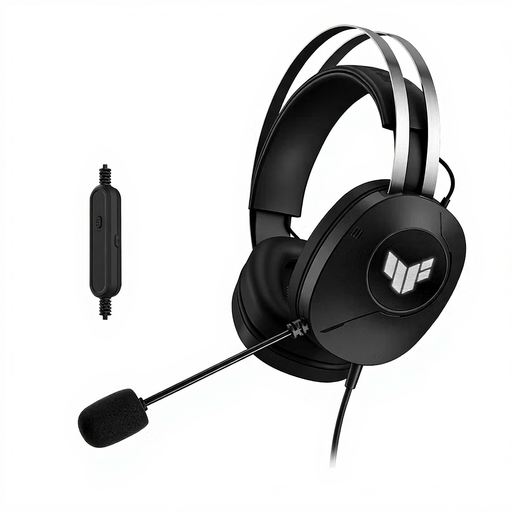 Image unavailable
A wired USB Type-A headset with a boom microphone to consider for computer recordings. Check that your recording app recognises the microphone.
The product description specifies a foldable microphone, adjustable headband, over-ear ear cushions and a weight of 297 g.
 Image unavailable
A wired USB headset to consider if you want to be able to position and mute the microphone during a computer session.
The product description specifies an adjustable, rotatable microphone boom and volume and mute controls on the cable. Check that the connection works with your recording device.
 Image unavailable
A wired stereo headset with a USB connection to consider for voice recordings on a computer.
The product description specifies plug-and-play and volume controls on the cable. Before a long recording, select the microphone as the input source and test the recording level.
 Image unavailable
A wired USB headset to consider for a computer with a compatible USB connection.
Logitech describes the H340 as plug-and-play and specifies an adjustable microphone. Make a test recording to see how your voice sounds.
 Image unavailable
A wireless headset with a detachable boom microphone to consider if you’re not looking for a wired model. Check that the connection works with your recording device and app.
The product name specifies Bluetooth and 2.4 GHz, a detachable boom microphone and memory foam ear cushions.
Start with a short recording and check the microphone position and level. The Audacity manual suggests aiming for a peak of around −6 dB when recording in Audacity. Then listen back to assess how your own voice sounds.
No, you can’t assume that. Jabra states that not all USB-C devices or apps support the audio connection for the Evolve2 40. Check compatibility with your exact headset, device and app by making a test recording.
If you use Audacity, the manual recommends exporting an audio backup straight away, before editing the project.
In the Netherlands, your statutory guarantee is separate from any manufacturer’s warranty. If a product doesn’t meet your reasonable expectations during normal use, the seller must offer an appropriate free remedy, according to ACM ConsuWijzer. Online purchases also generally come with a statutory cooling-off period; ACM ConsuWijzer states that this ends 14 days after delivery. Check whether an exception applies to your purchase.
That depends on the recording and how you share it. The Dutch Data Protection Authority describes a limited exception for publication solely for personal or household purposes; this doesn’t automatically apply to public or professional publication. Consider the circumstances of the people involved before sharing the recording.