What should you look for?
Assess the recording itself: microphone placement, clear pronunciation and the connection each need to be checked separately.
| What to consider |
What should you check? |
Which consumers is this important for? |
| Keeping your voice clear |
Position the microphone close to your mouth, keep it out of the airflow and make a recording with the fan on. |
If I record while the fan is running, I want my voice to be easy to understand. Around 40% of consumers prioritise reducing fan noise. |
| Keeping pronunciation recognisable |
Record words with different consonants and soft word endings; compare the original with any processed version. |
If I want listeners to be able to judge Dutch sounds, I check that the recording still sounds natural. Around 30% of consumers prioritise recognisable pronunciation. |
| Connection and settings |
Check whether the exact version has USB-A, USB-C or 3.5 mm, then select the headset as the microphone input. |
If I want to use the headset with my laptop, the connection needs to fit and the microphone must be selectable in the recording software. Around 20% of consumers put connection and settings first. |
| Comfort and playback |
Check the fit of the headband and ear cushions; assess the microphone signal by making a recording. |
If I record several examples in a row and listen back to them, fit and comfort matter too. Around 10% of consumers make wearing comfort their top priority. |
Headsets at Joybuy
These wired headsets have different microphones and connections, including USB and 3.5 mm. Check which connection suits your recording device, then listen to the microphone in a test recording.
 Image unavailable
JBL Quantum 120 Wired Multiplatform Gaming Headset
This could suit you if you’re looking for a wired headset with a 3.5 mm connection and a microphone.
The product description lists a detachable cardioid microphone and settings via JBL QuantumENGINE. The stated software noise reduction doesn’t prove that fan noise will be filtered out or that Dutch sounds will remain clear.
View at Joybuy
 Image unavailable
CORSAIR HS80 RGB USB Wired Gaming Headset, White with Dolby Audio 7.1 Surround Sound
This could suit you if you want to record via USB and be able to mute the microphone between takes.
The product description lists a flip-up omnidirectional microphone that mutes when raised. Make a recording to assess how the microphone captures your voice and the fan.
View at Joybuy
 Image unavailable
Kingston USB Hi-Fi Headphones with Microphone
This could suit you if you want to record via USB and position the microphone boom close to your mouth.
The product description lists a 270° swivel microphone boom and plug-and-play use. Compatibility with Windows, Mac and Chromebooks is also mentioned; check that your recording device and software recognise the headset as a microphone input.
View at Joybuy
 Image unavailable
Trust Ayda Wired Headset, USB Type-A, Black
This could suit you if you’re recording on a laptop or PC with USB-A and want to be able to mute the microphone while using it.
The product description lists a flip-up microphone with a flip-to-mute function, on-headset volume control, an adjustable headband and breathable ear cushions. Check the microphone sound in a test recording.
View at Joybuy
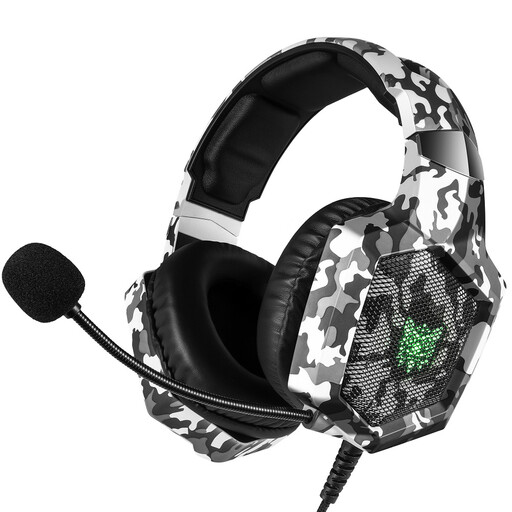 Image unavailable
ONIKUMA Model K8, Camouflage White
This could suit you if you’re looking for an adjustable microphone boom and a 3.5 mm connection for a PC or laptop.
The product description lists an adjustable omnidirectional microphone boom and a 3.5 mm connection. The claim that the microphone cancels noise isn’t an independent test of fan noise or how faithfully it captures pronunciation.
View at Joybuy
Frequently asked questions
Does noise cancelling in the earcups mean there will be less fan noise in my recording?
No. Earcup isolation or ANC affects what you hear; to assess the recording, check the microphone, any microphone processing and the recorded file. Jabra describes passive isolation and microphone technology separately.
How do I record while the fan is running?
Position the microphone close to your mouth and out of the direct airflow, then make a short test recording. Select the headset as your input device. If the fan noise is constant, you can use a section containing only noise as a profile in Audacity; afterwards, listen to check that your voice still sounds natural.
What can I do if the headset isn’t suitable or breaks early?
Online purchases generally come with a 14-day statutory cooling-off period after delivery, subject to applicable exceptions. A faulty product is also covered by the statutory guarantee: in the Netherlands, the product must last as long as you could reasonably expect with normal use, and you should contact the seller about this. ACM ConsuWijzer explains these rights.
What should I consider when sharing word examples featuring other people’s voices?
If you process identifiable voices belonging to other people, consider which GDPR legal basis applies before recording and sharing. The Dutch Data Protection Authority lists consent as one possible legal basis, but not the only one.


