If you mainly read at a computer, a wired USB headset with an adjustable microphone boom is a practical starting point, provided the connection is compatible with your device. If you already have a suitable recorder or audio interface, check that a headset with separate connectors will work with it. And if you want to move around while reading, consider the wireless connection and charging requirements too. Position the microphone beside your mouth, not directly in the airflow, and check the result with a test recording: a claim about call clarity doesn’t prove how accurately your pronunciation will be captured.
Who is this guide for?
Readers who listen back to their pronunciation
You record short passages on a computer and want to compare your voice each time with the microphone in roughly the same position. Shure recommends positioning it beside your mouth, away from direct airflow. Choose a boom you can adjust, then check the result with a test recording.
Readers in a shared space
You want to reduce background noise without losing soft sounds, consonants or breathing. DPA Microphones points out that a microphone close to your mouth and nose can pick up wind noise. Check both its position and your own test recording, rather than relying on a noise-cancellation claim alone.
Readers with an existing audio interface
You want to connect your headset to your current recording set-up. Audio-Technica lists separate microphone and headphone connectors for the BPHS1, so check the connectors on the exact version against the ports on your equipment.
What should you look for?
Wired USB computer headset
A good fit if: you read at a computer and have a compatible USB-A or USB-C port.
Bear in mind: the cable limits your freedom to move. Noise cancellation for calls doesn’t automatically indicate how faithfully your voice will be recorded.
Wireless headset with microphone boom
A good fit if: you want to move around while practising and your recording device supports the Bluetooth connection or included adapter.
Bear in mind: charging needs to fit into your routine, and a stated wireless range doesn’t guarantee a reliable connection in your room.
Recording headset with separate connectors
A good fit if: you already have a suitable recorder or audio interface and want to connect the microphone and headphones separately.
Bear in mind: Audio-Technica specifies a 3-pin XLR microphone plug and a 6.3 mm headphone plug for the BPHS1. According to the manufacturer, the BPHS1-XF4 has a different cable configuration.
| What to consider |
What to look for |
Especially relevant for |
| Recording and microphone position |
Check that the boom is adjustable and test its position with p, b and t sounds. |
If I want to listen back to my pronunciation repeatedly, I need to be able to position the microphone consistently without speaking directly into the airflow. Around 36% of consumers put recording and microphone position first. |
| Connectivity |
Check your device’s ports, the connectors on the exact version and the recording input in your software. |
If I want to record with my computer, recorder or audio interface, the headset needs to match the inputs I actually use. Around 29% of consumers prioritise compatibility. |
| Listening back and comfort |
Check the playback output and mute controls, and make a test recording before reading for a long time. |
If I record and listen back to passages several times, I need to be able to wear the headset comfortably and play the recording through the intended device. Around 21% of consumers prioritise repeated use and comfort. |
| Freedom to move |
Check that your recording device can use the wireless microphone as an input, and test the connection in the space where you normally use it. |
If I want to read aloud standing up or while moving around, a cable could get in the way. I also need to factor in charging. Around 14% of consumers put freedom to move first. |
Common buying mistakes
-
Positioning the microphone directly in front of your mouth because closer seems better
A microphone in the direct airflow can pick up breathing and plosive sounds. For the SM35, Shure recommends positioning it beside the corner of your mouth, rather than directly in front of it.
Adjust the boom so it sits beside your mouth, then compare short test recordings using your usual reading voice.
-
Assuming noise cancellation for phone calls means your pronunciation will be recorded accurately
A manufacturer’s claim about call clarity doesn’t automatically tell you how soft sounds and consonants will come through in your recording.
Before a long practice session, record a short passage using the words and speaking volume you actually want to practise.
-
Assuming every version has the same connector
Logitech offers the H390 with USB-A and USB-C connectors. Audio-Technica lists different cable ends for the BPHS1 and BPHS1-XF4.
Check the full model and version name, then compare the microphone and headphone plugs with the ports on your device.
-
Confusing the manufacturer’s warranty with your statutory rights
According to the Dutch government, the Netherlands has no fixed statutory guarantee period. A manufacturer’s warranty doesn’t automatically replace your statutory rights if a product doesn’t meet expectations.
Keep your purchase and product information, and contact the retailer if the product is faulty.
Relevant brands to consider
Logitech
The H390 is a range of wired USB computer headsets for practising at a computer. When choosing one, check whether you need the USB-A or USB-C version.
- Logitech describes the H390 as having a noise-cancelling microphone and in-line controls.
- The manufacturer’s description for video calls isn’t an independent assessment of recordings of Dutch pronunciation.
Trust
The Ayda USB-ENC is an on-ear computer headset for anyone looking for a wired USB connection and a flip-to-mute microphone.
- Trust lists an adjustable headband and noise cancellation for calls.
- Check the exact connector version, then use a test recording to see whether soft sounds and consonants remain clear.
HP Poly
The Blackwire 3220 series is wired, while the Voyager 4300 UC series is a separate wireless range.
- HP describes the Blackwire 3220 as having a flexible microphone boom. One version comes with USB-C and a USB-A adapter.
- Connectors and included accessories can vary between versions. A stated wireless range doesn’t show how well it will work in your reading space.
Audio-Technica
The BPHS1 is a broadcast headset designed for use with compatible separate microphone and headphone connections.
- Audio-Technica lists an adjustable boom, closed-back earcups and separate XLR and 6.3 mm plugs for the BPHS1.
- According to the manufacturer, the BPHS1-XF4 has a different cable for intercom systems. Check the exact version and your equipment.
Jabra
The Evolve 20 is a range of computer headsets with several versions available.
- Jabra lists, among others, an Evolve 20 MS Stereo version with USB-C/A.
- Check the full version name and your recording device settings. The support information isn’t an independent assessment of reading recordings.
Joybuy product picks
These Joybuy picks include headsets with USB and 3.5 mm connections. Before choosing a version, check which recording and headphone inputs your device has.
 Image unavailable
Logitech PC 960 USB headset
A wired USB headset for recording on a computer. The adjustable microphone boom can be positioned beside your mouth.
View at Joybuy
 Image unavailable
Logitech H340 USB headset, black
A good option for recording on a computer if you’re looking for a wired USB headset with an adjustable microphone boom.
View at Joybuy
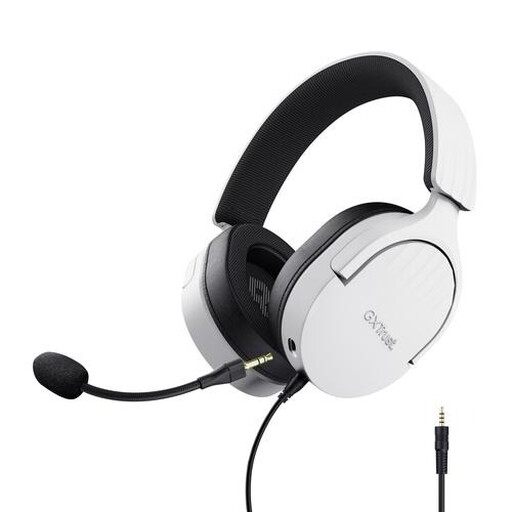 Image unavailable
Trust GXT 489W Fayzo gaming headset, white
The flexible, detachable microphone can be adjusted for a reading session.
Wired, with a 3.5 mm connection. Check that your device has a compatible connection for both microphone and audio.
View at Joybuy
 Image unavailable
Logitech H150, white (981-000350)
An option if your device has a compatible 3.5 mm connection. Check that it also supports microphone input.
If your device has separate audio and microphone ports, you may need a splitter. According to the product information, one isn’t included.
View at Joybuy
 Image unavailable
EPOS | SENNHEISER IMPACT SC 230 USB MS II headset, black
A good fit for computer recording if you’re looking for a USB headset with an adjustable microphone boom.
Single-sided design with one earcup.
View at Joybuy
Frequently asked questions
Where should you position the microphone for a test recording?
Start beside the corner of your mouth, rather than directly in front of it. Shure recommends this position for the SM35 to reduce plosive sounds. Try different positions with your headset to find what works, as the microphone boom can vary between versions.
Why isn’t my computer recording through the headset?
Select the headset as the recording device in your recording software, and check the playback device separately. Also make sure the microphone isn’t muted, then record a short test passage.
How can you avoid distortion when reading aloud?
Watch the level meter as you read at your usual loudest volume. Lower the recording level if the meter reaches its limit. Once clipping has been recorded, it can’t be undone afterwards.
Are you always entitled to exactly two years’ statutory warranty on a headset in the Netherlands?
No. According to the Dutch government, the Netherlands has no fixed statutory guarantee period. You’re entitled to a product that meets the standards you can reasonably expect. If a product is faulty, contact the retailer. Any stated manufacturer’s warranty is separate from this.
Can you return a headset bought online in the Netherlands?
According to the Dutch government, distance purchases often come with a 14-day cooling-off period, although there are exceptions. Before using the headset, check which terms apply to your specific purchase. A shop’s additional returns period isn’t the same as the statutory cooling-off period.


