If you usually practise sitting at a computer, look for a wired headset with a boom microphone and a connection that suits your device. Bluetooth may be a better choice if you want to move around while reading aloud, but test both recording and playback with your own device and app. On a Mac, playback quality may drop when the Bluetooth microphone is active. Noise cancellation for calls doesn’t prove that Dutch speech sounds will be recorded accurately.
Who should consider this choice?
Readers who listen back to check their pronunciation
You want to record your own voice and listen back to clips so you can focus on areas to improve. Pay attention to the microphone, the selected recording input and a test recording, not just the sound through the earcups. Microsoft Support explains how to select and test a microphone in Windows.
Evening practice in a shared space
You want to listen to your recording through a headset rather than room speakers. Fit and easy-to-reach volume controls matter here; microphone noise cancellation won’t make your voice quieter for other people in the household.
Readers who want to move around while practising
You’d rather have freedom to move than be tethered by a cable. Check that your device can use the Bluetooth headset’s microphone as the recording input, and test playback too. Apple Support describes how sound quality can change on a Mac when the Bluetooth microphone is active.
What should you look for?
For evening read-aloud practice, your choice mainly depends on what you want to hear in your recording, how you’ll listen back and which connection your device supports.
| What to consider |
What to look for |
Who should pay particular attention? |
| Recording your voice clearly |
Select the headset as the recording input and make a short test recording in your practice app. Listen for consonants, volume and sounds that drop out. |
If I want to assess my pronunciation, I need to hear my own voice clearly. Around 36% of consumers mainly want to assess how intelligible their recording is. |
| Listening back without disturbing others |
Check the fit and how easy it is to reach the volume control. Listen at a comfortable volume through the headset rather than room speakers. |
If I practise in a shared space in the evening, I want to listen to my recording through a headset. Around 29% of consumers want to listen back without disturbing others. |
| Selecting the right recording input |
Compare the connection on the version you’ve chosen with your device. Then check which microphone is selected in the operating system and recording app. |
If I want to avoid my device using a different microphone, I check the connection and input selection first. Around 21% of consumers mainly look for a recording connection that works with their device. |
| Comfort and freedom to move |
Decide whether you’ll practise sitting down or walking around. If you choose Bluetooth, test recording and playback at the same time on your own device. |
If I want to move while reading aloud, I weigh up a wireless connection against charging and compatibility with my device. Around 14% of consumers are mainly looking for comfort or freedom to move. |
Common buying mistakes
-
Assuming call-focused noise cancellation is a pronunciation test
Manufacturers often describe noise cancellation as a feature for calls. It won’t silence your voice as you speak aloud in the room, and it doesn’t prove that subtle speech sounds will be recorded accurately.
Make a test recording using your own practice text, then listen carefully for the sounds you want to improve.
-
Assuming versions with the same model name are identical
A product range may include versions with different connections and accessories. A version that doesn’t connect to your device may need a suitable adapter, or you may need a different version.
Check the full model name, connection and included accessories before you choose.
-
Confusing a stated warranty period with the Dutch legal position
A product page may describe a period as a legal warranty, but the Dutch government says there is no fixed statutory warranty period in the Netherlands.
Distinguish between a manufacturer’s warranty and your legal right to a product that is fit for purpose. If there’s a fault, contact the seller.
Relevant brands to compare
Logitech
The wired H390 is a USB-A option for recording on a computer from a fixed position.
- Logitech lists an adjustable headband, rotating boom microphone, volume controls and a mute function for the H390. The cable is 1,9 m long.
- The manufacturer describes its noise cancellation as a feature for calls; it isn’t an independent pronunciation test. Check the connection on the version you’re considering.
Trust
The Ayda range includes wired versions with different connections, as well as a wireless Bluetooth version. So it’s important to check the full model name.
- Trust describes the Ayda USB-ENC as having a fold-up, muteable microphone and a USB or USB-C connection.
- Bluetooth and a rechargeable battery are features of the wireless Ayda ENC. Noise reduction claims aren’t an independent test of recordings for read-aloud practice.
HP Poly
The Blackwire 3220 USB-A is a wired stereo headset for a computer with USB-A.
- For this USB-A version, HP lists on-ear earcups and a noise-cancelling microphone.
- Other Blackwire 3220 versions may have a different connection or adapter. Call specifications aren’t a measure of pronunciation.
EPOS
The wired IMPACT 100 series is worth considering if you’re looking for a USB-C connection with a USB-A adapter.
- EPOS lists a weight of 76 g and a directional microphone for the stereo version.
- These are manufacturer specifications and claims; check whether you’re choosing the mono or stereo version. They don’t prove accuracy for speech recordings.
Jabra
The Evolve2 30 SE is a business headset range to compare if fit and voice recording matter to you.
- Jabra describes the Evolve2 30 as having a two-microphone system and foam cushions.
- The product information distinguishes between versions for different collaboration platforms. The manufacturer’s description doesn’t show how naturally spoken Dutch will be recorded.
Headsets on Joybuy
These Joybuy picks include wired headsets with a 3,5mm or USB connection, and a wireless Bluetooth headset. Check the connection and recording input with your own device and app.
 No image available
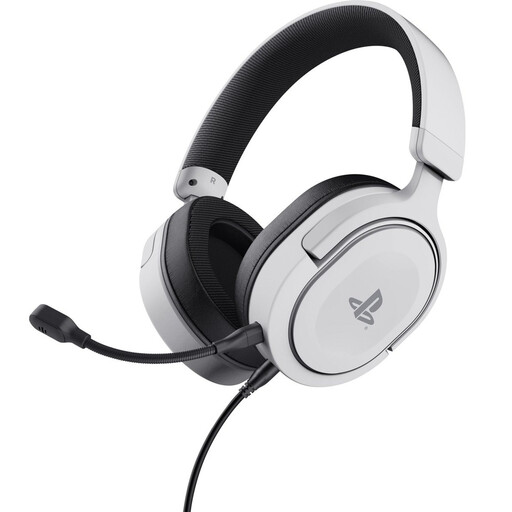
Trust GXT 498W Forta gaming headset, wired, white
An option to compare if you want to practise with a wired headset and use its microphone as the recording input. Check that the connection works with your device.
The product name lists over-ear earcups, 50 mm drivers and an official PS5 licence.
The product description warns that listening at high volume for long periods may damage your hearing.
View on Joybuy
 No image available
Razer Kraken V3 X headset, black
A wired USB option to compare if you want to record on a computer. Check that the headset microphone is selected as the input in your recording app.
The product description warns that listening at high volume for long periods may damage your hearing.
View on Joybuy
 No image available
Jabra Evolve2 75 headset
A wireless option to compare if you want to move around while practising. Test both recording and playback with your own device and app.
Wireless use means you’ll need to charge it. According to Apple Support, playback quality may drop on a Mac when the Bluetooth microphone is in use.
View on Joybuy
 No image available
Logitech PC 960 USB headset
A wired USB option to compare if you want to record on a computer. Check that the headset is selected as the microphone in your operating system and recording app.
The product description warns that listening at high volume for long periods may damage your hearing.
View on Joybuy
 No image available
Logitech H650e Stereo headset, wired
A wired USB option to compare if you want to record on a computer and listen back through a headset. Check the input selection in your recording app.
The product description warns that listening at high volume for long periods may damage your hearing.
View on Joybuy
Frequently asked questions
How can you check that your reading is being recorded with the right microphone?
Select the headset microphone as the audio input on your device and in your recording app. In Windows, you can start a test through the microphone settings, speak normally and play back the sample. Adjust the input volume if needed.
Can Bluetooth affect playback while you’re recording?
This can happen on a Mac when an app uses the Bluetooth microphone, causing the headset to switch to a speech mode. Apple Support explains that playback quality temporarily drops in this situation. Test this combination with your own device and app; it won’t necessarily happen with every Bluetooth setup.
How can you use a headset comfortably for evening practice?
Listen at a comfortable volume and take listening breaks. Before you practise, check which microphone is selected as the input and make a short test recording. Follow the care instructions for your model when cleaning the ear cushions.
What can you do if a headset bought online doesn’t fit or develops a fault?
For a standard online purchase from a business in the Netherlands, you’ll usually have a 14-day cooling-off period; check the applicable terms. If a product is faulty, the seller must offer a solution. The Dutch government says there is no fixed statutory warranty period in the Netherlands.


