If you mainly record short clips while seated at a computer, start with a wired headset that has the right connection for your computer. Mono may suit you if you want to keep one ear free; stereo may be better if you want to listen back through both earcups. Wireless gives you more freedom to move around. Make a short test recording first and check that your recording app is using the right microphone.
Who is this guide for?
Pronunciation tester
Records short sentences again to listen back to their own pronunciation. Keeping the microphone in a consistent position and making a test recording can help you check your settings. Microsoft Support explains how to record and play back a microphone test, while Shure offers advice on microphone placement.
Frequent listener
Often switches between speaking and listening, so pays attention to how the headset is worn, how it fits and how easy it is to control recording and playback. The Audacity manual explains how to select the recording source.
Practises in different places
Switches between devices or moves around while speaking. Check the connection on the version you choose: HP, for example, lists a 3.5 mm option for the Blackwire 3315 and 3325, while JBL describes the Quantum 350 Wireless as using a USB dongle.
What should you look for in a headset for short speech recordings?
First decide where you’ll be recording and how you’ll listen back. Then check the microphone input with a short test in the app you normally use.
| What to consider |
What should you check? |
Who is this important for? |
| Clear speech |
Choose an adjustable microphone boom if you need one. Position the microphone beside your mouth and listen back to a test recording. |
If you’re re-recording short sentences, being able to hear your pronunciation consistently is what matters most. Around 36% of consumers put speech clarity first. |
| Connection and recording input |
Check whether the version has USB-A or USB-C, then select the headset as the input device in your recording app once it’s connected. |
If you want to record several takes without wondering which microphone is in use, check both the connection and the recording source. Around 29% of consumers prioritise connection reliability. |
| Listening back and fit |
Check whether the version is mono or stereo, and whether it feels comfortable to wear. |
If you often switch between speaking and listening back, how the headset fits may influence your choice. Around 21% of consumers give listening back and wearing comfort top priority. |
| Freedom to move |
Check the connection type and whether your device supports the required receiver. |
If you want to move around while practising, weigh the freedom of going wireless against having to manage a receiver and battery charge. Around 14% of consumers prioritise freedom to move. |
Pitfalls when buying a headset for speech practice
-
Assuming noise cancellation guarantees good pronunciation recordings
Manufacturers often describe noise cancellation as a feature for calls. On its own, that feature doesn’t tell you how a recording of Dutch pronunciation will sound.
Make a short test recording using your own app and listen back to it. Don’t compare unmeasured recording quality based solely on a feature name.
-
Assuming one version’s connection applies to the whole product range
Connections can vary by product code. According to HP, the 3.5 mm option in the HP Poly Blackwire 3300 series is listed only for the 3315 and 3325.
Check the full model name and version, and compare the connection with the port and microphone support on your recording device.
-
Assuming a shop listing matches a verified manufacturer version
The Jabra Evolve2 30 SE comes in several USB versions. The model name alone won’t tell you which one you need for your device.
Before buying, check the full manufacturer code and the connection listed for the specific version.
Brands to consider for this use
Logitech
The H390 is a wired computer headset worth considering if your device has a suitable USB-A connection.
- Logitech lists an adjustable microphone boom and in-line controls for the H390.
- These product specifications don’t prove how accurately it records pronunciation in short clips, so check the exact USB version.
EPOS
The IMPACT SC 30 USB ML is a wired mono option if you want to keep one ear free while practising.
- EPOS lists USB connectivity for PC, a noise-cancelling microphone and in-line controls.
- Claims about call clarity aren’t an independent measurement of how it performs for short pronunciation recordings.
Jabra
The Evolve2 30 SE comes in different USB and mono or stereo versions.
- Jabra specifies a two-microphone system for the range.
- USB-A, USB-C and combined USB-C/A versions have different product codes. Claims about calls don’t prove an advantage for assessing pronunciation.
HP Poly
The Blackwire 3300 series is worth considering if you want to compare fit and connection options across versions.
- HP lists mono and stereo options, as well as a flexible microphone.
- According to HP, the 3.5 mm option is available only on the Blackwire 3315 and 3325, not automatically across the whole series.
JBL
The Quantum 350 Wireless is a wireless option if freedom to move is a priority.
- JBL lists a 2.4 GHz USB dongle, a detachable microphone boom and 22 hours of battery life.
- Battery life is a product specification, not a measured recording time for this type of practice. The stated features don’t prove how accurately it records Dutch pronunciation.
Joybuy headsets for short speech recordings
This selection of Joybuy products includes wired and wireless headsets to consider for short speech recordings and listening back. Check that the microphone and connection on each version work with your device and recording app.
 Image unavailable
Jabra Evolve2 75 headset
An option if you want freedom to move while practising. Before you buy, check that the microphone on this version works as an input in your recording app.
The product information lists wireless Bluetooth connectivity and a battery, so bear in mind that it needs charging and a wireless connection.
Joybuy
 Image unavailable
Logitech PC 960 wired USB headset
A wired USB headset to consider if you record short clips at a computer.
Check that the USB connection is compatible with your device, then select the headset as the recording source in your app.
Joybuy
 Image unavailable
Jabra Evolve2 65 USB-A Black MS Mono
The mono version may suit you if you want to keep one ear free. Check how it fits and whether its microphone works with your recording app.
The product information lists Bluetooth, a USB-A adapter and a battery, so bear in mind that it needs a receiver and charging.
Joybuy
 Image unavailable
Jabra Evolve 30 II MS Stereo
A stereo version to consider if you want to listen back to your clips through both earcups. Check which connection this version uses.
The listed cable length is 0.95 m, so bear this in mind when considering how far you’ll be from your device.
Joybuy
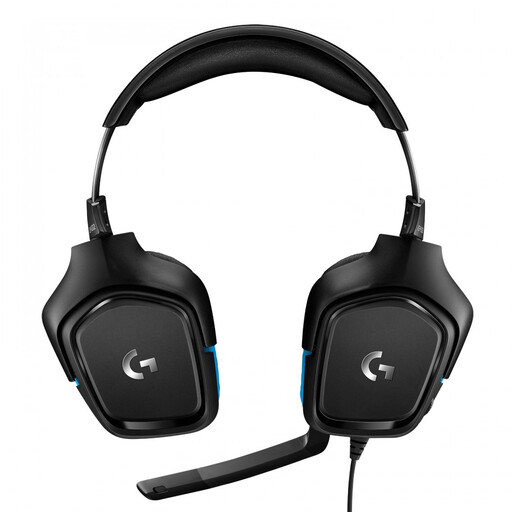 Image unavailable
Logitech G G432 7.1 Surround Sound wired gaming headset
This wired gaming headset is an option for speech recordings only if the version you choose has a microphone that your device and recording app recognise.
Before use, check which microphone is selected as the input.
Joybuy
Frequently asked questions
How can you stop your laptop’s microphone from recording your clip?
Explicitly select the connected headset as the recording input and record a short test. According to Microsoft Support, Windows offers a microphone test with playback; Audacity lets you choose the recording source.
How can you record several short clips without buying another headset?
Use a recording app that lets you stop, save and listen back to a clip. Apple explains that Voice Memos on Mac can use a compatible headset and lets you play back and edit recordings. Check which input is selected for each device and app.
Where should you position the microphone boom?
Position the microphone beside your mouth and listen back to a test recording. Shure recommends this position for the SM35 headset microphone to reduce plosive sounds; this isn’t a performance claim for every headset model.
What are your rights if a headset bought online doesn’t suit you or develops a fault?
According to the Dutch government, when you buy from a business at a distance as a consumer, you generally have 14 days to change your mind. Check the terms and any exceptions that apply to your order. If the product is faulty, you should contact the seller. The Dutch government states that the Netherlands has no fixed statutory guarantee period.
Can you keep your own speech recordings?
The Dutch Data Protection Authority states that processing personal data purely for personal or household use falls outside the GDPR. This doesn’t automatically determine how recordings of other people or published recordings are treated; those situations need to be assessed separately.


