What should you look for in a headset for short recordings?
Start by checking the connection and making a test recording. Then decide whether the convenience of a wired headset or the freedom to move matters more to you.
| What to consider |
What should you check? |
Who is this important for? |
| Clarity |
Position the microphone and record a short test take. Select the headset microphone in your recording app, then listen back. |
I want to hear which words, stresses and pauses need attention. Around 36% of consumers put clarity at the top of their list when buying. |
| Easy to repeat |
Check how to mute the microphone and how to start, stop and rename a take in your recording app. |
If I make several short attempts, I want to be able to tell the recordings apart and listen back easily. Around 29% of consumers give easy repeat recording their top priority. |
| Connection |
Check your device’s port or Bluetooth support, then test whether the microphone is available as an input. |
I want to be sure my device can use the headset microphone. Around 21% of consumers put device compatibility first. |
| Freedom to move |
Test whether your recording app uses the Bluetooth microphone and check the battery before you start. |
If I want to practise while walking, I don’t want to be restricted by a headset cable. Around 14% of consumers put freedom to move first. |
Headsets on Joybuy for practising presentations
These are wired headsets for practising with a computer or a compatible wired connection. Check that each model’s connection suits your device.
 No image available
Logitech PC 960 USB headset
A wired USB option for anyone recording short takes at a computer.
USB connection.
Joybuy
 No image available
Logitech H340 USB headset, black, wired
A wired USB headset for practising at a computer. Check that the connection suits your device.
USB connection; black version.
Joybuy
 No image available
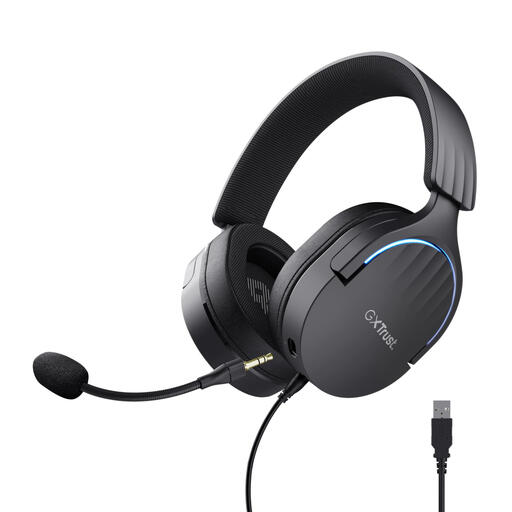
Trust GXT 490 FAYZO over-ear 7.1 USB gaming headset
A wired USB option for practising at a computer if you’re looking for an over-ear model.
Over-ear; USB; 7.1 according to the product name.
Joybuy
 No image available
Trust Ayda wired headset, USB Type-A, black
A wired USB Type-A option for practising at a laptop or PC. Check that your device has this port.
USB Type-A; black version. The product name mentions noise cancellation; assess the recording by making a test in your own space.
Joybuy
 No image available
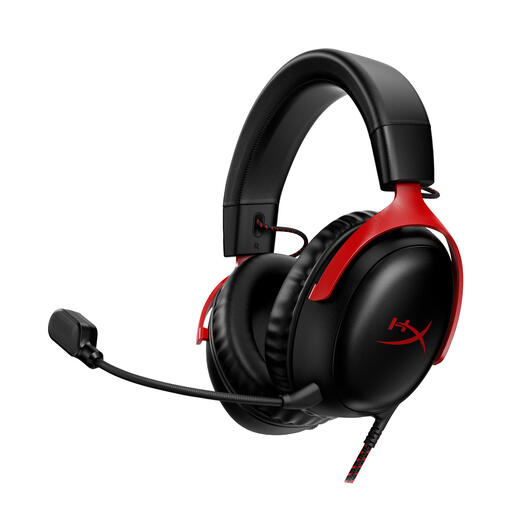
HyperX Cloud III gaming headset for PC, PS5 and Xbox Series X|S, black/red
A headset for anyone looking for a wired option who wants to check the connection with their recording device first.
The product name lists PC, PS5 and Xbox Series X|S; black/red version.
Joybuy
Frequently asked questions about headsets for recording presentations
How do you record several short takes on a Windows computer?
As Microsoft explains, you can use Sound Recorder to start a recording and rename it later. The first time you use it, check microphone access and listen back to a test recording. The headset’s mute button doesn’t replace the recording controls.
Do you always need a noise-cancelling headset for better recordings?
No. A noise-cancellation claim from Logitech or Trust doesn’t prove how clear your recording will sound in your practice space. Make a short recording where you plan to practise and check for yourself that your words are easy to follow.
What rules and conditions apply if you buy online and the headset doesn’t work properly?
For online purchases, you generally have a 14-day cooling-off period, although there are exceptions. If a product is faulty, you’re also entitled to an appropriate solution in the Netherlands. The Dutch government says there’s no fixed statutory guarantee period. Check the seller’s specific returns and delivery terms too.
Can you record classmates’ voices or share a take?
According to the Dutch Data Protection Authority, a sound recording that can identify someone may count as personal data. For this exercise, it’s best to record only yourself. If other people can be heard or you want to share a recording, consider the circumstances and your school’s rules first.
Is CE marking required on every headset?
No. The European Commission says CE marking is only required for product categories covered by the relevant EU rules. Bluetooth radio equipment has a separate EU regulatory framework, so check the documentation for the specific wireless version.


