For individual speech recordings at a small desk, a headset with an adjustable boom microphone is practical: you don’t need to put a separate microphone on your desk. A wired USB headset may be suitable if its connector matches your computer; also consider cable space, wearing comfort and your recording app’s microphone settings. Claims about clarity or noise cancellation during calls don’t prove how your pronunciation recordings will sound.
Who is this suitable for?
Practising pronunciation and listening back
Do you record your own voice to listen back to short exercises? Then a positionable microphone and checking the actual recording input are both important. Logitech and Microsoft describe a positionable microphone and microphone access for Windows Sound Recorder, respectively.
Practising at a small desk
Would you like to speak without setting up a separate desk microphone? Consider the headset cable, its connector and how the cable will run around your workspace. Logitech describes USB headsets for use with a compatible computer port.
Practising in longer sessions
For longer practice sessions, fit and the choice between one or two earcups may also matter. Jabra and HP describe models with different wearing styles; comfort is a personal matter.
What should you look for when choosing?
Start with the recording itself and the connection to your device. Then consider whether the cable and wearing style suit your workspace and practice session.
| What to consider |
What to look for |
Who should pay particular attention? |
| Recording your voice clearly |
Position the microphone near your mouth and make a test recording in your own room. |
When I listen back to my pronunciation, I want to be able to judge what I’ve said. Around 33% of consumers prioritise capturing their own voice. |
| Desk space |
Choose a headset-mounted microphone and check that the cable will fit around your workspace. |
If my desk has limited space, I don’t want to have to set up a separate microphone. Around 27% of consumers prefer to save desk space. |
| Connection and recording input |
Check the USB-A or USB-C port and make sure your recording app uses the headset microphone. |
When I start practising, I want to make sure my device and recording app can use the microphone. Around 20% of consumers prioritise the connection and recording input. |
| Wearing comfort and listening back |
Consider the fit and choose mono or stereo depending on how much background noise you want to hear. |
For longer practice sessions, I want a comfortable style that suits the way I like to listen back. Around 20% of consumers give the most weight to comfort and listening during longer sessions. |
Common buying pitfalls
-
Confusing speaker quality with recording quality
Specifications for playback or microphone features for calls don’t tell you how clearly your pronunciation will be recorded in your room.
Position the microphone and listen back to a test recording of your own voice before deciding whether the headset suits your practice goals.
-
Assuming all models in a range are the same
Headsets in the same product range can have different connectors and wearing styles. If a connector isn’t compatible with your device, you may need an adapter or a different model.
Check the exact USB connector and whether the model you’ve chosen is mono or stereo.
-
Assuming that plugging it in will immediately start a recording
A recording app needs access to the microphone. If you don’t check, you may not realise until after your practice session that no recording was made or that it used the wrong input.
Before your session, check the microphone permission and input, then make a short test recording.
Brands worth comparing
Logitech
The wired H340 and H390 are USB options to compare for practising at a computer. For the H390, check which USB version you’re looking at.
- Logitech lists a 180 cm cable for the H340 and a 1.9 m cable for the H390 USB-A; compare these lengths with the space around your desk.
- Logitech’s claims about clarity or noise cancellation during calls aren’t independent measurements of pronunciation recordings.
Jabra
The Evolve2 30 SE is a business headset range worth comparing if microphone positioning, wearing style and connection type are important to you.
- Jabra describes the range as having two microphones and soft ear cushions.
- Jabra’s claims about sound quality and comfort come from the manufacturer. Check the exact model, including whether it has USB-A or USB-C and is mono or stereo.
HP Poly
According to HP, the wired Blackwire 3200 series includes mono and stereo models to compare for practising and listening back.
- HP lists an adjustable headband and different wearing styles and connection options across the range.
- Features listed for the series don’t confirm that every Blackwire 3220 model has the same connector or accessories; check the exact model.
Headsets at Joybuy
These Joybuy products are headsets with microphones for practising on a computer or another compatible device. The models shown have a USB or 3.5 mm connection.
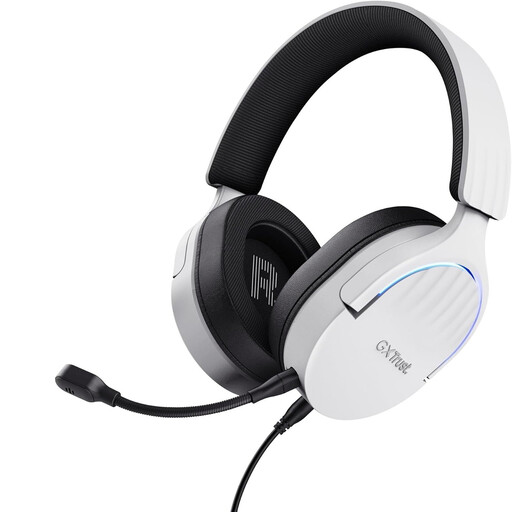 Image unavailable
Trust GXT 490 FAYZO gaming headset, USB Type-A, white
This wired USB headset has a detachable, flexible microphone that you can position for practice without a separate desk microphone.
USB Type-A connection; over-ear cushions.
Joybuy
 Image unavailable
Logitech PC 960 USB headset
The adjustable microphone boom lets you change the microphone’s position during speaking practice.
USB connection; the product description lists an adjustable headband and soft ear cushions.
Joybuy
 Image unavailable
Logitech H340 USB headset, black, wired
The adjustable microphone is attached to the headset, so you don’t need to place a separate microphone on your desk.
USB connection; the product description lists digital stereo audio and an adjustable headband.
Joybuy
 Image unavailable
Trust Ayda wired headset, USB Type-A, black
The microphone can be flipped up to mute it when you’re not recording.
USB Type-A connection; the product description lists an adjustable headband and ear cushions.
Joybuy
 Image unavailable
Logitech H150, white, 981000350
This wired headset has a rotating, adjustable microphone for use with a compatible device.
3.5 mm connection; some devices may require a splitter, which isn’t included.
Joybuy
Frequently asked questions
How do I make a test recording on a Windows computer?
If needed, give Sound Recorder access to your microphone, make a short recording and listen back before practising for longer. Microsoft explains how to enable microphone access; check your own settings to see which input is being used.
Should the microphone boom be close to my mouth?
Jabra recommends keeping the microphone close to your mouth for the Evolve2 30. Then make a test recording at your normal speaking volume so you can judge for yourself how it sounds.
What cooling-off period applies when I buy a headset online?
For eligible distance purchases by consumers, the Government of the Netherlands generally states that you have a 14-day cooling-off period. An online purchase from a private individual doesn’t fall under the definition mentioned; also check who the seller is and what returns information applies to your purchase.
Can I share a recording of someone I’m practising Dutch with?
That depends on how you use it and whether the recording contains other people’s personal data. The Dutch Data Protection Authority distinguishes between personal or household use and publication or processing by an organisation. Where the GDPR applies, processing needs a valid legal basis; this doesn’t give you general permission to share every conversation recording.


