If you mainly record your own voice at a fixed computer setup, a wired headset with an adjustable microphone boom is a practical choice, as long as the connection is compatible with your device. If you also want to hear your conversation partner clearly, first test how both voices sound in your recording setup; a headset microphone positioned close to one person’s mouth is not a tested solution for two speakers. For longer sessions, fit and easy-to-reach controls matter too.
Who is this relevant for?
Pronunciation practice
You record phrases repeatedly and listen back to them. A microphone you can keep in a similar position, along with a working recording input, are practical considerations. Shure recommends positioning the SM35 at the corner of your mouth.
Practising with a conversation partner
You want to assess not only your own voice, but the other person’s too. Before you start, consider whether a wearable microphone is suitable for recording both speakers in their usual practice positions.
Practising for longer sessions
You speak and listen for extended periods. Consider the fit, where the mute and volume controls are, and whether you’ll be sitting at your desk while practising. Comfort is personal; a manufacturer’s specifications don’t automatically predict how a headset will feel on you.
What should you look for?
First decide whether you mainly want to compare your own pronunciation or also need to hear a conversation partner’s voice. Then check the connection, recording input and comfort.
| What you need |
What to look for |
Who this is for |
| Recording your own voice consistently |
Look for an adjustable microphone boom and keep it in a similar position each time you practise. Microsoft Support explains how to test your recording input in Windows. |
If I want to compare my pronunciation with earlier recordings, I want to avoid using a different microphone position each time. Around 29% of consumers put comparing their own voice first. |
| Recording two voices |
Make a test recording with both speakers in their usual positions; a wearable microphone sits close to one person’s mouth. Shure explains how microphone positioning can affect a recording. |
If I also want to hear my conversation partner’s responses, my setup needs to capture both voices. Around 18% of consumers prioritise this. |
| Connecting and listening back |
Check the exact connection, whether you need an adapter, and which recording input is selected. Microsoft Support gives separate steps for testing a microphone and listening back to a recording in Windows. |
If I want to hear what I’ve recorded straight after practising, I need a compatible connection and a working recording and playback setup. Around 24% of consumers prioritise these checks. |
| Fit and controls |
Check how the specific model fits and where the mute and volume controls are. Make sure the microphone isn’t muted before you start. |
For longer practice sessions, I want to be able to wear and use a headset without constantly taking my attention away from the exercise. Around 17% of consumers prioritise comfort and controls. |
| Freedom of movement |
A cable limits how far you can move; a wireless headset needs charging and a compatible connection. Check the specifications for the exact model. |
If I want to walk around while practising, being tied to a fixed cable position may not suit the way I work. Around 12% of consumers prioritise freedom of movement. |
Common mistakes
-
Assuming noise cancellation guarantees a tested pronunciation recording
A feature described by a manufacturer for calls doesn’t prove how your voice and room will sound in a practice recording.
Make a short recording using your usual speaking style and background noise, then listen back to check whether the details you want to practise come through clearly.
-
Choosing a headset close to one person’s mouth to record two voices
A wearable microphone sits close to one speaker, so you’ll need to check whether the other person’s voice is clear enough in your setup too.
Test both speakers in their usual positions before choosing the headset for conversations with two participants.
-
Confusing connections and model variants
Product ranges can include different USB connections and versions. Trust lists the Ayda USB PC and Ayda USB-ENC as separate models.
Compare the full model name, connection and any included adapters with your recording device.
-
Confusing statutory rights with a fixed two-year guarantee
ACM ConsuWijzer distinguishes statutory guarantees from manufacturer or seller guarantees; a universal two-year period doesn’t automatically apply to every product.
Keep your proof of purchase and assess any fault in light of what you could reasonably expect from the product under normal use.
Brands to consider
Logitech
The H390 is a wired computer headset designed for one person using a computer. Logitech lists USB-A and USB-C options.
- Logitech describes the H390 as having a positionable microphone boom and in-line controls. For the USB-A version, Logitech lists a 1.9 m cable.
- Check the connection on the exact version. These specifications aren’t an independent test of Dutch speech recordings.
Jabra
The Evolve 20 range includes mono and stereo versions, as well as different USB options for computer use.
- Jabra lists a unidirectional microphone and a control unit for the range.
- Mono, stereo, USB-A and USB-C/A are different versions. Call certification doesn’t prove that a model is better suited to pronunciation recordings.
Trust
The Ayda USB PC and the separately listed Ayda USB-ENC are wired headsets for computer use.
- For the Ayda USB PC, Trust describes a fold-up mute microphone, on-ear controls and an adapter.
- Trust attributes noise cancellation to the Ayda USB-ENC. This doesn’t make it identical to the standard Ayda or prove that it records pronunciation better.
HP Poly
The Blackwire 3220 USB-A Stereo is a wired stereo headset with on-ear earcups and call controls.
- For this specific USB-A version, HP lists mute and volume controls and a noise-cancelling microphone.
- Check connections and mono or stereo versions separately. HP’s specifications aren’t an independent recording test.
JLab
The original GO Work Wireless is a wireless option for anyone who wants more freedom to move while practising.
- For this version, JLab lists Bluetooth, USB-C charging and a stated battery life of more than 45 hours.
- The GO Work Gen 2 has different specifications. Battery life alone says nothing about recording quality.
Joybuy product picks
This selection includes wireless headsets and wired models with different connections for a range of practice setups. Check that the connection and microphone controls suit your recording device and the way you work.
 No image available
Jabra Evolve2 75, USB-A MS Teams, black
A wireless headset option if you want to use a Bluetooth connection while practising.
The product description lists eight microphones, connection to two devices and a range of 30 metres. Wireless use requires charging.
View at Joybuy
 No image available
Jabra Evolve2 55 wireless stereo headset, black
A wireless option if you want to combine a microphone boom with freedom of movement while practising.
The product description lists Bluetooth, a USB-C adapter, connection to two devices and a flexible microphone boom. Wireless use requires charging.
View at Joybuy
 No image available
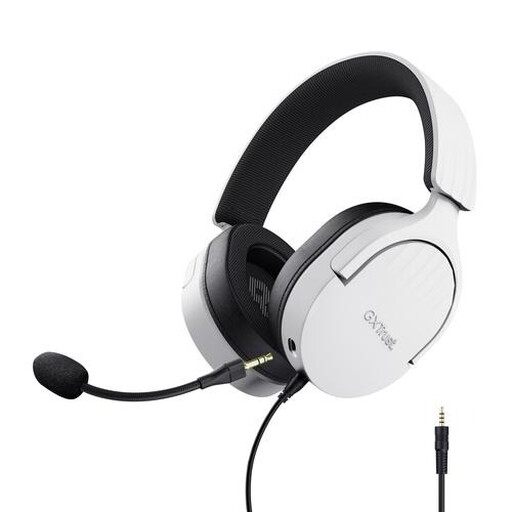
Trust GXT 489W Fayzo wired gaming headset, white
A wired option if you want to position and mute a flexible microphone.
The product name lists 50 mm drivers and an over-ear design. The description mentions a 3.5 mm connection, a detachable microphone and an extension cable for PC use.
View at Joybuy
 No image available
Trust Ayda wired headset, USB Type-A, black
A wired option for a computer setup where you want to mute the microphone regularly.
The product description lists USB-A with a USB-C adapter cable, volume controls on the earcup and a fold-up mute microphone.
View at Joybuy
 No image available
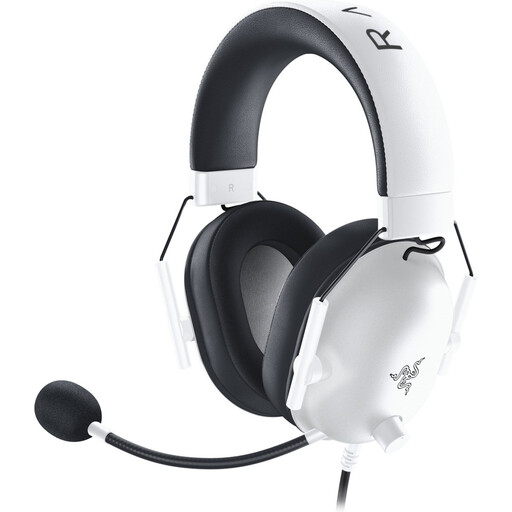
Razer Blackshark V2 X, white
A wired headset option if your device has a 3.5 mm connection and you want to be able to mute the microphone.
The product description lists a cardioid microphone, volume controls, a mute button and a weight of 240 grams.
View at Joybuy
Frequently asked questions
How can I check whether my headset is recording my practice?
In Windows, select the microphone you want under Input, start a microphone test and listen back to the sample. For Sound Recorder, the app needs microphone access; once you stop recording, the recording appears in the list. These steps apply to the Windows features mentioned, not automatically to every phone or learning app.
Where should I position the microphone for repeated pronunciation recordings?
For the SM35, Shure recommends positioning the microphone at the corner of your mouth rather than directly in front of it, to reduce plosive sounds. Keep the position as consistent as possible and assess your own headset with test recordings; this guidance isn’t automatically specific to every headset model.
Can I record and share a practice conversation with someone else in the Netherlands?
The Dutch Data Protection Authority describes an exemption from the GDPR for personal or household use only. Using or publishing personal data outside that private sphere raises other questions, including the purpose and an appropriate legal basis. This information doesn’t establish that every recording or publication is automatically permitted; discuss recording and sharing with the other person beforehand.
What are my rights if I’m unhappy with a headset bought online or it breaks quickly?
According to ACM ConsuWijzer, online purchases usually come with a 14-day cooling-off period after delivery, subject to exceptions. Your statutory rights are separate from any manufacturer’s guarantee: with normal use, you can expect the product to work properly for a reasonable time. ACM ConsuWijzer doesn’t give a fixed, universal two-year period.


