What should you look for?
Start by checking what the microphone picks up, then make sure the connection, listening comfort and freedom of movement suit your shared workspace.
| Consideration |
What to check |
Who should pay particular attention? |
| Recording your voice clearly |
Check for a microphone boom and read about the microphone features. Listen to a test recording in the app you plan to use, with someone talking nearby. |
If colleagues are sitting close by, I want to hear first whether my voice stays clear in the recording. Around 33% of consumers rank recording clarity as their top priority. |
| Easy connection |
Check the connection for the exact version, then select the headset microphone in your operating system and app. |
If I mainly dictate on one computer, I want to get started without charging or pairing. Around 27% of consumers rank easy connection as their top priority. |
| Focus and staying approachable |
Check whether the headset is mono or stereo and whether that version has passive isolation or ANC. Test the microphone separately. |
At a shared workspace, I want to concentrate while still noticing when someone speaks to me. Around 20% of consumers rank this balance as their top priority. |
| Freedom of movement |
Check whether you want to work wirelessly, which adapter is included and which devices that version supports. |
If I want to stand up while dictating, I don’t want to be tied to a cable. Around 20% of consumers rank freedom of movement as their top priority. |
Headsets at Joybuy
These Joybuy products are designed for hands-free dictation with a wired or wireless headset. Check that the connection and microphone on each model are compatible with your computer and app.
 No image available
JBL Quantum 120 wired gaming headset
Could suit you if you want to dictate using a wired headset with a detachable microphone boom. Test the microphone in your own app.
Cardioid microphone and 3,5mm connection. The product description mentions noise reduction via JBL QuantumENGINE. The cable is 1,5 m long.
View at Joybuy
 No image available
HyperX Cloud III S wireless gaming headset
Could suit you if you want to dictate wirelessly and move around while using it. Check the connection to your computer and test the microphone in your app.
Detachable microphone boom, mute control and 2,4 GHz or Bluetooth connection. Runs on a rechargeable battery and requires a wireless connection to be set up.
View at Joybuy
 No image available
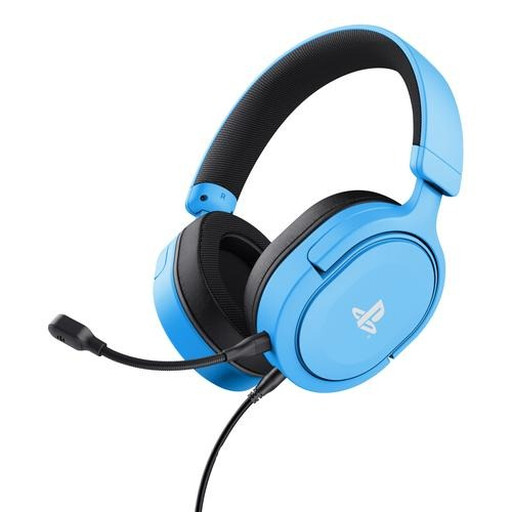
Trust GXT 498B Forta wired gaming headset
Could suit you if you want to position the microphone close to your mouth and need a wired connection. Check the plug is compatible with your computer.
Stereo headset with a flexible, detachable microphone, mute control and 3,5mm connection. The cable is 1,2 m long.
View at Joybuy
 No image available
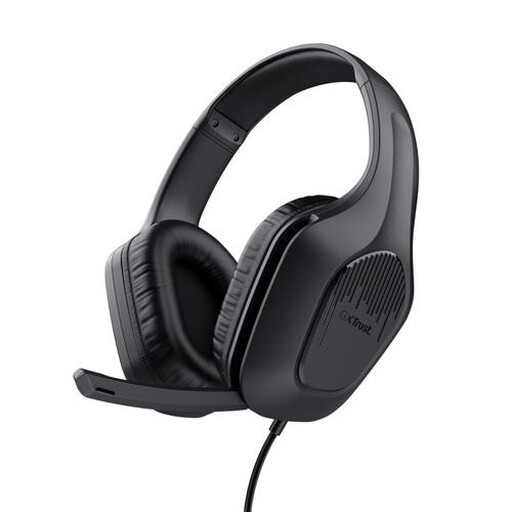
Trust GXT 415 Zirox wired gaming headset
Could suit you if you want to dictate hands-free at a fixed computer workstation without setting up a wireless connection.
Wired, with a foldable microphone, mute function and 3,5mm connection for PC and laptop. The fixed cable is 2 m long.
View at Joybuy
 No image available
Razer Blackshark V2 X 7.1 wired gaming headset
Could suit you if you’re looking for a wired microphone for voice recording. Check whether your computer has a 3,5mm connection or needs a compatible splitter.
Cardioid microphone, mute button and 3,5mm connection. The cable is 1,3 m long; a splitter may be needed for PCs with separate audio and microphone ports. Check whether one is included.
View at Joybuy
Frequently asked questions
Does a headset work as a voice recorder on its own?
No, you’ll also need a suitable recording or dictation app. Microsoft lists a working microphone, an internet connection and a cursor in a text box as requirements for Voice typing in Windows. This feature enters text; it isn’t the same as saving an audio file.
How can I check that the right microphone is recording?
Select the headset under Input in Windows sound settings, then make a test recording and listen back to it. Repeat the test in your own app and at your shared workspace.
Can I record colleagues without them knowing?
That depends on the specific recording and how it is processed; don’t assume there is blanket permission. According to the Dutch Data Protection Authority, audio recordings in which someone can be identified may constitute personal data, and an organisation needs a legal basis under the GDPR to process it. Check your workplace policy and applicable privacy requirements before making or keeping such recordings.
Who can help if a headset bought in the Netherlands is faulty?
For a consumer purchase, the seller must provide a solution if the product doesn’t meet what you’re entitled to expect. The Dutch Government distinguishes between your statutory rights against the seller and any manufacturer’s or additional warranty.
How can I keep a headset clean in a shared workspace?
Follow the cleaning instructions for the exact model and materials. Jabra advises gently cleaning its products with a slightly damp cloth and then allowing them to dry; don’t automatically apply this advice to a headset from another brand.


