Who is a headset microphone for dictation suitable for?

Someone dictating alongside a rehearsal

You want your own voice to remain clear when other voices or music are audible. CALL Scotland describes positioning a microphone close to your mouth as a way to record your voice from a consistent position. A test recording will show how well this works in your space.

Someone dictating at a computer

You work in one place and want to get started without having to charge a headset. It’s important to check that the USB version you choose is compatible with your device, and that your headset is selected as the microphone in your device and dictation software.

Someone who dictates while moving around

You move around the room while dictating, so you’ll need to weigh up range, charging and comfort against the restrictions of a cable. Philips states that the SpeechOne has a range of up to 5 metres; this is a manufacturer’s claim, not a measurement taken in a rehearsal room.

What should you look for in a headset microphone for dictation?

Wired USB headset

A good fit if: you dictate at a fixed computer setup and the USB connection on the version you choose is compatible with your device.

The trade-off: you won’t need to charge a headset battery, but the cable will restrict your movement.

Wireless dictation headset

A good fit if: you move around while dictating and can connect the accompanying docking station to your recording computer.

The trade-off: consider charging, the stated range and what’s included with the version you choose. Wireless doesn’t automatically mean the headset will work with a venue’s sound system.

What to consider What should you check? Who is this important for?
Speech clarity Check whether you can position the microphone boom close to your mouth, and make a short test recording with the sounds you hear in your workspace. If there are voices or music, I want to know whether my own voice will be recorded clearly. Around 36% of consumers say speech clarity is their top priority.
Connection and software Check whether the version has USB-A or USB-C, and select the headset as the microphone in your device and dictation software. I want to know whether the headset works with my computer and software before I start dictating. Around 29% of consumers put connectivity and software compatibility first.
Comfort and awareness of your surroundings Choose between mono and stereo, and assess the fit and how well you can hear your surroundings during a session. If I’m dictating for a long time, I want the headset to be comfortable and, if needed, to let me hear what’s happening around me. For around 21% of consumers, comfort or awareness of their surroundings matters most.
Freedom to move Decide whether you’ll be moving around while dictating and, if you choose a wireless headset, check its range and charging requirements. I want to be able to walk away from my computer while dictating. Around 14% of consumers put freedom of movement first.

Common buying mistakes when dictating in a rehearsal room

  • Assuming ‘noise cancellation’ guarantees an error-free transcript

    Noise cancellation for what you hear and the microphone’s features are two different things. A claim about call quality doesn’t show how speech recognition will handle the sounds in your rehearsal room.

    Check the microphone specifications and make a test recording in conditions similar to how you’ll actually use it.

    Having to correct a recording or dictate it again can take extra time.

  • Choosing based on the model name alone

    Different versions in the same model range can have different connections or included adapters. If you choose the wrong connection, you may not be able to use the headset directly with your device.

    Before buying, check the full model variant, its connection and what’s included in the box.

    If the right connection isn’t included, you may need an extra adapter or a different headset.

  • Using a headset microphone as hearing protection

    Microphone noise cancellation doesn’t prove that a headset protects you from loud music. Arboportaal states that for work in the Netherlands, employers must provide hearing protection when daily noise exposure exceeds 80 dB(A); employees must wear it when exposure exceeds 85 dB(A).

    If you’re taking part in a loud professional rehearsal, assess your noise exposure and the relevant hearing protection separately.

Brands to consider

Philips

The SpeechOne range is designed for dictation and speech recognition, and may be worth considering if you move around while dictating.

  • Philips states that the SpeechOne comes with a docking station and replaceable cushions, has a range of up to 5 metres and offers up to 12 hours of recording time.
  • These are manufacturer’s specifications; they don’t show how accurately it transcribes speech in rehearsal-room noise. Check what’s included with the exact PSM version.

EPOS

The wired IMPACT 100 range has mono and stereo versions for a fixed computer setup.

  • The UC Stereo USB-C/A version reviewed lists a directional, noise-cancelling microphone, a USB-C to USB-A adapter and a 2-metre cable.
  • Call quality doesn’t prove how accurately speech recognition works in a rehearsal room.

Poly

The Blackwire 3320 is a wired office headset for anyone looking for an adjustable microphone boom and a computer connection.

  • HP’s specification sheet for version 8X220AA lists a noise-cancelling microphone and USB-C with a USB-A adapter.
  • Specifications for other Blackwire versions aren’t necessarily the same, so check the full model details.

Logitech

The H390 is a wired USB headset for a fixed dictation setup; Zone Wired is a separate business range with two microphones.

  • Logitech lists USB-A, an adjustable microphone boom and in-line controls for the H390.
  • Logitech’s claim that Zone Wired suppresses nearby conversations isn’t based on an independent dictation test. Don’t assume the models have the same specifications or USB connections.

Headsets and headphones at Joybuy

This selection includes headsets and headphones with microphones for calls; their suitability for dictation in a rehearsal room hasn’t been established. Check the connection and test the microphone with your own dictation software.

Sennheiser MOMENTUM 4 Wireless, white wireless over-ear headphones

Sennheiser MOMENTUM 4 Wireless, wireless over-ear headphones, white

The product information lists microphones for calls; this doesn’t demonstrate how accurately they’ll capture dictation in a rehearsal room.

This is a wireless version, and the title lists 60 hours of battery life and four microphones. Active noise cancellation doesn’t prove that background noise will be filtered out of a dictation recording.

View at Joybuy
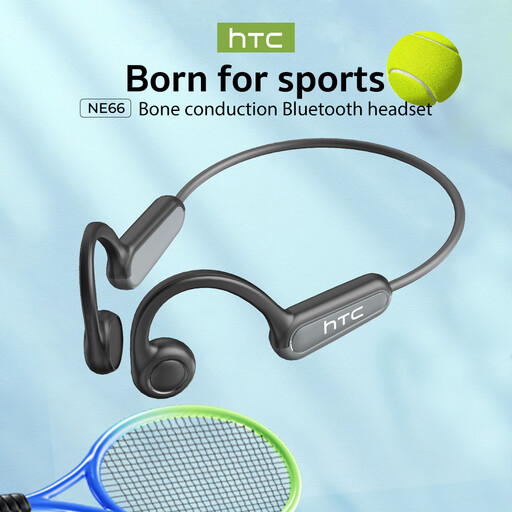
NE66 bone conduction headphones, Bluetooth 5.4, black

NE66 bone conduction headphones, Bluetooth 5.4, black

This wireless version is listed for calls; check for yourself whether the microphone and connection work with your dictation software.

The description mentions an open-ear design. This alone says nothing about speech recognition accuracy when there’s background noise.

View at Joybuy
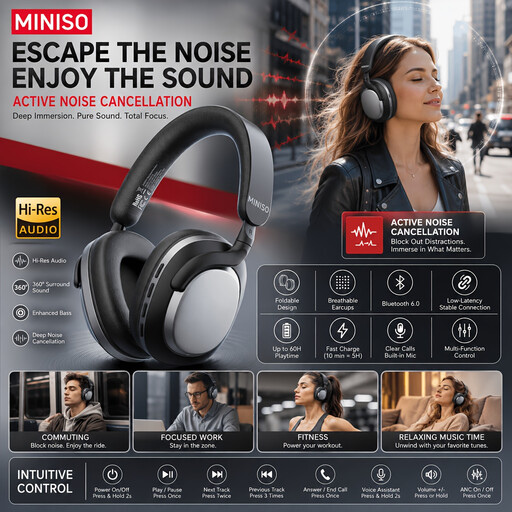
MINISO MG210 wireless over-ear headphones, black

MINISO MG210, wireless over-ear headphones, black

The product description lists calls as a use, but doesn’t confirm how the microphone performs with dictation software in a rehearsal room.

The title lists noise cancellation and 24 hours of battery life. This noise cancellation doesn’t prove that the microphone will filter background noise out of your dictation.

View at Joybuy

Turtle Beach Atlas 200 PC gaming headset, wired, black

Turtle Beach Atlas 200 PC, wired gaming headset, 3.5 mm, black

This wired headset is listed as having a microphone for communication and for PC use; test the microphone before relying on it to record a report.

The description lists a 3.5 mm connection, a USB adapter and a flip-to-mute microphone. The cable will restrict your movement.

View at Joybuy

Turtle Beach Airlite Fit, wired gaming headset, black and white

Turtle Beach Airlite Fit, wired headset, 3.5 mm, Nintendo Switch, Switch Lite and Switch OLED, black/white

The description lists a microphone for communication; check whether the headset works with your recording device and dictation software.

According to the description, the headset has a 3.5 mm connection and a flip-to-mute microphone. The cable will restrict your movement.

View at Joybuy

Frequently asked questions about dictating with a headset microphone

Can I plug in the headset and start dictating in Word straight away?

The USB connection alone isn’t enough: select the microphone on your device and test it in your software. For the dictation feature described in Microsoft 365 Word, Microsoft lists an enabled microphone, sign-in to Microsoft 365 and a reliable internet connection as requirements. Check which version of Word you’re using.

How should I use and maintain a shared dictation headset?

Position the microphone boom close to your mouth and make a short test recording first. Philips says the SpeechOne has replaceable cushions; follow the cleaning instructions for the model you’re actually using.

What if a headset I bought online doesn’t fit or is faulty?

For online consumer purchases in the Netherlands, you generally have a 14-day cooling-off period from delivery, subject to legal exceptions. Separately, the seller is responsible for the legal guarantee if a product doesn’t meet what you could reasonably expect; there isn’t one fixed time limit for all products. ACM ConsuWijzer explains these consumer rights.

Can I record other people in the rehearsal room while dictating?

That depends on the situation and how the recording is processed. If an organisation processes identifiable voices as personal data, the Dutch Data Protection Authority says there must be a legal basis under the GDPR. Consent is one possible legal basis, but it isn’t automatically required in every case. First establish whether other people will be recorded clearly and how the recording will be used.

Does a noise-cancelling headset also protect your hearing during a loud rehearsal?

Don’t assume it does: microphone noise cancellation doesn’t show that a headset provides hearing protection. Arboportaal states that for work in the Netherlands, employers must provide hearing protection when daily noise exposure exceeds 80 dB(A), and employees must wear it when exposure exceeds 85 dB(A). Whether these rules apply to your work depends on the circumstances and your exposure.
