Who is this relevant to?

Computer dictation in a noisy room

You want to dictate a letter on a computer while people are talking or playing elsewhere in the rehearsal room. Test the microphone position and dictation results in those conditions; a general noise-cancelling claim doesn’t, on its own, tell you how accurately speech will be transcribed.

User of rehearsal equipment

You want to be able to move around or connect to existing audio equipment. Check that the connector matches the microphone input. Microsoft Support describes computer dictation as a feature that requires a microphone and a reliable internet connection.

Regular dictation user

For longer passages, a comfortable fit, a stable microphone position and easy-to-reach controls can all matter. Logitech, EPOS and Poly describe these features for specific headset ranges or versions, so check the model you’re considering.

What should you look for when choosing?

Wired USB computer headset

Choose this option: if you dictate directly into a computer and the USB version is compatible with the port available.

Bear in mind: a cable limits how far you can move, and claims about microphone quality on calls don’t prove error-free speech recognition among instruments.

Headset microphone for audio equipment

Choose this option: if you want to move around while dictating or connect the microphone to an existing audio interface or rehearsal setup.

Bear in mind: check that the connector matches the microphone input and find out what signal path is needed. This option doesn’t automatically include headphones for listening back.

Key consideration What should you check? Who is this important to?
Keeping your voice clear Test the microphone position and your dictation software while people are talking or playing in the room. If I’m dictating a letter while instruments or other voices are audible, I want to test the results in those conditions. Around 31% of consumers prioritise clear speech above all else when there’s background noise.
Getting the right connection Check your computer port or the equipment’s microphone input, as well as the connector on the exact version. I want to know in advance whether I’ll be dictating directly into my computer or connecting to existing equipment. Around 25% of consumers put the right device connection first.
Comfort and controls Check the fit and microphone position, and how to mute the microphone when you need to pause. For longer passages, I want a comfortable headset with controls that are easy to reach. Around 25% of consumers make comfort and controls their top priority when choosing.
What’s included and aftercare Check what comes with the version, what else you might need to connect it and who to contact if it develops a fault. I want to avoid discovering that I need extra equipment to connect it, and know who to contact if there’s a problem. Around 19% of consumers prioritise what’s included and aftercare above all else.

Common mistakes

  • Assuming noise cancellation guarantees error-free dictation

    Product descriptions of microphone or call quality don’t automatically measure recognition errors when instruments are playing. You may still need to correct your letter.

    Test your own dictation software while the rehearsal room is in use, then proofread the text before sending the letter.

    Allow time to check a test dictation and correct any errors.

  • Buying a USB headset for an XLR input, or vice versa

    A USB computer headset and a microphone with an XLR connector use different connection routes and aren’t automatically interchangeable.

    Check the exact headset version and the input on the device you actually want to use for dictation.

  • Confusing the manufacturer’s warranty with your statutory rights

    According to ACM ConsuWijzer, your statutory guarantee applies in addition to any guarantee offered by the manufacturer or seller.

    Keep your proof of purchase and contact the seller if a product develops a fault too soon during normal use.

Brands to consider

Logitech

The H390 is a USB computer headset for anyone who dictates directly into a computer using a compatible port.

  • Logitech lists an adjustable headband, a positionable microphone boom and in-line controls.
  • The manufacturer describes the microphone as noise-cancelling; this isn’t an independent measure of transcription quality in a rehearsal room. Also check whether the version you choose uses USB-A or USB-C.

Jabra

The wired Evolve2 40 range is a computer headset option if blocking out ambient sound for the wearer and having microphone controls are important to you.

  • Jabra lists three microphones, passive noise isolation and a microphone boom that can be lifted to mute.
  • The claim about reducing background conversations applies under the manufacturer’s stated conditions and doesn’t prove dictation accuracy when music is playing. Check the port, mono or stereo version, and UC or Teams edition.

EPOS

The IMPACT 100 range is designed for anyone looking for a lightweight, wired computer headset with a microphone boom.

  • EPOS describes a unidirectional microphone, noise-cancelling algorithms and an included USB-C to USB-A adapter.
  • These are manufacturer specifications for calls, not an independent test of dictation in a rehearsal room. Check whether you’re choosing the mono or stereo version.

Poly

The Blackwire 5220 is a wired computer headset to consider if you need the connections available on version 8X231AA.

  • For version 8X231AA, HP lists a noise-cancelling microphone, USB-C with a USB-A adapter and a 3.5mm connection.
  • These connections are specific to this model and don’t automatically apply to every Blackwire version; they’re not an independent dictation test.

Shure

The WH20 range is a stage-focused headset microphone for anyone who needs a connector that’s compatible with their audio equipment.

  • Shure describes a cardioid dynamic microphone that helps isolate ambient sound, and lists an XLR version.
  • This isn’t a complete USB computer headset with headphones. Check the connector and signal path needed for computer dictation.

Products on Joybuy

This selection includes wired headsets for dictating on a computer, with USB or 3.5mm connections as specified for each version.
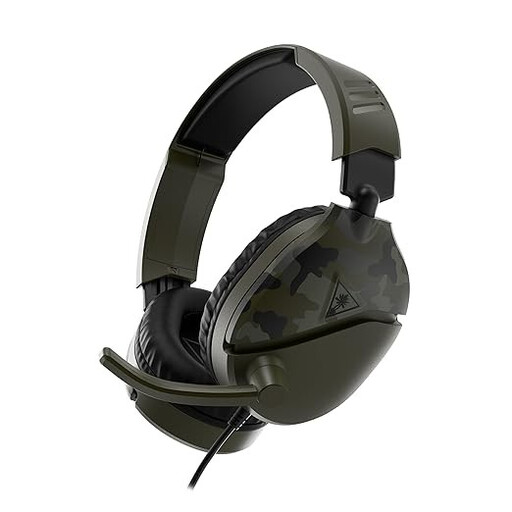
Turtle Beach Recon 70 wired gaming headset, 3.5mm connection, Green Camo

Turtle Beach Recon 70, wired, 3.5mm, Green Camo

An option if you dictate on a computer with a compatible 3.5mm connection and want to mute the microphone during a break.

The product name specifies a wired 3.5mm connection and a flip-up microphone that mutes when raised; check your computer’s connection.

Joybuy

Jabra Evolve2 30 SE headset

Jabra Evolve2 30 SE headset

An option to consider if you’re looking for a wired headset for dictating directly into a computer via USB-A.

Before buying, check that your computer has a compatible USB-A port and that the version suits your needs for fit and controls.

Joybuy

Logitech PC 960 USB Wired Headset

Logitech PC 960 USB Wired Headset

An option for computer use via USB if you want to position the microphone and be able to mute it during a break.

USB is specified in the product name; check that your computer has the right connection and that the controls on the version you choose suit the way you’ll use it.

Joybuy

Logitech H340 USB headset, black, wired

Logitech H340 USB headset, black, wired

An option if you’re looking for a wired USB headset for computer use and want to be able to position the microphone.

Check that the USB connection is compatible with your computer and that the microphone position suits your dictation setup.

Joybuy

Logitech H150, white, 981-000350

Logitech H150, white, 981-000350

An option to consider if your dictation device has a compatible 3.5mm connection and you want to be able to position and mute the microphone.

Check whether your device has one combined connection or separate headphone and microphone ports. If the ports are separate, you may need a splitter; according to the product information, one isn’t included.

Joybuy

Frequently asked questions

What should I set up before dictating a letter in Word?

For the Microsoft 365 feature described, Microsoft Support says you need an enabled microphone, to be signed in to Microsoft 365 and to have a reliable internet connection. Go to Start and select Dictate, try a short passage first, then check the recognised words and punctuation.

Can I connect a USB headset directly to the microphone input on a venue’s sound system?

Don’t assume you can: the Logitech H390 reviewed here has a USB computer connection, while the Shure WH20 is also available in an XLR version. Before buying, check the connector on the exact version and the input on the sound system.

What can I do if the headset doesn’t fit properly or develops a fault early?

For an online consumer purchase, ACM ConsuWijzer says you’ll generally have up to 14 days after delivery to change your mind, with some exceptions. You’re also covered by the statutory guarantee if a product doesn’t perform as you could reasonably expect during normal use; contact the seller in that case.

Can I record other people in the Netherlands while dictating without further consideration?

No, there’s no general permission to do so. According to the Dutch Data Protection Authority, collecting and using personal data requires a lawful basis under the GDPR. Consent is one possible basis, but it isn’t automatically the only one. Consider the specific recording and how it will be used separately, especially if other people’s voices are captured.
